Lead Generation for SaaS: 2026 Playbook

You're probably dealing with one of two bad setups right now. Either you have traffic coming in, forms firing, and a CRM full of names nobody follows up with properly. Or you have a few channels running in parallel, but no clean way to tell which click, page, or campaign produced revenue.
This highlights the core problem with lead generation for SaaS. It usually gets treated like a channel problem when it is a systems problem. Ads live in one tool. SEO lives in another. Email sits in the CRM. Attribution is half-broken. Sales works the pipeline in its own way. Then everyone wonders why “lead quality” feels inconsistent.
The fix isn't to add more tactics. It's to build one audit-ready engine where channels, landing pages, tracking, CRM, and follow-up all work as a single operating system. When that system is tight, you can make fast decisions with confidence. When it's fragmented, even decent performance looks random.
Table of Contents
The Blueprint for Your SaaS Lead Generation Engine
Most SaaS teams start too late on strategy and too early on execution. They launch Google Ads, publish a few blog posts, maybe build a webinar, then discover they never agreed on who they want to sell to.
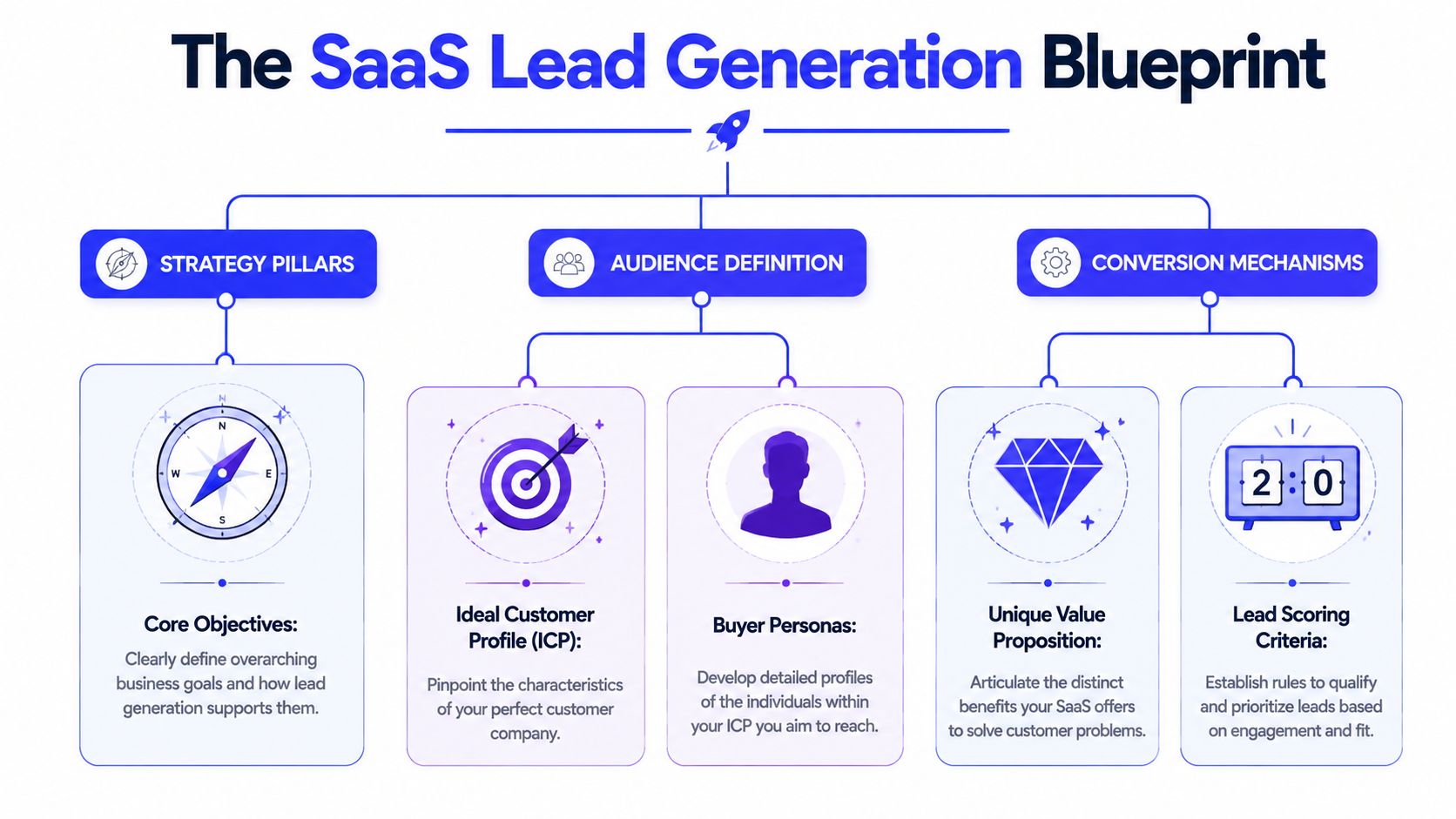
That's backwards. The blueprint for lead generation for SaaS starts with the commercial target, then moves outward into channels, content, offers, and tracking. If the first layer is fuzzy, every downstream metric gets noisy.
Start with the company, not the persona
An Ideal Customer Profile, or ICP, is not “marketing managers at growing companies.” That's a vague wish. A usable ICP names the company shape first, then the buyer inside it.
For a B2B SaaS product, define at least these fields:
Industry fit
Be narrow enough that your copy sounds native to the prospect's world. “SaaS” is broad. “Remote-first B2B software teams” is more useful. “Vertical SaaS for clinics” is even better.Company size
Team size changes pain, budget, urgency, and buying process. A product that solves handoff issues for a team of fifty won't be purchased the same way by a team of five.Role and buying influence
Separate users, champions, blockers, and economic buyers. The person who fills out your form may not be the person who signs.
The quality of this work shows up fast in outbound and inbound alike. Artisan's B2B SaaS lead generation guide notes that for cold outreach, defining specific industry, size, and role attributes is key to achieving 20 to 30% open rates and 3 to 5% response rates, while mismatched ICPs can push response rates below 1%.
Practical rule: If your sales team says “we can sell to anyone,” your pipeline data will become useless.
Match channels to buying intent
A real blueprint maps channels to funnel stage. Not because the funnel is sacred, but because intent changes. Someone searching for a category term behaves differently from someone downloading a checklist.
Here's a clean way to understand it:
Funnel stage | Job to be done | Best-fit channel types | Typical offer |
|---|---|---|---|
TOFU | Capture attention and frame the problem | SEO content, paid social, partnerships, webinars | Guides, pain-point content, educational assets |
MOFU | Qualify interest and educate | Retargeting, nurture email, comparison pages, webinars | Use cases, ROI framing, product education |
BOFU | Convert active demand | Search ads, demo pages, sales outreach, review/comparison content | Demo, trial, consultation, pricing conversation |
This is where channel trade-offs get real. High-intent search often reaches buyers later in the cycle. SEO compounds slower but can create durable demand capture. Paid social can be useful for problem education, but it tends to struggle when the offer is weak or the category is unfamiliar.
One more blunt point. Content and SEO are not “nice to have” side projects. Cirrus Insight's roundup of lead generation statistics cites data showing content marketing produces three times more leads than outbound methods at 62% lower cost, and SEO-focused content can deliver 748% ROI for B2B brands. That's why many SaaS teams build their engine around content-led demand capture, then use paid channels to accelerate or fill gaps.
Design the conversion path before traffic arrives
A blueprint isn't finished when you've picked channels. It's finished when you know exactly what happens after someone clicks.
That means defining:
The offer
Demo, trial, audit, checklist, webinar, comparison page. Pick the ask that matches intent.The destination
Dedicated landing page beats generic homepage routing almost every time because it keeps message match intact.The next step
What happens after form fill. Confirmation page, calendar option, nurture flow, SDR alert, CRM routing.The qualification logic
Which fields matter, what counts as MQL, and when sales should act.
If you skip this and “figure it out later,” you don't have lead generation for SaaS. You have disconnected traffic acquisition.
Building the Machine with Campaigns and Landing Pages
Once the blueprint is set, build the first version of the machine with restraint. Early-stage SaaS teams usually spread budget too thin, test too many offers at once, and learn almost nothing.
A better approach is to start with a compact campaign stack and force tight message match between ad, landing page, form, and follow-up.
A practical campaign stack for an early SaaS team
For most B2B SaaS companies, the first paid setup worth building has two parts. One captures existing demand. The other creates qualified awareness inside the ICP.
Search ads should focus on high-intent themes, not vanity volume. Build campaigns around buyer language such as problem-aware, solution-aware, and alternative/comparison searches. Keep ad groups tight enough that the headline can mirror the query.
LinkedIn ads work best when you already know the job title, function, and company type you want. Don't ask LinkedIn to “find your audience” from a broad seed if you haven't proven the offer. Use it to deliberately reach the roles your ICP mapping already identified.
A sensible launch structure looks like this:
Search campaign one
Bottom-funnel terms tied to pain or solution category.Search campaign two
Competitor and alternative intent, if your positioning is clear enough to stand next to other tools.LinkedIn campaign one
Problem-led offer for a narrow audience segment.Retargeting layer
Bring back visitors who engaged but didn't convert.
Good campaigns don't rescue weak positioning. They expose it faster.
The landing page does the selling
Most SaaS ads underperform because the landing page feels like it was written by a different company. The ad promises one thing. The page talks about something else. The form asks for too much too soon. The CTA is generic. Friction rises and intent leaks out.
A strong SaaS landing page requires a few essential elements:
Headline match
Repeat the promise or pain from the ad in plain language.Clear use case framing
Say who this is for and what problem it solves before talking about features.Product proof
Interface visuals, workflow examples, implementation clarity, or customer evidence.Low-friction form design Ask only for what sales or automation needs.
Focused CTA path
One primary action. Not five.
Content should also support the paid engine, not live in a different universe. As noted earlier, content and SEO are often the most durable acquisition assets in SaaS, especially when they target intent-rich topics and support conversion pages already in market.
A simple example using a project management SaaS
Say you're launching a fictional project management tool built for software agencies.
For search, one campaign targets buyers looking for an alternative to bloated enterprise tools. The ad speaks directly to agency pain: missed handoffs, scattered client communication, poor visibility across delivery. The landing page opens with a headline tied to that exact problem, shows the workflow, and offers a demo.
For LinkedIn, the audience is agency founders and operations leads. The ad shouldn't scream product features. It should frame the operational cost of projects slipping because delivery, client updates, and internal planning are stuck in separate tools. The click goes to a page with a sharper educational angle, then a demo CTA lower on the page.
That difference matters. Search traffic often arrives with stronger intent. Paid social traffic often needs more context before it's ready to raise a hand.
Wiring the Nervous System for Flawless Attribution
Most startup attribution fails for a boring reason. Nobody designed the data path from click to CRM before campaigns launched.
So Google Ads has its own numbers. LinkedIn reports something else. GA4 misses parts of the journey. The CRM stores lead source inconsistently. Sales updates stages manually when they remember. By the time someone asks which channel created pipeline, the answer is mostly storytelling.
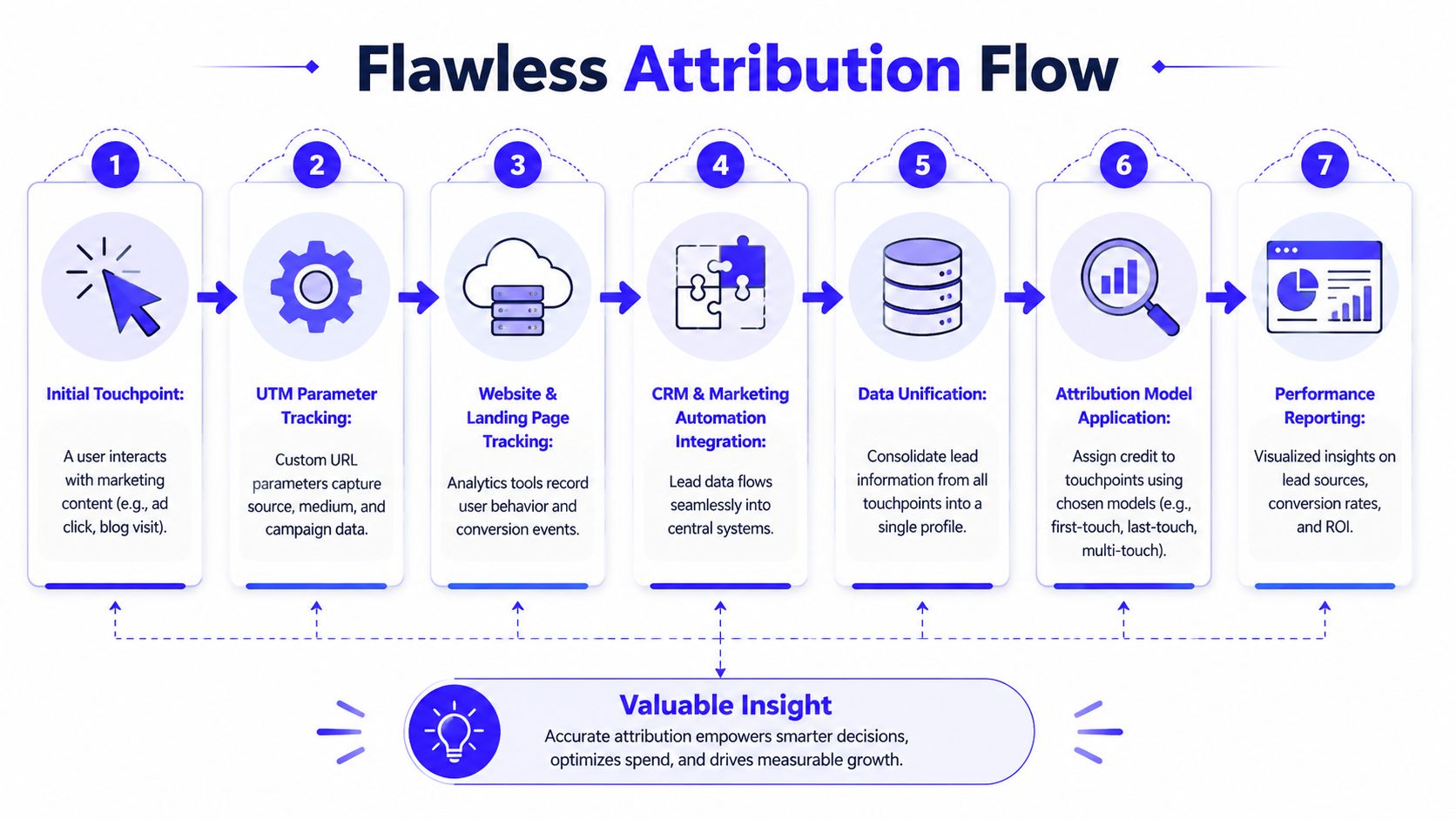
A real lead generation for SaaS system needs a nervous system. Every click needs an identity. Every form fill needs source data. Every qualified opportunity needs to tie back to the originating touchpoint.
UTMs are boring until they save your budget
Start with one enforced UTM convention across every traffic source. If naming is inconsistent, reporting becomes fiction.
Keep it simple and rigid:
Parameter | Example | Rule |
|---|---|---|
utm_source | google, linkedin, newsletter | Use platform or publisher name only |
utm_medium | cpc, paid-social, email | Keep medium standardized |
utm_campaign | demo_us_agency_ops | Encode offer, geo, segment, or objective |
utm_content | video_a, image_b, headline_1 | Use for creative or variant testing |
utm_term | agency project software | Use where keyword intent matters |
Then make sure those values persist through the conversion path and land inside the CRM. Hidden fields on forms help. So does middleware when native form behavior is unreliable.
Attribution breaks less from technical complexity than from sloppy naming.
How the data should move
Use Google Tag Manager to manage event tracking cleanly instead of hardcoding scripts every time you need a change. Configure GA4 conversion events around meaningful actions, not every tiny engagement. A pricing page visit can matter. A random scroll often doesn't.
Then close the loop with server-side and CRM data. If you're running Meta, Conversions API helps reduce data loss from browser limitations. If you're running Google Ads or LinkedIn Ads, offline conversion syncing from the CRM gives those platforms better feedback on which leads turned into actual opportunities.
The flow should look like this:
User clicks a tagged link
Landing page captures UTM data
GTM sends behavior and conversion events
Form submission pushes source fields into the CRM
Lead status changes update qualification stages
Qualified pipeline and closed revenue sync back to ad platforms when possible
Gravitate Design's B2B SaaS guide notes that the MQL-to-SQL conversion rate benchmarks at 15 to 25%, and that without proper attribution and behavioral triggers, conversion efficiency can drop by 30 to 40%. That's the hidden tax of weak infrastructure. You don't just lose reporting accuracy. You train your campaigns on bad feedback.
What an audit-ready setup actually includes
“Audit-ready” means another operator can open your stack and understand exactly how lead data moves. No mystery fields. No half-documented zaps. No channel naming lottery.
The minimum standard:
A shared tracking spec
Document UTM rules, event names, conversion definitions, and CRM field mappings.CRM source discipline
Store original source, latest source, campaign, and landing page where possible.Clear lifecycle stages
MQL, SQL, opportunity, closed won. No custom stage sprawl without reason.QA routines
Test forms, thank-you pages, event firing, and CRM sync any time you change templates or campaigns.
If your current setup feels messy, this breakdown of CRM tracking blunders that kill ROAS) is a useful gut check.
From Lead to Demo with Smart Nurture Flows
A captured lead is not progress unless the next interaction is relevant and fast. Too many SaaS companies celebrate the form fill, then dump every contact into the same generic sequence and hope sales picks up the right ones.
That's lazy lifecycle marketing. Buyers don't convert that way.
Reach Marketing's guide to generating SaaS leads notes that SaaS leads often interact with a brand 8 to 12 times before converting, and that email marketing delivers 4,200% ROI while serving as the primary lead generation channel for 81% of marketers. Email works because it lets you continue the conversation based on what the lead already showed you.
Segment by entry point, not by hope
The easiest way to ruin a nurture sequence is to ignore why the lead converted.
Someone who downloaded a top-of-funnel resource needs education and problem framing. Someone who requested a demo needs scheduling momentum, product proof, and fast human follow-up. If both get the same drip, one gets bored and the other gets irritated.
Segment your nurture flows at minimum by:
Offer type
Demo request, webinar signup, guide download, contact form, trial start.Intent level
Educational interest versus active buying behavior.ICP fit
Strong-fit accounts should trigger tighter follow-up and clearer routing.
Build nurture around real buying signals
Good nurture isn't a fixed email calendar. It's a response system.
A simple CRM setup in HubSpot or Pipedrive can score activity and route leads based on behavior. Page visits, repeat visits, email clicks, meeting intent, or a return to pricing and comparison pages all tell you more than a one-time form fill.
A practical nurture sequence might look like this:
Immediate confirmation
Deliver the asset or confirm the request. Set expectations clearly.Problem reinforcement
Send a useful piece that deepens the pain or clarifies the cost of doing nothing.Use case education
Show how teams like theirs solve the problem with a workflow, not just feature bullets.Proof and objection handling
Address common concerns such as implementation, team adoption, or switching friction.Direct conversion ask
Invite the lead to book a demo or take the next action when behavior suggests readiness.
The best nurture emails feel like timely sales enablement, not newsletter leftovers.
If your team is still passing every form fill straight to sales, it's worth reviewing how predictive lead scoring can stop junk from hitting the pipeline.
The handoff is where teams usually fumble
Sales should not need to guess whether a lead is worth immediate attention. Your system should tell them.
That means setting internal notifications and routing logic based on fit plus engagement. If a strong-fit lead visits pricing, clicks multiple nurture emails, or requests a product-focused asset, the CRM should create urgency automatically. If a weak-fit lead downloads a broad educational piece and disappears, keep it in nurture.
Use simple operating rules:
Hot leads get human follow-up fast
Don't wait for the next daily standup.Warm leads stay in automated education
Keep building context until intent strengthens.Cold leads aren't dead leads
Keep them tagged and recyclable for future campaigns or reactivation.
The handoff should feel mechanical, not emotional. If reps are cherry-picking or marketers are arguing for “better quality,” the system still isn't doing enough of the sorting.
The Dashboard That Matters and Your Optimization Rhythm
Most dashboards are overbuilt and undertrusted. They show impressions, click-through rates, and platform conversions in bright colors, but they don't answer the only question that matters: which parts of the engine are producing qualified pipeline efficiently?
A useful SaaS dashboard should be ugly before it's pretty. Accuracy first. Readability second. Decoration last.
Start with the visual summary essential for teams.
Track the few numbers that control the whole system
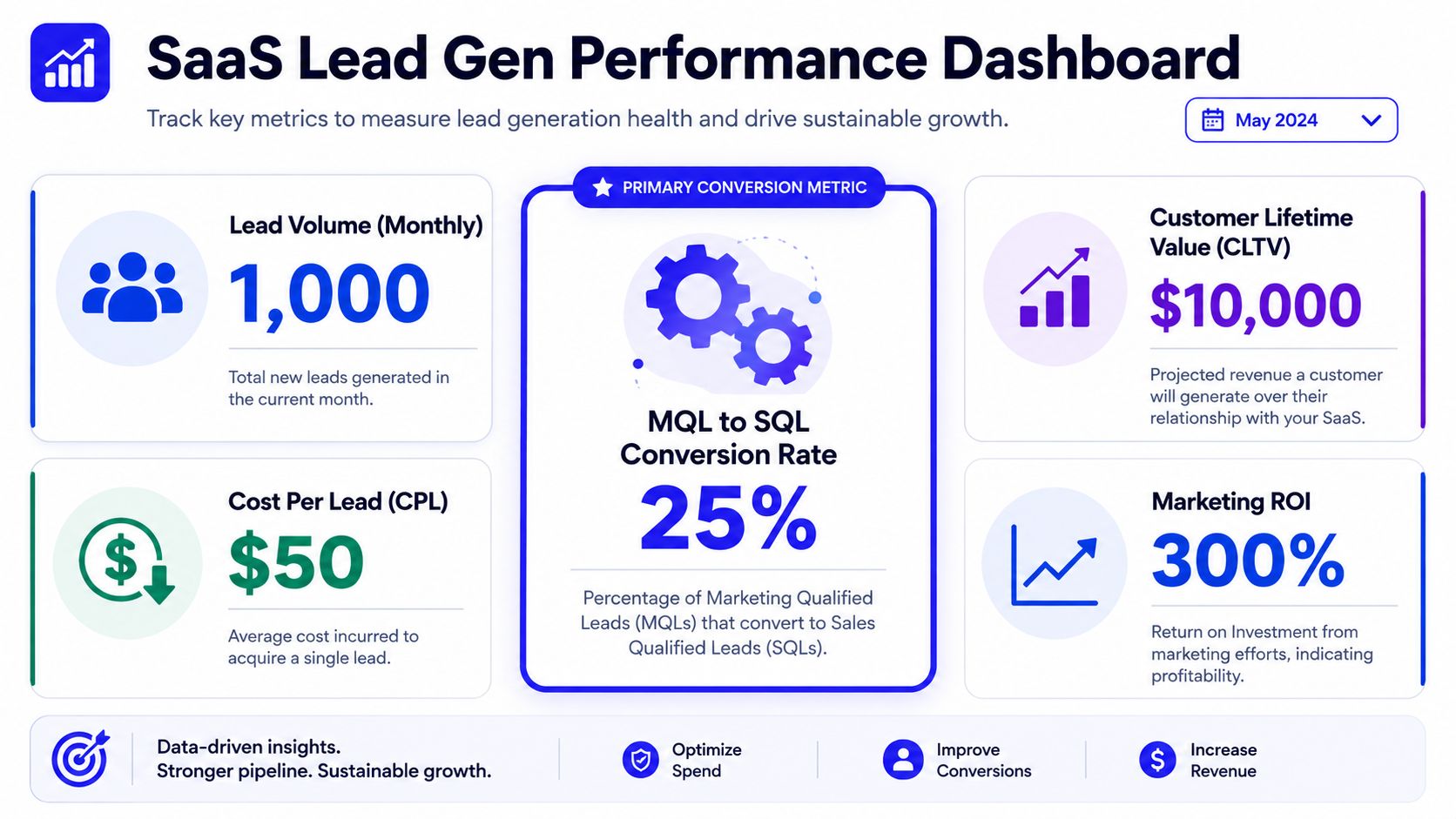
You don't need twenty KPIs. You need the handful that reveal where efficiency is breaking.
Use a dashboard in Looker Studio or your BI layer that includes:
Lead volume
Directionally useful, but only in context. More leads can mean worse performance if quality drops.Cost per lead
Helpful for channel management, but never enough on its own.Cost per MQL
Better than CPL because it introduces quality.MQL-to-SQL conversion rate
One of the clearest signals of lead quality, routing quality, and sales-marketing alignment.Customer acquisition cost
The metric that forces honesty. If your front-end lead costs look great but CAC is ugly, the machine is leaking later.
Here's the mistake to avoid. Don't let platform-reported conversions sit beside CRM-qualified outcomes as if they're equal. They're not. One is a media signal. The other is a business outcome.
For teams that need a sharper filter on vanity metrics, this guide to marketing metrics that actually matter in 2026) is worth keeping nearby.
A short walkthrough can also help if you're building reporting from scratch:
What to review every week and every month
Optimization cadence matters as much as metric choice. If you change strategy every week, you create chaos. If you wait a month to fix obvious campaign issues, you waste budget.
Weekly reviews should stay close to execution:
Weekly check | What to inspect | Typical action |
|---|---|---|
Spend pacing | Overspend, underspend, uneven delivery | Reallocate budget |
Search terms and audiences | Relevance and waste | Add negatives, tighten targeting |
Ad and creative performance | Message fatigue, weak CTR, poor fit | Rotate copy or creative |
Landing page behavior | Drop-off, form friction, device issues | Fix forms, layout, CTA clarity |
Lead routing | Delays, missing owners, bad stage assignment | Repair automation or ownership |
Monthly reviews should stay strategic:
Channel quality comparison
Which sources create MQLs, SQLs, and opportunities most efficiently.Offer performance
Demo, trial, webinar, content asset, consultation. Which moves buyers.ICP drift
Are the right accounts entering the system, or did campaign targeting creep.Attribution confidence
Are source fields populated, offline conversions syncing, and reporting aligned.
A healthy dashboard doesn't just report performance. It tells the team where to intervene next.
Build a dashboard that sales can trust too
If sales doesn't trust marketing reporting, the dashboard won't change behavior.
So include CRM-based views that reps and founders care about: lifecycle stage movement, lead aging, source by opportunity creation, and time-to-follow-up. When marketing and sales read from the same source of truth, channel arguments get replaced by operational decisions.
That's the whole point. The dashboard isn't a recap. It's the control panel for the engine.
Your First 90 Days A SaaS Lead Gen Launch Plan
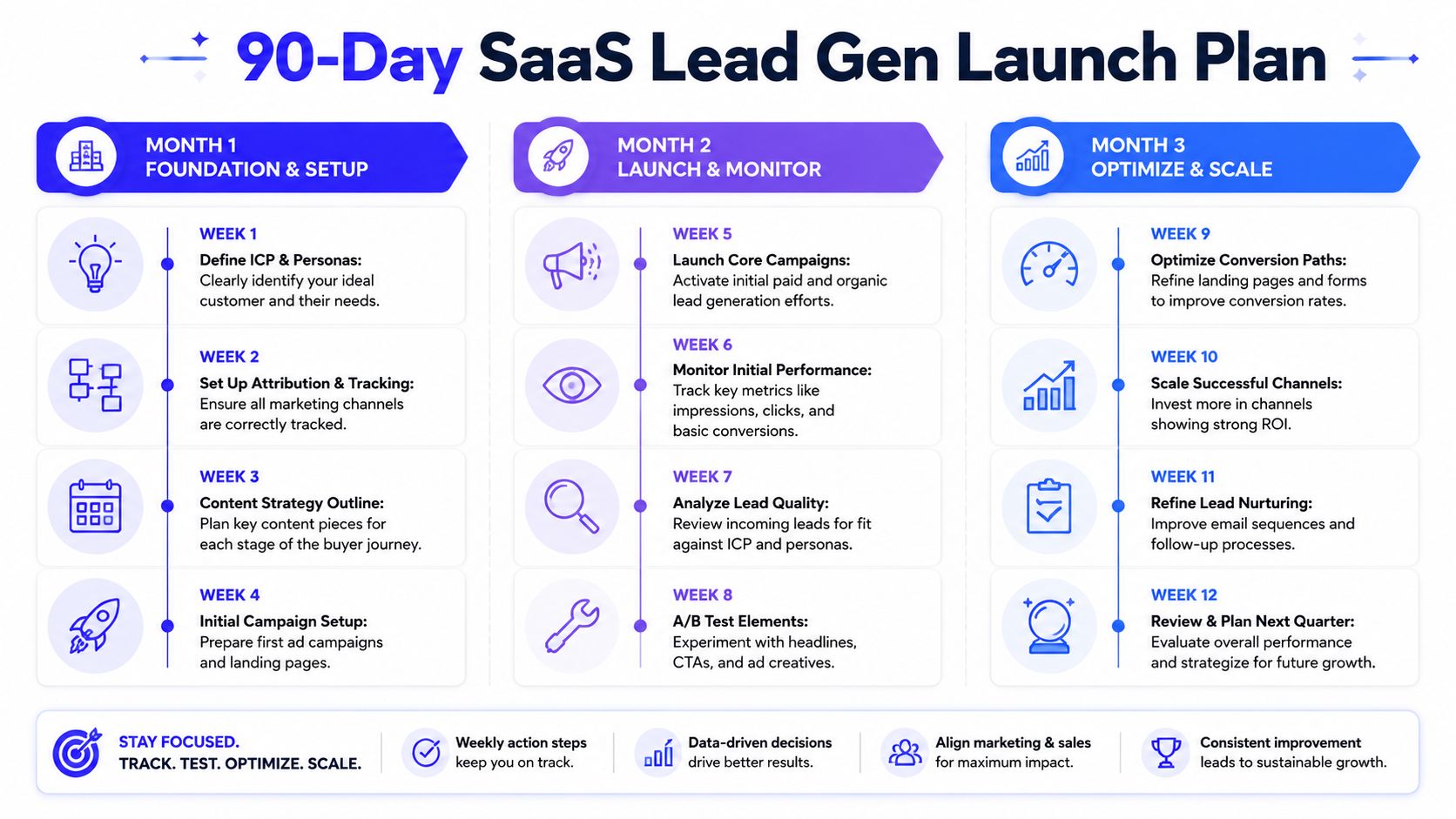
The first quarter should produce a working system, not a masterpiece. Speed matters, but only if the plumbing is solid enough to trust what you launch.
Month 1 foundation
Lock the ICP. Define funnel stages. Standardize UTM naming. Set up GTM, GA4 conversions, CRM source fields, and form capture. Build one or two landing page templates that can support both paid traffic and organic offers.
Month 2 activation
Launch a focused paid search campaign and one narrow ICP-based social campaign. Publish the first few content pieces that support real buying intent, not random traffic. Turn on basic email nurture by entry point and make sure hot leads route instantly.
Month 3 optimization
Audit lead quality against the ICP. Review CPL, cost per MQL, and stage progression. Tighten targeting, rewrite weak landing page sections, fix attribution gaps, and push more effort into the channels and offers that are creating qualified pipeline instead of just top-of-funnel activity.
The big idea is simple. Lead generation for SaaS works best when you stop treating channels, tracking, and CRM as separate projects. They're one machine. Build it that way from day one, and scaling becomes a decision problem. Build it in fragments, and scaling just multiplies confusion.
If you want help building that machine without juggling separate freelancers for ads, SEO, email, CRM, landing pages, and attribution, Du Marketing handles the whole system as one integrated growth engine. That means cleaner execution, clearer reporting, and a direct line to the person doing the work.