Offline Conversion Tracking: A Practical Guide for Startups

You can feel the gap before you can prove it. The dashboard says leads are up, the sales team says some of them are junk, and the founder still wants to know why the best campaigns never seem to be the cheapest clicks. By the time a real prospect books a demo, talks to sales, or signs in the CRM, most ad accounts are already celebrating the wrong thing.
Offline conversion tracking is the piece that ties that mess together. It connects the click to the revenue event, so Google Ads, Meta, or Microsoft Advertising can learn from actual outcomes instead of stopping at form fills. Google's own documentation treats offline imports as a built-in measurement path, not a workaround, and that matters because once the original click ID is preserved, the sale can be credited back to the ad that created it. Google Ads offline conversion imports
Table of Contents
Why Your Startup Is Flying Blind Without It
A common startup story goes like this. The founder opens Google Ads, sees a pile of leads, and assumes the account is working. Then sales calls arrive, pipeline quality looks uneven, and the CRM starts telling a very different story from the ad platform. The gap is not subtle, it's just hidden behind a familiar metric like form fills.
That's the trap with early reporting. Clicks and lead submissions are easy to count, but they don't tell you which campaign produced a booked demo, a signed contract, or a real purchase. Without offline conversion tracking, the platform learns to chase cheap front-end actions, not the outcomes that keep the business alive. That's why high-consideration funnels get distorted so quickly, especially when the sale happens days or weeks after the click.
There's also a second problem, and it's worse than undercounting. If you only optimize around web events, you can end up cutting budget from campaigns that bring in fewer but better customers. The automotive benchmark in the verified data makes that trade-off obvious, because offline conversion tracking is associated with a 2% average conversion rate, while top-performing dealerships reach 16%. The same benchmark says repair, service, and parts campaigns can reach a 14.67% Google Ads conversion rate, and that digital marketing can cost about $150 per vehicle sold versus $1,581 for traditional media, a roughly 10x cost advantage when attribution is set up properly. Offline conversion tracking statistics
Practical rule: if the sale doesn't happen in the browser, the browser can't be your source of truth.
The business cost shows up in budget meetings. Teams stop trusting campaign data, bidding becomes conservative, and the best-performing lead sources get buried under a pile of surface-level metrics. Offline measurement fixes that by feeding real outcomes back into the platform, so bidding systems can learn from revenue instead of from interest alone.
What Offline Conversion Tracking Means
A shopper grabs a grocery store coupon in one place, then hands it over weeks later at the register and gets the right promotion credited. Offline conversion tracking follows that same chain. The ad click is the first touch, the later sale or qualified lead is the outcome, and the platform gets credit back to the source interaction.
At the technical level, Google formalized this process in Google Ads as a way to upload outcomes like closed sales from a CRM back to the campaign that drove the click, using identifiers such as GCLID to match the original click with the later offline action. The minimum upload set usually includes the click ID, conversion name, conversion time, and often conversion value. Once that identifier is captured at lead time, the chain from click to revenue stops being guesswork. Google Ads offline conversion imports
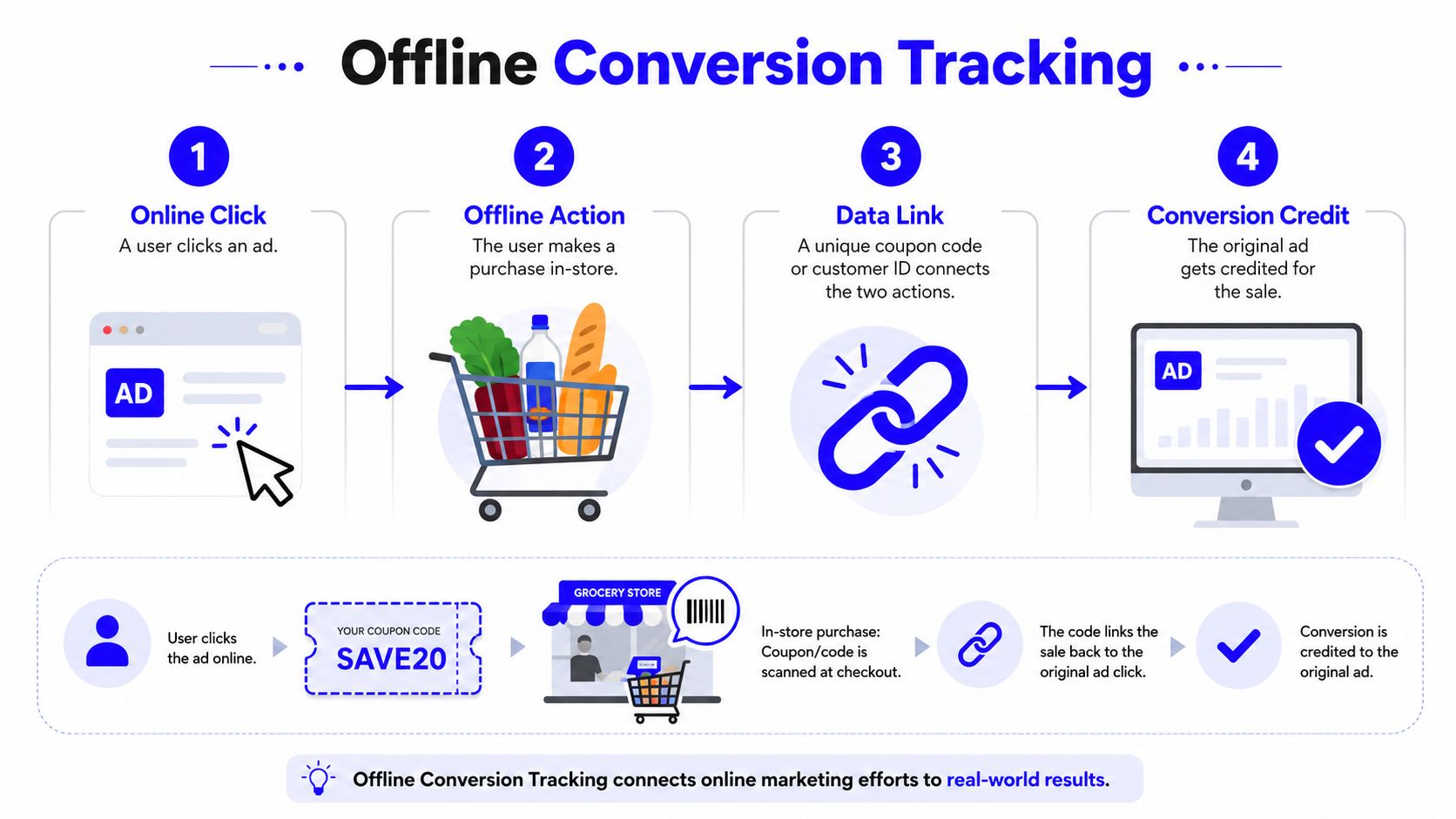
There are four ingredients most systems share. First, a deterministic identifier like GCLID, FBCLID, or Microsoft Click ID. Second, a timestamp that tells the platform when the conversion happened. Third, a conversion name that says what kind of outcome this was. Fourth, often, a value that lets the platform see not just that a deal happened, but what it was worth. Google's help docs frame offline imports as a native measurement path, which is why this setup matters so much once revenue lives in a CRM rather than a checkout page.
The hard part is not the upload itself. It is keeping the chain intact when IDs go missing, sales teams enter data late, or a CRM field gets renamed and breaks the match. A clean setup on paper can still fail in practice if lead capture, handoff, and reporting are not disciplined.
A clean way to explain it internally is simple. The ad click leaves a trail, the CRM preserves that trail, and the upload tells the ad platform what happened after the handoff. That is the difference between measuring traffic and measuring business results.
Comparing the Four Main Methods
A clean setup can still fail out in the field if the IDs arrive late, the sales team updates the CRM after the attribution window, or a field rename breaks the handoff. That is why the method matters less than the failure mode it can survive. The four common paths are CSV uploads, platform APIs, server-side Conversions API, and CRM sync. All four send conversion data back to the ad platforms, but they behave very differently once the pipeline gets messy.
Offline Conversion Tracking Methods at a Glance | Best For | Latency | Maintenance |
|---|---|---|---|
CSV uploads | Low-volume teams and early experiments | Slow, because someone has to prepare and upload files | High, because humans break file hygiene |
Platform APIs | Teams with a developer who can own the pipeline | Faster than CSV, because uploads can be automated | Medium to high, because API logic and error handling need care |
Server-side Conversions API | Teams that want better control over signal loss and privacy handling | Fast, when webhook flows are wired correctly | Medium, because the data layer still needs monitoring |
CRM sync | Teams with a CRM-led sales motion and repeatable lifecycle stages | Fast once the workflow is stable | Low to medium, because the CRM becomes the source of truth |
CSV uploads work when the volume is low enough that a spreadsheet is still manageable. They are straightforward, but they are brittle. One bad timestamp, one missing click ID, or one sloppy export can turn a batch into noise. If the team depends on manual exports from a CRM, the process usually slips the moment one person gets busy or a field name changes.
Platform APIs remove some of that manual work, but they move the burden to whoever owns the integration. That trade-off is real. You get faster, more repeatable uploads, but you also need error handling, retry logic, and monitoring for failed calls. A broken API job can sit for days unless someone is checking the logs.
Server-side Conversions API setups make more sense when browser tracking gets brittle. Analysts at Meta have reported stronger recovery of lost signals through its Conversions API, which is the practical reason many teams move event collection server-side when ad blockers or consent limits strip out browser-side data. The upside is better control over what gets sent. The downside is that the server layer becomes another system that can drift, miss events, or send partial records if the webhook chain is not watched closely. Offline conversion tracking statistics
Use the simplest method that can survive your sales process, not the fanciest one that only works in a demo.
CRM sync usually wins for startups with long sales cycles. It fits teams where the CRM already decides when a lead becomes qualified, when a deal is real, and when revenue should be reported back. The catch is the same one that shows up across every method, late uploads and sloppy data hygiene are where attribution falls apart. If reps skip fields, rename statuses, or close deals after the window has expired, the sync looks healthy while the reporting stays wrong.
The platform window matters too. Google Ads offline click conversions are commonly referenced with a 90-day maximum from click to conversion, Microsoft Advertising uses MicrosoftClickId and supports duplicate handling through CountType plus an ApplyOfflineConversions flow after a required two-hour wait, and Meta-oriented guides commonly cite FBCLID/_fbc matching with a shorter 62-day window. That means the upload path has to match the sales cycle, not the other way around. Offline conversion tracking guide for PPC experts
A Practical Implementation Checklist
A startup stack usually looks messy before it looks elegant. Google Tag Manager captures the click, GA4 handles the site layer, HubSpot or Pipedrive holds the lead, and Google Ads or Meta does the bidding. The goal is not to make every system do everything. The goal is to make each system preserve the piece of the journey it's best at keeping.
Start with the form. Capture the click identifier at submission time, then store it as a custom field on the CRM contact record. If the lead comes through Google Ads, that means GCLID; if it comes through Microsoft Advertising, Microsoft Click ID; if you're working with Meta, preserve the identifiers the platform can match later. Use hidden fields or a lightweight script to move that value from the landing page into the CRM before the sales team ever touches the record.
The next step is lifecycle wiring. Trigger the offline upload on a meaningful stage, not on every half-baked lead status. Qualified lead, booked demo, contract sent, or closed-won are far more useful than “new” or “contacted.” A stage change in HubSpot or Pipedrive can push the event into Zapier, a native workflow, or a direct API call, depending on how much control you need. The key is consistency, because the platform cannot optimize for a field that sales reps treat casually.

A workable checklist looks like this:
Prepare the CRM fields. Create dedicated fields for click IDs, source, conversion stage, and value so the sales team isn't overwriting raw attribution data.
Capture source data at lead time. Pass the click ID into the form, and keep the original timestamp intact.
Normalize the record. Make sure the CRM stores clean timestamps and stable field names, because upload errors usually start here.
Send the conversion only when it's real. Use a lifecycle stage that reflects an actual business outcome, not a hopeful internal note.
Test the round trip. Submit a test lead, move it through the pipeline, and confirm the upload appears in the platform before you scale the flow.
A practical implementation also needs privacy handling, including Consent Mode v2 for Google traffic where required. The tracking plan has to decide what happens when consent is missing before the lead even enters the CRM. That's not a legal footnote, it's part of the design.
When the Setup Looks Fine but the Data Lies
The hardest failures are the ones that look like success in the UI. The tags fire, the workflow runs, and the CRM shows closed deals. Yet the ad platform still optimizes badly because the chain between those systems is broken in subtle ways. That's where attribution is commonly lost, not in the setup screen.
The first failure mode is missing identifiers. Forms that are too short, ad blockers, iOS privacy limits, and cross-device journeys all make click IDs disappear before they ever reach the CRM. The best practice here is to use both click IDs and hashed user data, because click IDs are deterministic while hashed identifiers give you resilience when the click ID never makes it through. Recent implementation guidance also recommends setting upload cadence based on the sales cycle rather than a fixed daily routine, because a rigid schedule can cause late-stage deals to age out before they're imported. Offline conversion tracking best practices
A second failure mode is sloppy handoff discipline. Sales reps forget to update source fields, deals close outside the attribution window, or the CRM stores the wrong timestamp. Duplicate uploads are another quiet killer, especially when both browser-side and server-side systems send the same conversion. If the team doesn't have strict rules for deduplication and stage ownership, the numbers become theater.
Practical rule: if the CRM is allowed to mutate the original source fields, your attribution will drift even when the integration is technically “working.”
A third failure mode is that the system preserves the wrong thing. Some teams obsess over collecting more and more identifiers, but the goal is preserving the ones the platforms can match later, then keeping them intact through every workflow hop. That means the CRM needs to be treated as a data pipeline, not just a contact database.
For a deeper look at how CRM tracking issues break the loop, the article on top CRM tracking blunders) is worth a read. The central lesson is simple. A beautiful dashboard doesn't matter if the underlying source data is stale, missing, or duplicated.
Reporting That Connects Spend to Revenue
Good reporting starts when you stop asking for more charts and start asking one hard question, which campaigns produced closed revenue. The answer belongs in a dashboard that blends platform data, GA4 context, and offline conversions from the CRM. Anything less usually turns into a vanity report that looks busy but does not help a founder make a budget call.
The most useful weekly metrics sit between ad spend and cash. Cost per qualified opportunity, cost per closed deal, return on ad spend by campaign, and time-to-close by source tell a more useful story than impressions or click-through rate ever will. A campaign that creates fewer leads but closes faster is often a better allocation target than a campaign that floods the CRM with weak names. That is the view you get when offline conversions are layered into Looker Studio instead of left stranded in separate systems.
The cleanest way to think about the dashboard is to separate discovery from decisioning. GA4 is good for seeing how the journey behaves across channels. The ad platform is where bidding decisions happen, so it should receive the enriched offline conversion data that reflects real outcomes. Google's imported offline signals are meant to improve how the platform learns, which is the point of feeding closed revenue back into bidding. Google Ads offline conversion imports
In practice, the report has to survive messy operations. IDs go missing, sales teams close deals late, and fields drift when reps update the CRM without thinking about attribution. A dashboard that ignores those failure modes will look clean right up until the week it matters.
Once the platform starts optimizing for a better downstream event, the campaign that used to look mediocre on form fills can become the one that deserves more budget. That shift is not about prettier reporting, it is about changing the training signal.
For a practical view of how the systems fit together, the guide on marketing data integration pairs well with a revenue dashboard. The useful report is the one that tells you what to fund next, not the one that just confirms you spent money.
Privacy, Consent, and the Tracking Plan
Privacy can't sit at the end of the process like an afterthought. If the consent model is loose, the tracking plan will be too. If the identifiers are handled sloppily, the risk sits with the business, not with the ad platform.
Hashed email and hashed phone are the safest persistent identifiers for matching because they give you continuity when click IDs are missing, but they still need to be treated as personal data, not as anonymous noise. Consent Mode v2 changes the rules for Google traffic in covered regions, so the system has to know whether a user's data can be used for matching before the upload happens. That's a design decision, not a checkbox. The technical rescue plan for Consent Mode v2

Server-side Conversions API setups help because they give you more control over what leaves the system and when it leaves. That doesn't remove the compliance burden, but it does make the data flow easier to govern. The safest operational pattern is to document which fields are captured, which ones are hashed, which uploads are suppressed without consent, and which platform receives each event type.
A tracking plan that a privacy reviewer can audit should read like an actual system map, not a marketing wish list. If the team can't explain where the data goes, what consent gates apply, and how uploads are blocked when consent is denied, the setup isn't ready yet.
Your First 30 Days and Common Questions
The first month should be boring in the best possible way. Week one is for auditing what's already in place, which fields exist in the CRM, which click IDs are being captured, and where source data gets overwritten. Week two is for instrumenting the identifier capture so the form and CRM preserve the same record. Week three is for building the sync from lifecycle stage to ad platform. Week four is for checking the first uploads, fixing mismatched timestamps, and making sure duplicate prevention is working.
That order matters because most failures come from skipping the boring checks. A startup doesn't need a perfect attribution architecture on day one. It needs a reliable one that survives real sales behavior, a real CRM, and a real team.
A few questions come up almost immediately:
Does this work for e-commerce? Yes, when the sale happens offline or the revenue event lands somewhere other than the browser.
What about multi-touch journeys? Keep the click ID intact at the first capture point, then let the CRM preserve the trail through later stages.
What if my CRM has no closed-won field? Use the closest meaningful lifecycle stage that represents a real business outcome, then map it consistently.
Are small budgets worth this setup? If the business sells high-consideration offers, even a small budget can benefit because the platform learns from outcomes instead of noise.
The true test is not whether the setup exists. It's whether the next salesperson, marketer, and founder can all trust the same source of truth when a deal closes.
Du Marketing helps startups connect paid media, CRM, and analytics into one working measurement system, so you can stop guessing which campaigns drive real revenue. If you want offline conversion tracking wired into a broader growth stack with tracking, reporting, and lifecycle execution that holds together, visit Du Marketing.