Marketing Data Integration: From First Click to Revenue

You open Google Ads and see one lead count. GA4 shows another. Your CRM says the sales team only talked to a fraction of either number.
By Friday, the team is in a meeting arguing over which dashboard is “right,” someone exports three CSVs, someone else says attribution is broken, and the founder is left making budget decisions with numbers nobody trusts. That's normal in early-stage startups. It's also expensive.
The fix isn't “more reporting.” It's marketing data integration built to connect first click, form fill, CRM stage change, and closed revenue into one audit-ready system. Once that system exists, the conversation changes. You stop debating platform screenshots and start asking the only question that matters: which campaigns created revenue?
Table of Contents
The Data Chaos Every Startup Knows Too Well
A founder asks a simple question: “How much pipeline did paid search generate last month?”
Nobody answers quickly.
The paid media manager has platform conversions. The product person trusts GA4. Sales is looking at HubSpot or Pipedrive and saying half those leads were junk or duplicates. Finance wants revenue, not leads. So the team spends more time reconciling definitions than improving campaigns.
This is the startup version of spreadsheet hell. One tab for Google Ads. One for Meta. One export from GA4. One CRM report with “Original Source” that doesn't match UTMs. Then a stitched-together slide deck that looks clean enough for a board meeting and falls apart the second someone asks where the number came from.
The real problem usually isn't bad performance. It's bad traceability.
I've seen the same pattern repeatedly. A campaign launches fast, lead volume looks promising, then the first serious budget review happens and nobody can prove which clicks turned into qualified pipeline. Founders don't need prettier charts at that point. They need a system that survives scrutiny.
That's where marketing data integration stops being a backend project and starts delivering significant operational advantage. You build one path for data to move from click to session, from session to lead, from lead to opportunity, and from opportunity to revenue. Once that path is standardized, you can trust the story the numbers tell.
If your current reporting still depends on manual exports and heroic spreadsheet cleanup, a better starting point is a structured approach to marketing reporting automation. Automation alone won't fix broken attribution, but it exposes exactly where your handoffs and naming problems live.
The payoff is simple. Fewer meetings about conflicting dashboards. Faster budget decisions. Better answers when someone asks what marketing produced.
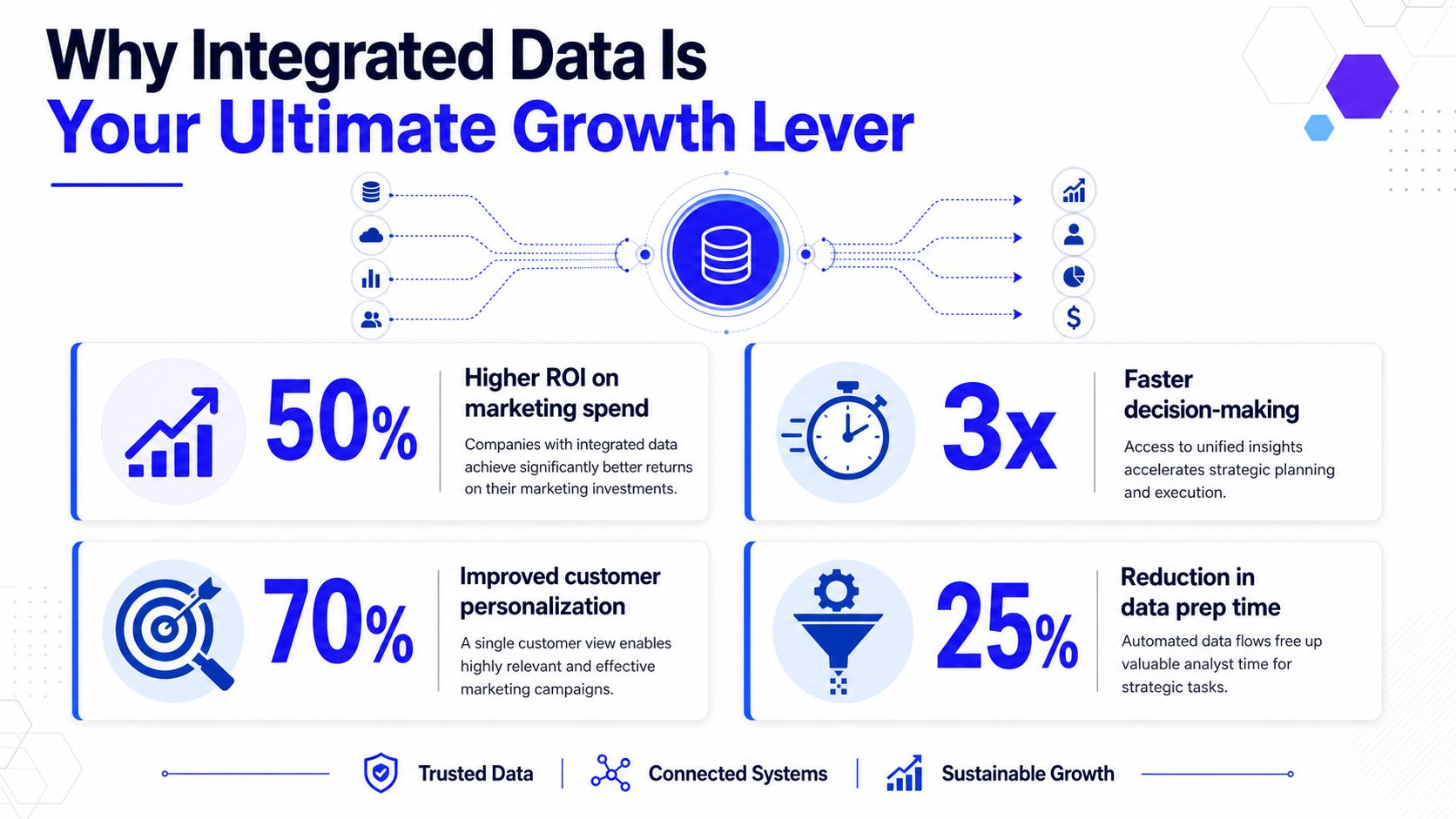
Why Integrated Data Is Your Ultimate Growth Lever
Founders usually think of growth levers as channels, creative, pricing, or sales process. Fair enough. But if your measurement system can't connect spend to revenue, every other lever gets harder to pull with confidence.
That's why marketing data integration matters. It turns scattered activity into decision-grade evidence. Instead of asking whether Google Ads, LinkedIn, SEO, or email “seem to be working,” you can compare cost, lead quality, opportunity creation, and revenue outcome in one operating view.
The business case is commonly underestimated. The global data integration market was estimated at USD 15.18 billion in 2024 and is projected to reach USD 30.27 billion by 2030, with more than 56% of revenue coming from marketing applications, according to Grand View Research's data integration market analysis. That's a useful signal. Companies aren't prioritizing this because it sounds technical. They're prioritizing it because revenue teams need a unified customer view to make budget decisions that hold up.
What changes when the data is integrated
When the system is wired correctly, three things happen.
CAC gets more honest. You stop measuring cost per form fill as if every lead were equal. You can compare spend against qualified opportunities and closed deals.
ROAS becomes defensible. Ad platform conversion claims stop being the final word. You can inspect what landed in the CRM and what sales converted.
LTV conversations improve. Even early-stage startups can separate channels that create one-and-done leads from channels that create customers worth keeping.
None of that requires enterprise complexity. It requires consistency.
What integrated data lets a founder do
A unified setup changes the quality of decisions, not just the speed of reporting. Founders can:
Decision | Without integration | With integration |
|---|---|---|
Budget shifts | Based on platform-reported conversions | Based on downstream CRM and revenue outcomes |
Channel prioritization | Based on lead volume | Based on lead quality and pipeline contribution |
Sales and marketing alignment | Driven by opinion | Driven by shared attribution fields |
Forecasting | Hand-wavy | Grounded in source-to-revenue patterns |
Practical rule: If marketing can't show how a campaign created revenue, that campaign is still a hypothesis.
This is why I push startups to treat integrated data like core infrastructure. A clean attribution spine doesn't just help reporting. It affects bidding decisions, creative direction, sales follow-up, and which channels deserve another dollar.
The founder benefit is simple. You stop funding channels on faith.
Understanding Your Marketing Data Flow Architectures
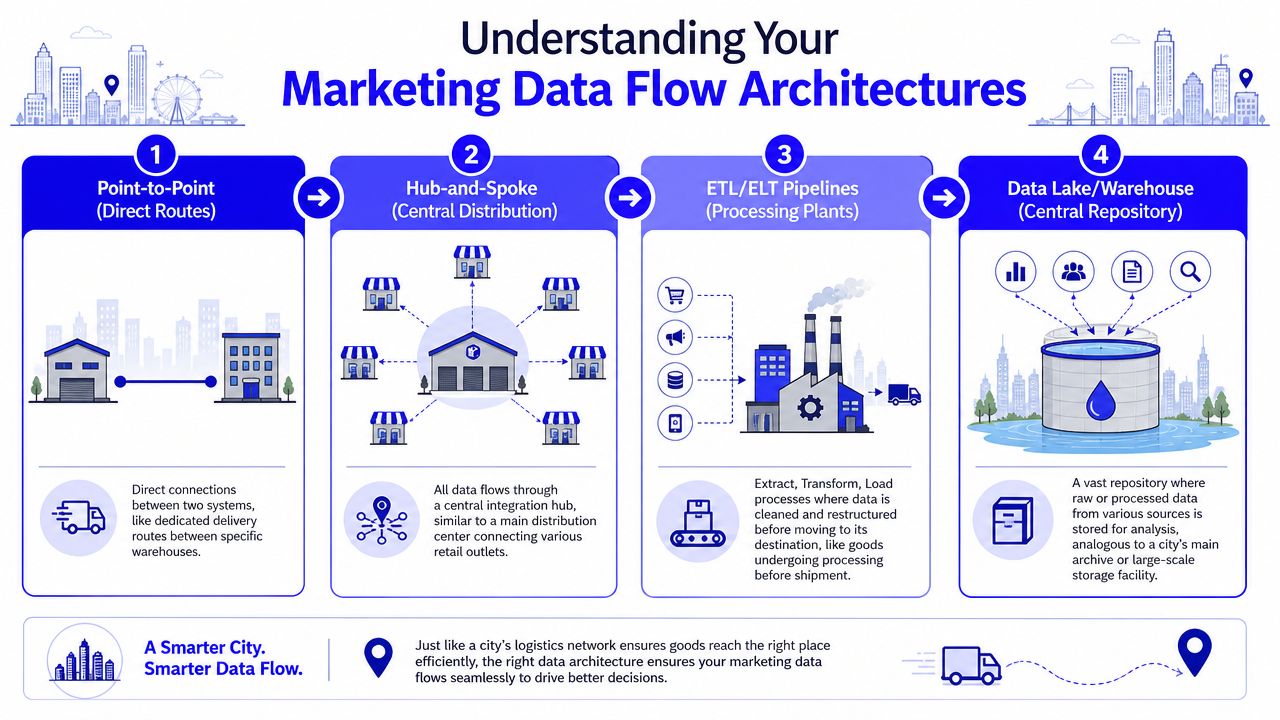
Most startups hear terms like client-side, server-side, API sync, warehouse, and offline conversions and assume the stack is more mysterious than it is. It isn't. Think of your data system like a city logistics network. Different vehicles move different packages, and all of them should eventually reach the same central depot.
Shopify's overview of marketing data integration and single-source reporting describes the core value well: integrated infrastructure consolidates fragmented inputs into a single source of truth, automates synchronization, reduces manual errors, and connects ad spend, analytics, CRM pipeline, and revenue in one place.
A founder doesn't need to code this system. But a founder should understand how the pieces move.
Client-side tracking
Client-side tracking is the local courier. The browser sees a page load, a button click, a form event, then sends that data to tools like GA4 or ad pixels.
This setup is fast to launch and easy to understand. GTM usually handles the deployment. For early-stage teams, it's the quickest way to establish event tracking and campaign visibility.
The downside is reliability. Browsers block more than they used to. Privacy settings, ad blockers, and script failures can interrupt collection. Client-side tracking is useful, but it shouldn't be your only source for critical conversion events.
If your team needs a cleaner GTM foundation before adding complexity, this guide to event tracking in Google Tag Manager is a good practical reset.
Server-side tracking
Server-side tracking is the armored truck. Instead of asking the browser to deliver everything, your server or tagging server sends events directly to analytics and ad platforms through APIs such as Meta CAPI.
That gives you more control over what gets sent, how it's normalized, and how consent rules are applied. It also tends to be more durable when browser-side signal quality drops.
The trade-off is implementation effort. You need event mapping, identity handling, and deduplication logic so server-side and browser-side events don't both claim the same conversion. If that logic is sloppy, your reporting gets worse, not better.
A good rule is this: use client-side for visibility, server-side for resilience.
CRM sync
CRM sync is your warehouse inventory update. Marketing systems may know a click happened. The CRM knows whether a real person became a qualified lead, an opportunity, or a customer.
Many startups fail when they track front-end conversions and stop there. This leads them to wonder why the ad platform says one thing while sales says another.
A proper CRM sync passes fields that matter to attribution, including lead source, campaign IDs, UTMs, lifecycle stage changes, opportunity status, and closed revenue. When those fields stay consistent, you can evaluate channels on business outcomes instead of on-platform optimism.
Offline conversions
Offline conversions are the special delivery manifests. They tell ad platforms that a meaningful business event happened after the click, often later and outside the browser.
For B2B, this can mean qualified lead, sales accepted lead, opportunity created, or closed won. For higher-consideration B2C, it might be a phone sale or a manually verified booking.
The direction of platform optimization is determined by the events you feed them. If you only send shallow lead events, they'll chase shallow leads. If you send validated downstream outcomes, the optimization loop gets much closer to revenue.
Here's a simple architecture comparison:
Flow type | Best for | Main risk |
|---|---|---|
Client-side | Fast deployment and broad behavior tracking | Signal loss in the browser |
Server-side | Durable event delivery and better control | Deduplication and setup complexity |
CRM sync | Revenue and pipeline attribution | Dirty field mapping |
Offline conversions | Training ad platforms on real outcomes | Delayed uploads or broken match keys |
A mature startup stack usually uses all four. Not because complexity is fashionable, but because revenue attribution breaks when any one of those routes is missing.
Later in the build, this video is useful for framing how integrated systems fit together in practice.
Your Essential Implementation Toolkit
Most attribution problems don't come from one giant failure. They come from small inconsistencies stacked on top of each other. A UTM typo here. An event naming mismatch there. A CRM field that nobody mapped cleanly. By the time you notice the reporting is off, the damage is already in the data.
The fix is a toolkit with clear jobs for each part.
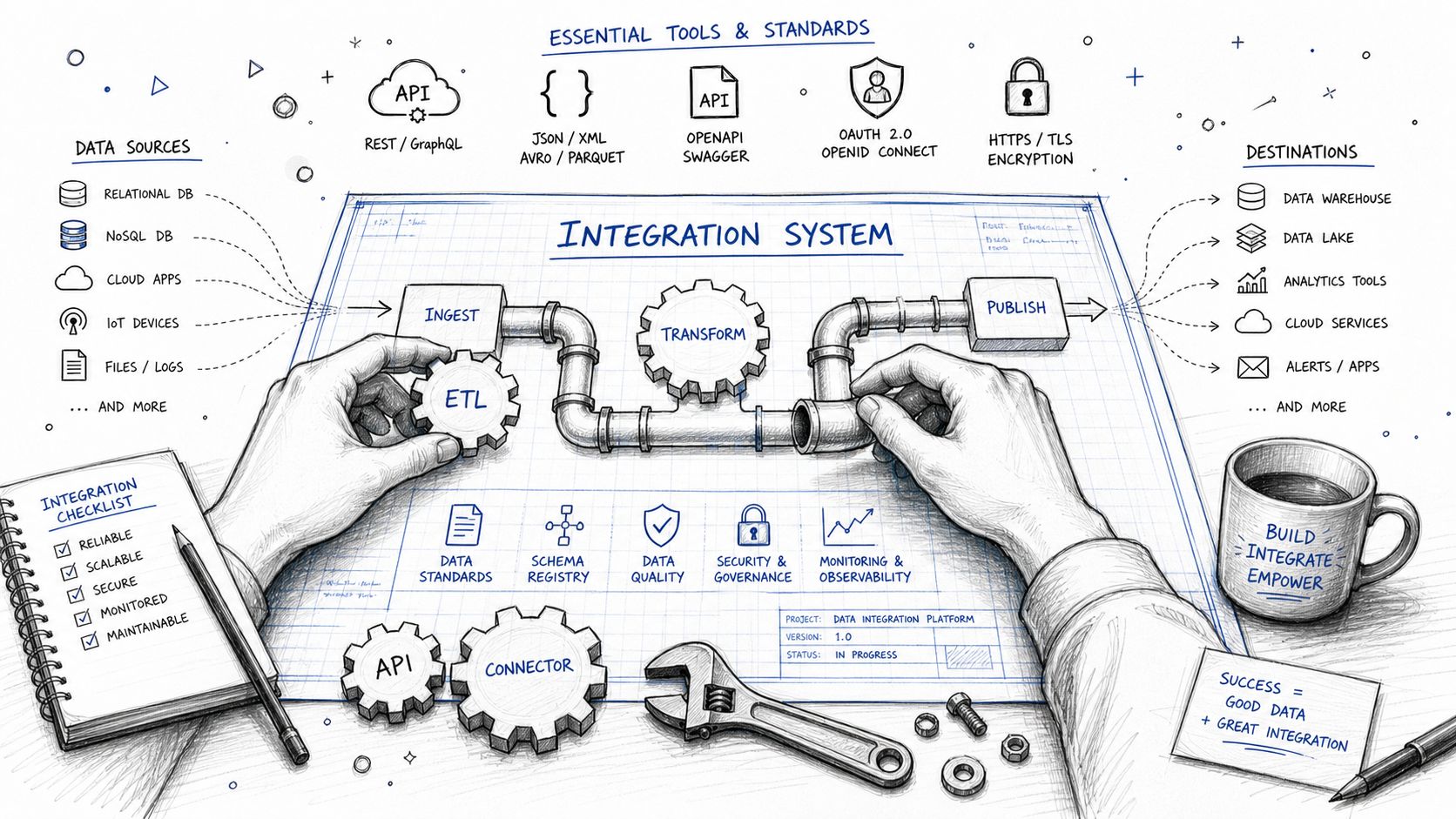
Ingest Labs emphasizes a key implementation requirement in its guide to standardized event taxonomy and first-party identity for marketing data integration: event names, structures, and definitions need to be mapped uniformly before ingestion, and a persistent first-party identity strategy needs to exist across source systems. That's the difference between data that looks collected and data that stays usable.
UTMs are your address labels
UTMs are boring until they aren't. If your source, medium, campaign, content, and term values are inconsistent, every downstream report inherits the mess.
Use a naming convention that survives handoff between paid media, email, content, and sales ops. Keep it documented. Don't let each person improvise campaign names in the ad platform.
A workable startup standard includes:
Source discipline: Keep values stable across teams, such as google, linkedin, meta, newsletter.
Medium consistency: Don't alternate between paid-social, paidsocial, and social_paid.
Campaign naming logic: Include a pattern for market, offer, audience, and date when needed.
Content detail: Use utm_content for ad variant, CTA, or asset identifier when comparison matters.
GTM is your tracking switchboard
Google Tag Manager should manage event deployment, not become a junk drawer.
A healthy GTM container has named variables, clear trigger logic, version control, and a staging or QA habit before publish. A bad one has duplicate tags, legacy scripts, mystery custom HTML, and half the team afraid to touch it.
What works:
One owner: Someone needs final say on tracking logic.
A data layer mindset: Push structured values instead of scraping random page text whenever possible.
Change control: Every publish should answer what changed and why.
Your GTM container should read like a system, not like a crime scene.
GA4 records behavior, not revenue truth
GA4 is useful. It is not your source of truth for revenue attribution on its own.
Use it to understand sessions, events, landing pages, and user paths. Keep its event schema aligned with your naming standard. Mark important conversion events carefully. But don't ask GA4 to settle every attribution argument once sales cycles and CRM stages enter the picture.
In early-stage setups, GA4 should act like the behavioral ledger. It records what users did on the site. Revenue truth still needs CRM confirmation.
Server-side tracking and CAPI protect signal quality
If browser-side tracking is your only method, your startup is operating with incomplete visibility. Server-side tracking gives you a second route for mission-critical events, especially form submissions, qualified leads, purchases, and key lifecycle milestones.
For most startups, the practical stack is straightforward:
Browser event fires through GTM.
Server-side endpoint or tagging layer sends the event through API connections such as Meta CAPI.
Deduplication keys prevent double counting.
Consent logic controls what gets sent based on user status.
A lot of implementations become fragile when teams set up the connection but skip identity rules, event_id consistency, or consent-aware behavior. The result is a pipeline that exists on paper and leaks in production.
CRM mapping closes the loop
This is the piece founders care about most, even if they don't phrase it this way. They want to know which spend created revenue.
That means mapping marketing fields into the CRM and keeping them persistent as records move through the pipeline. At minimum, preserve original lead source, latest source where relevant, UTM values, campaign identifiers, ad platform click identifiers when available, and downstream revenue fields.
A simple checklist helps:
Layer | Must be mapped |
|---|---|
Form capture | UTMs, landing page, timestamp, consent status |
CRM lead/contact | Source fields, campaign values, owner, lifecycle stage |
Opportunity/deal | Pipeline stage, amount, status, close date |
Ad platform feedback | Offline conversion or qualified event return path |
If you skip the mapping discipline, “closed-loop reporting” turns into a slogan. If you get it right, you can inspect a closed won deal and trace it back to the campaign logic that started the journey.
Common Pitfalls That Silently Wreck Your Attribution
The dangerous attribution problems aren't dramatic. They're quiet. Reports still load. Dashboards still have charts. People keep making decisions. The numbers are just wrong enough to mislead everyone.
The naming mess
One person uses utm_campaign=brand_search. Another uses Brand-Search. A third duplicates the campaign in HubSpot with a different naming style. Six weeks later, nobody can group the data cleanly without a manual cleanup project.
This sounds minor. It's not. Naming inconsistency breaks rollups, channel comparisons, and CRM reporting faster than often anticipated.
Fix it with one naming document, one owner, and validation before launch.
The QA shortcut
A lot of startups “test” tracking by filling a form once and checking whether something appears in GA4. That's not QA. That's optimism.
Real QA checks:
Event accuracy: The right event fires once, with the right parameters.
Deduplication: Browser and server events don't both claim the same conversion.
CRM persistence: UTMs survive record creation and stage progression.
Offline return path: Qualified leads or revenue events can flow back to ad platforms if needed.
Consent handling: Tracking behavior changes correctly based on user status.
If you don't test those paths, test events and broken mappings pollute production quickly. This is one reason CRM handoff issues keep destroying ROAS. These common CRM tracking blunders that kill ROAS) show up more often than most founders expect.
The connector mismatch
Teams often assume any ELT tool with a connector library is “good enough” for marketing data. Sometimes it is. Sometimes it absolutely isn't.
Improvado notes that purpose-built marketing integration tools can access over 46,000 pre-built marketing metrics and dimensions in a way that general-purpose ELT tools often don't, which matters when you need keyword-level, audience-level, and campaign-level analysis tied to revenue outcomes in CRM systems, as described in Improvado's comparison of marketing data integration tools.
That doesn't mean every startup should buy a specialized platform immediately. It means you should understand the trade-off.
Generic tools win on flexibility: Good for engineering-led teams with broader company data needs.
Marketing-specific tools win on depth: Better when campaign granularity and ad-platform quirks matter most.
The wrong fit creates hidden cost: You save on software, then spend the savings on cleanup, transformations, and analyst frustration.
Plenty of startups don't have a tracking problem. They have a connector-depth problem disguised as a tracking problem.
The expensive mistake is choosing a tool because it can connect, not because it can preserve the marketing detail you need.
An Agile Marketing Data Stack for Startups
Early-stage teams don't need an enterprise architecture diagram the size of a wall. They need a lean stack that captures critical events, syncs them to the CRM, and gives leadership one trustworthy view of performance.
The sweet spot is a setup that gets you most of the value without heavy maintenance.
Startup-Friendly Marketing Data Integration Stack
Component | Recommended Tool(s) | Why It's Essential |
|---|---|---|
Tag management | Google Tag Manager | Centralizes event deployment and reduces hard-coded tracking changes |
Web analytics | GA4 | Tracks sessions, events, landing pages, and user behavior |
Server-side events | Meta CAPI, GA4 server-side implementation | Improves resilience for critical conversion signals |
CRM | HubSpot or Pipedrive | Connects leads, pipeline stages, and revenue to acquisition sources |
Workflow automation | Zapier or native integrations | Moves data between forms, CRM, ad platforms, and reporting layers |
Data storage | BigQuery or a lightweight warehouse if needed | Gives teams a central destination for integrated analysis |
Visualization | Looker Studio | Makes source-to-revenue reporting accessible to founders and operators |
Consent handling | Consent Mode v2 setup with your CMP | Keeps tracking behavior aligned with privacy requirements |
Offline conversion loop | Native ad platform uploads or CRM-driven syncs | Feeds qualified outcomes back to optimization platforms |
The point isn't to buy everything at once. The point is to avoid gaps in the chain.
What to build first
If budget and bandwidth are tight, build in this order.
First, lock down UTM standards and form capture. If source data enters the system badly, no downstream tool can rescue it fully.
Second, make GTM and GA4 clean enough to trust behavioral events. That gives you visibility into traffic and on-site conversion actions.
Third, sync the CRM with the fields that matter to attribution. Once lifecycle stage and revenue values can be tied back to acquisition data, your reporting becomes commercially useful.
Fourth, add server-side tracking and offline conversions for the events worth protecting and feeding back to ad platforms.
A practical startup stack should feel boring in the best way. Reliable. Easy to inspect. Hard to break accidentally.
Here's the mistake to avoid: overbuilding for sophistication before you've earned consistency. A founder does not need a giant warehouse project if form submissions still lose UTMs on entry. Start with traceability. Then add depth.
Frequently Asked Advanced Integration Questions
The hard part of marketing data integration isn't connecting tools. Connecting tools is generally achievable. The hard part is deciding how records should behave when identity changes, consent limits data flow, and revenue shows up long after the original click.
NinjaCat highlights a gap many teams run into: technically merging server-side APIs like Meta CAPI and GA4 with CRM syncs such as HubSpot or Pipedrive under privacy requirements like Consent Mode v2 remains poorly explained, and 40% of startups report misallocated budgets due to incomplete attribution, according to NinjaCat's discussion of data integration challenges.
How do you merge server-side tracking with CRM data under Consent Mode v2
Don't start with tools. Start with identity rules.
Define which identifiers are allowed to exist at each stage: anonymous browser identifier, first-party user ID, CRM contact ID, and deal or opportunity ID. Then define precedence. When the same person appears across events, one persistent internal key should win for stitching records in your reporting layer.
Consent Mode v2 complicates this because not every event can be treated equally. Some events can be modeled or sent in limited ways depending on consent status. That means your pipeline needs to store consent state with the event, not as an afterthought.
A practical approach looks like this:
Capture consent status with each event
Store raw event metadata before heavy transformation
Map browser and server events to a shared event key for deduplication
Promote CRM IDs only after a lawful, first-party relationship exists
Avoid rewriting history blindly when a later identifier appears
That last point matters. When a user first arrives anonymously on mobile and later submits a form on desktop, don't overwrite the original path. Stitch it with a relationship table or identity graph logic inside your reporting model.
How do you handle cross-device attribution without making a mess
Use probabilistic thinking carefully and deterministic IDs wherever you can.
If a known user logs in, submits a form, or otherwise creates a first-party identifier, use that as the bridge. If they don't, keep the paths separate rather than forcing a fake certainty. Startups often damage attribution by being too aggressive with merges.
If you can't prove two records belong to the same person, keep them related loosely or keep them separate. Bad merges are worse than incomplete merges.
The goal is audit-ready reporting, not fictional precision.
How should startups think about offline conversion modeling
Model only the milestones sales respects.
For B2B, that usually means a short ladder such as lead, qualified lead, opportunity, and closed won. For each stage, define who changes the record, what field marks the stage, and when that event should be pushed back to ad platforms or dashboards.
Avoid creating elaborate custom scoring systems before your CRM hygiene is stable. A messy “high intent score” event is less useful than a clean opportunity-created event tied to the original campaign source.
When founders ask for better attribution, what they usually want is a system they can defend in a budget meeting. That comes from disciplined identity rules, consent-aware event handling, and CRM stages that mean something commercially.
If you want help building an audit-ready setup that connects GTM, GA4, server-side tracking, CRM sync, offline conversions, and reporting into one source-to-revenue system, Du Marketing does exactly that for startups. The work is hands-on, end-to-end, and built to answer the question founders actually care about: which dollars turned into revenue.