LinkedIn Advertising for B2B: A Startup's Playbook

You launched LinkedIn Ads because the board wants pipeline, sales wants meetings, and your dashboard is serving expensive clicks plus a handful of form fills from people who looked right on paper and wrong in the CRM. That's the normal starting point for a lot of startups.
LinkedIn advertising for B2B works best when you stop treating it like a lead vending machine. It's a revenue system. The campaigns, the offer, the CRM stages, the tracking, the retargeting windows, and the sales follow-up all have to line up. If they don't, LinkedIn feels overpriced. If they do, it becomes one of the cleanest ways to get in front of the exact companies and roles you want.
Table of Contents
Why Most B2B LinkedIn Ads Fail and How Yours Won't
Most failed LinkedIn programs have the same postmortem. The team judged success on cost per lead, chased the cheapest form fills, and never connected campaigns to qualified pipeline.
That's backwards.
LinkedIn is expensive if your definition of success is “how cheaply can I get a conversion pixel to fire.” It gets a lot more interesting when the question becomes “which channel creates the most revenue from the right accounts.” Between Q3 2024 and Q3 2025, LinkedIn ad budgets for B2B companies increased by 31.7%, and benchmark reports showed LinkedIn ads delivered 121% ROAS across B2B customer data, outperforming Google Search and Meta, according to Hootsuite's summary of benchmark data.
That doesn't mean every campaign wins. It means serious B2B teams are putting more money into LinkedIn because the platform can produce revenue when the setup is disciplined.
Cheap leads are often the most expensive outcome
A low-intent whitepaper download from the wrong company can make a dashboard look healthy while your sales team's confidence in marketing wanes. I'd rather see fewer conversions from a tightly defined audience than a parade of “leads” that never become opportunities.
Practical rule: If your CRM isn't telling you which LinkedIn campaigns create qualified pipeline, you're not optimizing advertising. You're decorating a dashboard.
LinkedIn advertising for B2B is strongest when it supports the whole buying journey. A prospect sees a founder-led ad, later clicks a retargeting asset, comes back through branded search, then books a meeting after your sales rep follows up with context. If you only credit the last touch, LinkedIn looks weaker than it is. If you track influence across touches, the economics often look very different.
Treat LinkedIn as part of a revenue system
The startups that get value from LinkedIn usually do a few things well:
They target tightly: They care about account fit, role relevance, and buying context.
They use offers with the right friction: Early-stage education for colder audiences. Higher-commitment asks for warmer traffic.
They sync ad data with CRM reality: Marketing qualified leads, opportunities, and closed revenue matter more than raw submission volume.
They accept the timeline: B2B buyers rarely convert in a neat, same-week path.
LinkedIn rarely rewards impatience. It rewards teams that know their buyer, track properly, and keep message consistency from first impression to sales conversation.
If your current account feels broken, the fix usually isn't a clever hack in Campaign Manager. It's stronger business logic upstream and cleaner attribution downstream.
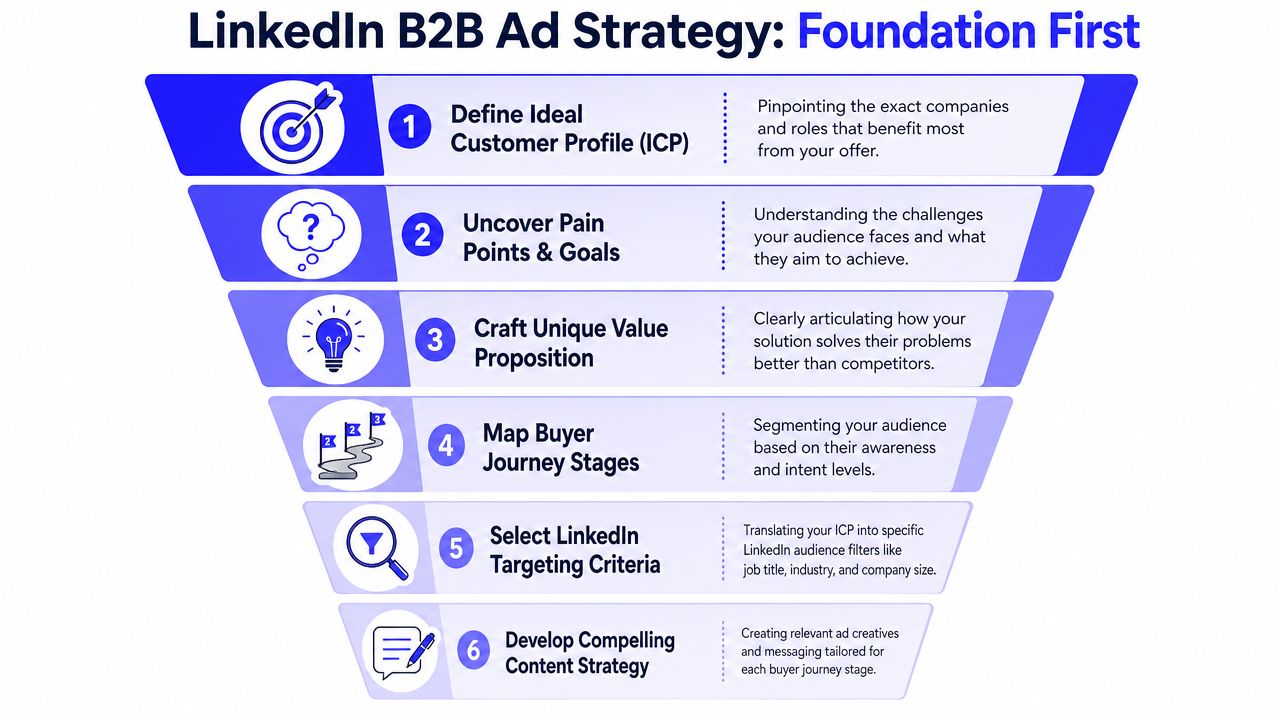
Foundation First Defining Your Audience and Strategy
The first targeting mistake happens before anyone opens Campaign Manager. A startup decides it “needs LinkedIn” because the audience is professional, then skips the hard question. Should this business even buy LinkedIn traffic in the first place?
Start with the ACV question
A mature channel strategy begins with critical data insights. Data indicates that 63% of B2B organizations should not spend on LinkedIn ads, especially those with low annual contract value, where Google or Meta often provide better intent-based conversion. The same source notes that the average time from first LinkedIn ad impression to revenue is 281 days, which means you need margin and patience to make the channel work. That framework comes from this LinkedIn post on the ACV threshold problem.
If you sell a lower-priced product to a broad market, LinkedIn can become a very polished way to lose money. If you sell a higher-value offer to a narrow set of companies and job functions, the economics look much better.
A simple decision lens helps:
Use LinkedIn first when you need precise access to defined companies, seniority levels, or job functions.
Use search-first channels when buying intent is already active and your market searches directly for the problem you solve.
Delay LinkedIn if your sales process, CRM stages, and nurturing aren't ready for a longer conversion window.
That same discipline applies to lead stages. If your team still debates what counts as a good lead, fix the definition before launch. A clean marketing qualified leads framework will save more budget than any targeting tweak.
Build audiences from business reality
Most startup accounts overuse job title targeting and underuse first-party data. Titles help, but titles alone are messy. One company's “Growth Lead” is another company's solo founder doing six jobs at once.
Start from your real customer base and sales knowledge:
List your best-fit accounts. Look at closed-won customers, high-retention customers, and active opportunities.
Identify repeat patterns. Company size, industry, geography, buying committee roles, and common pain points matter more than broad assumptions.
Map awareness stages. Cold prospects need educational offers. Warm visitors can handle stronger CTAs.
Build Matched Audiences. Upload customer lists, opportunity lists, and retargeting pools from site visitors or engaged users.
Layer filters carefully. Job function, seniority, and company attributes are useful when they sharpen an already solid ICP.
Avoid the audience-building traps
A few mistakes show up constantly:
Too broad: “All marketing managers in software” sounds sensible and usually isn't.
Too narrow too early: Tiny audiences can stall delivery and hide weak messaging behind low volume.
No exclusions: Existing customers, recruiters, job seekers, competitors, and irrelevant company sizes can contaminate results.
No buyer-journey segmentation: Sending demo offers to cold traffic is a fast way to blame the platform for your own impatience.
Build audiences from CRM truth first, platform options second.
Strong LinkedIn advertising for B2B starts with business constraints, not targeting excitement. If the ACV is wrong or the audience logic is fuzzy, no campaign structure will rescue it.
Choosing Ad Formats and Crafting Creative That Converts
A startup spends weeks building a polished campaign, launches with a broad audience, and gets clicks that never turn into pipeline. The problem usually is not LinkedIn itself. It is a mismatch between format, message, and buying intent.
LinkedIn ad formats do different jobs. If you treat them as interchangeable, costs rise fast and lead quality gets noisy. The goal is not to collect the cheapest conversion. It is to choose the format that gives sales a real shot at creating qualified pipeline, then connect that response back to CRM outcomes and revenue thresholds.
Match the format to the buying job
For cold audiences, attention and credibility matter first. For warm audiences, clarity and conversion path matter more.
Analysts at Chartis found that Thought Leader Ads reached a 2.68% CTR versus 0.42% for single-image ads. They also noted that Lead Gen Forms can lower cost per lead by 20% to 30% compared with landing pages, and that a 10% form completion rate is a useful benchmark. Those numbers do not mean one format always wins. They show how strongly response rate changes when the ad type matches buyer context.
Here is the practical way to use each format.
Ad Format | Best For | Benchmark CTR | Pro-Tip |
|---|---|---|---|
Thought Leader Ads | Founder brand, category education, credibility | 2.68% | Lead with a specific opinion, a hard lesson, or a painful pattern you see in deals |
Single-image ads | Simple offers, retargeting, broad testing | 0.42% | Use them to test angles and offers, especially with warm traffic |
Lead Gen Forms | Lower-friction lead capture | Not cited here | Add qualifying fields if sales capacity is limited or ACV requires tighter filtering |
Document Ads | Mid-funnel education, guides, frameworks | Not cited here | Turn a useful checklist, teardown, or internal framework into a skim-friendly asset |
Conversation Ads | Direct response follow-up | Not cited here | Reserve these for retargeting or known lists where the message has context |
Video Ads | Product context, objection handling, explainers | Not cited here | Put the problem in the first few seconds and show the product only after relevance is clear |
A common mistake is sending cold traffic straight to a demo form with a product-heavy single image ad. That setup can generate leads, but many will sit below your ACV threshold, outside your ICP, or too early to buy. A better path is often Thought Leader or Document Ads for education first, then retarget engaged visitors with a stronger ask. That gives you cleaner intent signals for CRM scoring and better downstream conversion rates.
Creative has one job. Make the right buyer stop and care.
Bad LinkedIn creative reads like internal positioning. Buyers do not care about “end-to-end visibility” or “scalable transformation” unless the ad ties that claim to an expensive problem they already feel.
Good creative is usually plainspoken.
It names the problem in the same language prospects use on calls. It stays focused on one idea. It earns the click by making a relevant promise, then sends people to the next step that fits their awareness level.
Use this filter before launching any ad:
Pain is concrete: “Pipeline looks healthy, but sourced revenue is flat.”
Audience is obvious: The right buyer should know within a second that the ad is for them.
Offer matches intent: Cold traffic gets education. Warm traffic gets evaluation.
CTA matches sales reality: If sales cannot work low-intent leads fast, do not ask for them.
Creative supports measurement: Use distinct angles and offers so CRM and CAPI data can show which messages produce qualified pipeline, not just form fills.
A few hooks that usually outperform vague brand copy:
Revenue attribution pain: “You generated leads. Finance still cannot see sourced pipeline.”
Ops pain: “Your team syncs data across HubSpot, Salesforce, and LinkedIn, and the numbers still do not match.”
Quality pain: “MQL volume is up. Opportunities from paid social are not.”
The best ads often sound like a sharp AE or founder who has heard the same objection fifty times and knows exactly how to address it.
Lead Gen Form or landing page
This decision affects more than conversion rate. It affects lead quality, routing, tracking, and what you can prove later.
Use a Lead Gen Form when you want speed, lower friction, and a simple offer. It works well for guides, webinars, checklists, and mid-funnel content. It also works when your follow-up process is tight and you can enrich or qualify leads after capture.
Use a landing page when you need stronger pre-qualification or better measurement control. A page gives you more room for proof, objection handling, product detail, meeting-booking logic, and event tracking. It is often the better choice for demos, technical products, higher ACV motions, or any campaign where sales wants fewer but better leads.
The trade-off is straightforward. Forms usually produce more volume. Landing pages often produce stronger intent signals and cleaner routing. For startups that care about pipeline efficiency, the right answer depends on what your CRM later shows about opportunity creation, deal size, and close rate.
Setting Budgets and Bids for Profitable Results
The budget conversation gets easier when you stop asking, “What can we afford to spend on LinkedIn?” and start asking, “What can we afford to spend to create qualified pipeline?”

LinkedIn B2B lead generation can produce a 28% lower cost per qualified lead than Google Ads and a median pipeline generation of $5.21 for every $1 spent, according to Digital Applied's LinkedIn B2B benchmark write-up. That's why high CPL by itself is such a misleading metric. Expensive leads can still be profitable if they convert into real opportunities.
Budget from revenue backward
Don't set budgets based on what feels tidy. Set them based on your unit economics.
A practical budgeting method looks like this:
Start with ACV or expected deal value.
Estimate close rate from qualified opportunity to customer using your own CRM data.
Estimate how many leads become qualified opportunities.
Work backward to an acceptable cost per qualified lead and cost per opportunity.
Only then choose a daily or monthly budget.
This gives you a financial guardrail. Without it, teams react emotionally to expensive clicks instead of rationally to downstream revenue.
If your close rates are still unstable, keep budgets controlled and use the early campaigns as learning infrastructure. You're buying signal quality, not just lead volume.
Choose bidding mode by signal quality
Maximum delivery can work when you already trust the account structure, audience, and conversion setup. It gives the system room to find efficient delivery. But if your conversion event is weak, you're asking the algorithm to optimize for noise.
Manual or more controlled bidding can make sense when:
Your audience is small and high value
You're validating new creative
Your conversion event is too top-of-funnel
Sales quality varies heavily by segment
If the account is still learning, don't flood it with too many variables at once. Stable budget, clear audience logic, and one meaningful conversion event beat constant tinkering.
A useful walkthrough on thinking through the mechanics sits below.
What profitable looks like in practice
A healthy startup account doesn't necessarily have cheap leads. It has leads that survive qualification, move into opportunities, and justify the spend.
Watch these three things together:
Lead quality by source campaign
Pipeline created per campaign
Sales feedback on fit and readiness
When those line up, you can raise budgets with confidence. When they don't, lowering bids rarely fixes the issue.
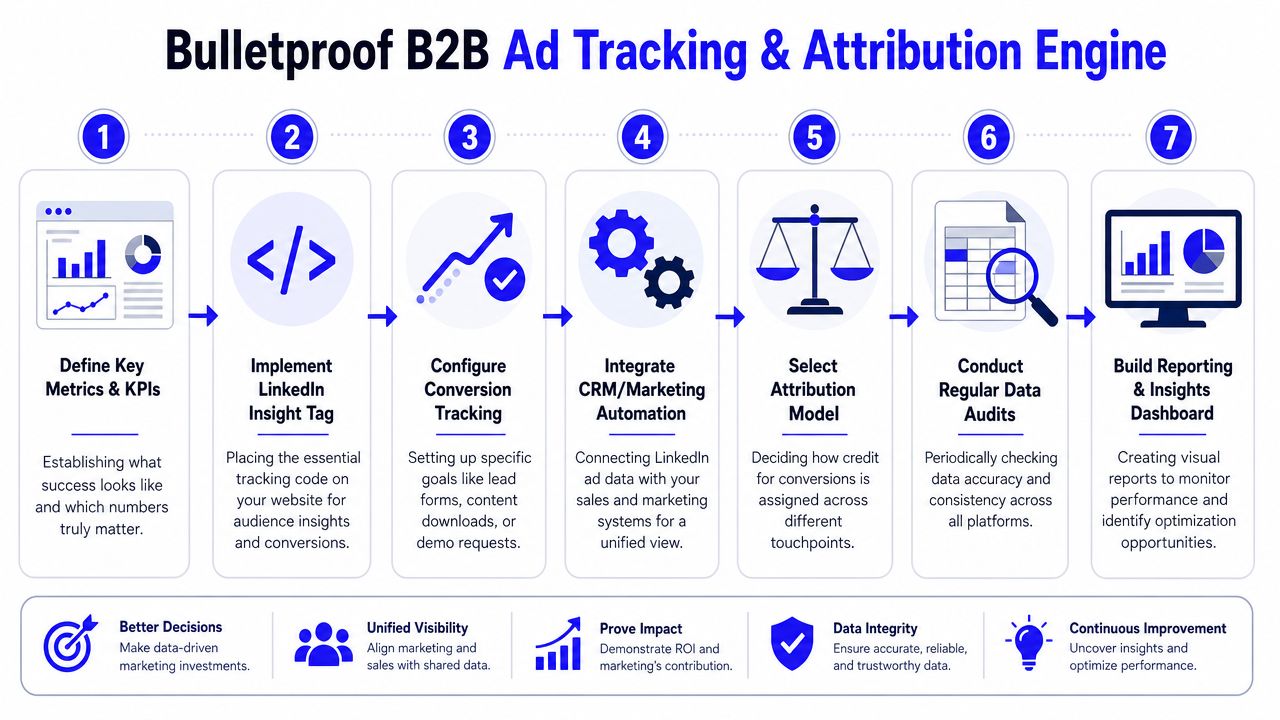
Building Your Bulletproof Tracking and Attribution Engine
Most LinkedIn accounts don't have a traffic problem. They have a truth problem. The ad platform says one thing, GA4 says another, and the CRM tells a third story a month later.
That's why tracking is where serious LinkedIn advertising for B2B either becomes investable or stays guesswork.
Track the full path not just the form fill
Installing the LinkedIn Insight Tag is table stakes. Installing it cleanly through Google Tag Manager is better because you get version control, easier QA, and cleaner event management.
The core setup should include:
Consistent UTMs: Campaign, audience, offer, and creative naming have to survive the click.
Primary conversion events: Demo requests, lead form submits, booked meetings, and other meaningful actions.
Micro-conversions: Useful for analysis, but don't let them become the main optimization target too early.
GA4 alignment: Make sure sessions and conversion definitions are understandable across tools.
If your team runs HubSpot or Pipedrive, the setup becomes particularly advantageous. The ad click should create a contact with source detail intact. That contact should progress through lifecycle stages. Once it becomes sales-qualified, an opportunity, or closed revenue, that status should be available for reporting and, where your stack supports it, fed back into ad platforms.
Don't ask LinkedIn to find better leads if you never tell it what a better lead became.
A lot of teams skip that loop and then wonder why optimization stalls.
Send revenue signals back into LinkedIn
Offline conversion tracking and CRM sync are the difference between lead reporting and business reporting. When you pass back qualified stages or closed deals, you give the platform better training data and give yourself a much clearer read on campaign value.
The practical flow looks like this:
Ad click happens
User lands with preserved UTM data
Form submission writes source detail into CRM
Sales updates lead status and opportunity stages
Qualified and revenue events are mapped back for reporting
Dashboards show campaign-to-pipeline performance
If your CRM hygiene is poor, fix that before trying to scale. Duplicate contacts, inconsistent stage names, manual source overwrites, and broken ownership rules will wreck attribution. This is exactly why a disciplined CRM tracking audit process) matters.
Audit before you scale
Privacy changes and browser limitations make server-side tracking and Conversions API style setups more important than they used to be. The point isn't technical theater. The point is preserving signal quality when browser-only tracking becomes less reliable.
A solid audit cadence checks:
Tag firing accuracy: Does the event fire once, on the right trigger, in the right environment?
Form-to-CRM field mapping: Are source fields, campaign values, and timestamps preserved?
Lifecycle stage integrity: Can sales update stages consistently without breaking reporting?
Cross-platform sanity checks: Do LinkedIn, GA4, and the CRM broadly agree on direction, even if they won't match exactly?
What your dashboard should answer
Your reporting layer should help you make budget decisions, not just admire charts.
At minimum, the dashboard should answer:
Which campaigns create the most qualified pipeline
Which audiences create junk leads
Which offers move contacts from first touch to opportunity
How long the lag is between ad engagement and revenue signals
Where the funnel breaks between click, lead, qualification, and deal creation
When a founder asks whether LinkedIn is working, “we got leads” isn't a serious answer. “This campaign generated qualified opportunities from target accounts, and here's the influenced pipeline” is.
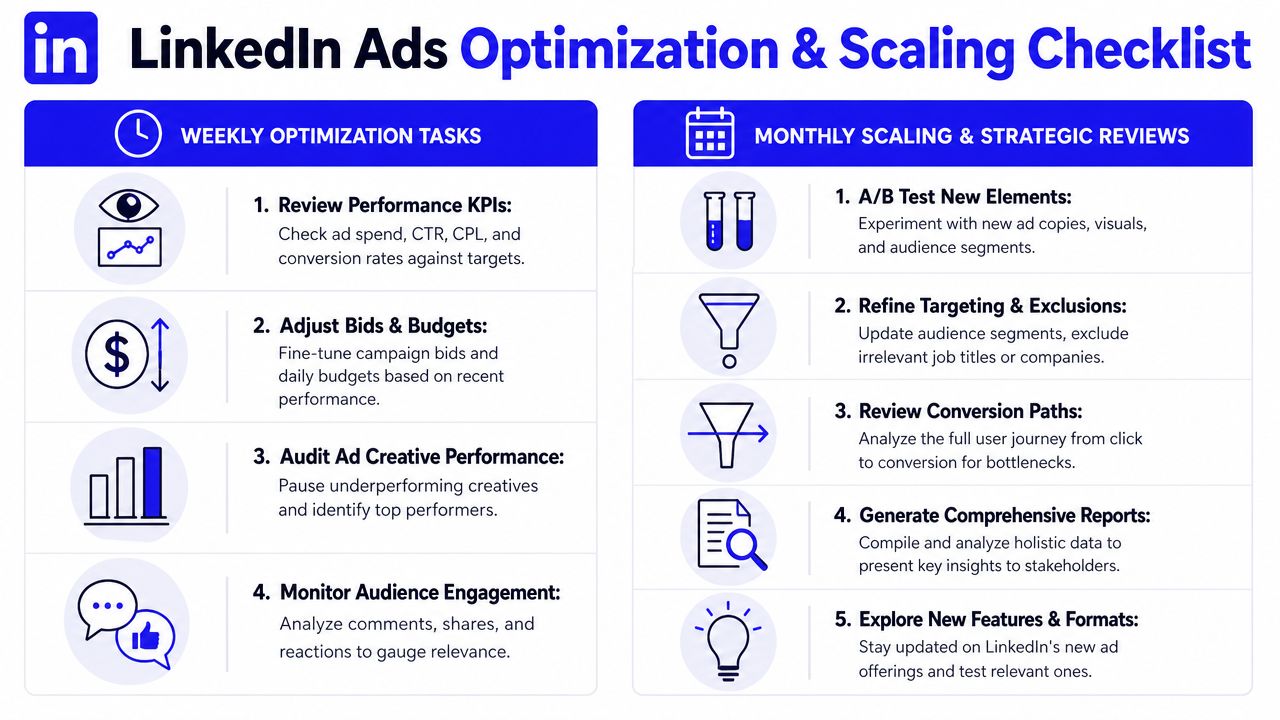
Your Ongoing Optimization and Scaling Checklist
Monday morning is where LinkedIn programs prove what they are. One account shows a low CPL and a full pipeline report. Another shows the same low CPL, but sales is already ignoring the leads. The difference usually comes from how the account is reviewed after launch.
Launch gives you data. The weekly and monthly operating rhythm determines whether that data turns into revenue or noise.
What to check every week
Weekly reviews should stay close to pipeline, not platform vanity metrics.
Read fresh leads in the CRM: Check company fit, job title, geography, deal size potential, and whether the account clears your ACV floor. If a lead would never become a real sales opportunity, a cheap conversion did not help.
Check opportunity creation rate by campaign: Form fills matter less than whether campaigns create meetings, qualified pipeline, and open opportunities from target accounts.
Review audience breakdowns: Seniority, function, industry, company size, and matched audiences often show where spend is producing interest from the wrong segment.
Watch for creative fatigue: CTR drops, weaker comment quality, and rising frequency usually show up before lead quality fully slips.
Match offer to buying stage: Cold audiences often need a lighter conversion step. Retargeting and high-intent lists can handle stronger asks like demos or audits.
One expensive mistake is optimizing for lower in-platform conversion costs while CRM quality gets worse. Audience expansion settings and looser placements can increase lead volume, but they often introduce contacts that never make it past qualification. I would rather pay more for a campaign that consistently produces pipeline than cut CPL and spend the next month explaining to sales why nothing is progressing.
That trade-off matters even more in startup accounts with limited budget. If you only have enough spend to generate a modest number of leads, every lead needs a real chance to become revenue.
How to scale without wrecking lead quality
Scale after the account proves it can create qualified pipeline with tracking you trust. That means LinkedIn data, CRM stages, and offline conversion uploads or Conversions API signals point in the same direction. They will not match perfectly. They do need to be reliable enough to make budget decisions.
Increase budget when these conditions are true:
Campaigns consistently generate qualified pipeline, not just leads
Sales feedback stays positive for at least a few weeks
Win rates or opportunity rates hold at your current spend level
Tracking captures downstream events well enough to measure quality
Broaden targeting more carefully than you raise budget.
Expand into nearby job functions, industries, or company bands only when the current ICP slice is saturated or too small to scale. Create separate campaigns for those expansions so you can see whether the new audience still clears your quality bar. If your average contract value only works above a certain threshold, keep that business logic in the review process. More leads from low-value accounts can make the dashboard look better while making the program less profitable.
Monthly, review channel role, not just campaign metrics. Some offers belong on LinkedIn as the primary demand creation channel. Others perform better when LinkedIn warms the account and search captures active buying intent. That is why a broader B2B paid search strategy often improves total pipeline efficiency instead of forcing LinkedIn to do every job.
The teams that scale LinkedIn well treat it like part of a revenue system. They connect campaign decisions to CRM outcomes, use offline signals to train optimization, and judge success by qualified pipeline created from accounts the business prioritizes closing.