What Is Server-Side Tracking and Why Startups Need It

Server-side tracking is a measurement model where event data is collected by your own server first, then forwarded to analytics and ad platforms via APIs, rather than sent directly from the user's browser. In recent industry guidance, teams see up to 40% better consistency between analytics and ad platform data, nearly 50% browser-based data loss across major regions, and an average 22% improvement in event match rates after switching to server-side forwarding, which is why so many startup stacks are rethinking their setup now industry guidance.
You're probably here because the numbers don't line up. GA4 says one thing, Meta says another, and your CRM is sitting there like the only adult in the room.
Table of Contents
The Attribution Gap That Keeps Startup Founders Up at Night
A founder I worked with had a familiar problem. Google Analytics showed 120 conversions, Meta Ads Manager showed 180, and the CRM showed 95 closed deals. Every team meeting turned into a blame game, because nobody could agree on which number was reliable enough to spend against.
That gap is where server-side tracking earns its keep. It does not create perfect truth, and it does not fix a broken offer or weak funnel. It does give you a cleaner measurement path when browser-based tracking starts dropping events, stripping identifiers, and breaking the handoff between website actions and ad platforms. In practical terms, server-side tracking means your website sends event data to your own server first, and that server relays it to tools like GA4, Meta, or Google Ads through APIs.
Pain shows up in spending decisions. If one platform undercounts conversions and another overstates them, founders end up rewarding the channel that looks best on paper instead of the channel that drives revenue. I've seen teams keep scaling a campaign because the dashboard looked healthy, then discover later that the signal was inflated, delayed, or incomplete.
Practical rule: if your ad platforms, analytics stack, and CRM all disagree, do not assume the problem is attribution alone. Assume the measurement path is leaky until proven otherwise.
Browser-only tracking worked better when browsers cooperated more consistently. Privacy controls tightened, ad blockers became more aggressive, and cookie restrictions made client-side measurement more fragile. The result is not just noisy dashboards, it is poor operating judgment. For a practical overview of event collection patterns in Google Tag Manager, see this guide to event tracking in Google Tag Manager.
The structural shift matters more than the tool name. Server-side tracking moves data from browser-to-vendor to browser-to-your-server-to-vendors, which gives the business a central point of control before data leaves the house. If you want a broader historical context, the trade-off is always the same, more control and governance in exchange for more infrastructure to maintain.
Client-Side Versus Server-Side Tracking Explained
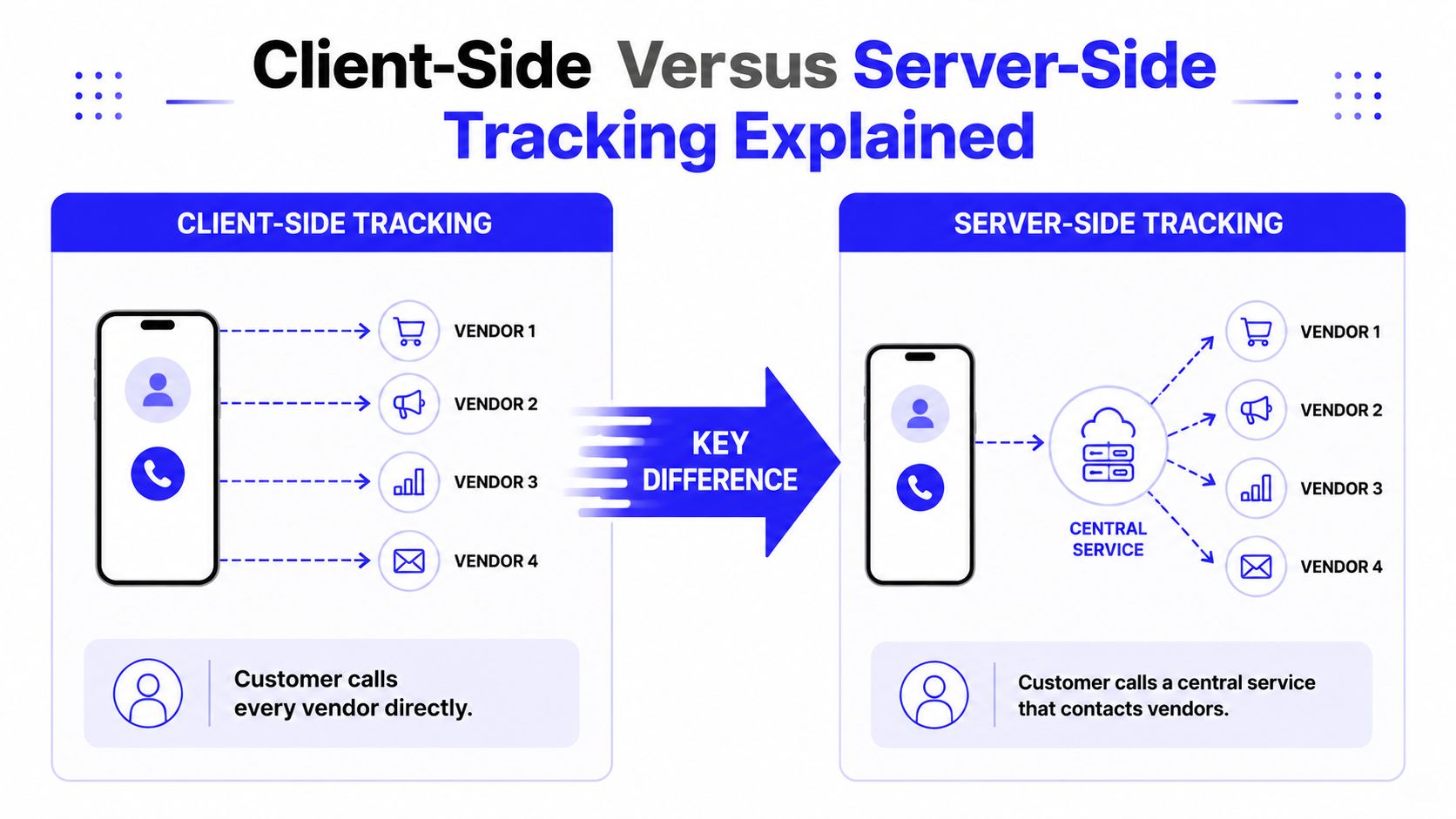
Client-side tracking sends each event straight from the browser to the vendor. Server-side tracking routes that event through your own endpoint first, so your team can inspect, filter, and decide what gets forwarded before it leaves your system. That extra layer is where the trade-off begins, because you gain control, but you also take on more ownership.
The data path in both models
In client-side tracking, the browser fires JavaScript tags and pixels directly to platforms like GA4, Meta, or Google Ads. The setup is quick to launch, which is why so many startups start there, but it depends on the browser behaving well every time. If a script is blocked, a cookie is refused, or a privacy rule interrupts the request, the event never reaches the vendor browser fragility and server-side resistance.
Server-side tracking changes the path. The browser sends a lightweight event to a first-party endpoint, your server container validates and reshapes that payload, then forwards it to each destination through APIs. That middle layer is useful because it gives you one place to enforce naming rules, strip unwanted fields, and keep vendor access consistent.
Dimension | Client-Side Tracking | Server-Side Tracking |
|---|---|---|
Data path | Browser to vendor | Browser to your server to vendors |
Main failure mode | Browser blocking or dropping the event | Bad server setup or bad governance |
Control over outgoing data | Limited | High |
Identifier persistence | More fragile | Can be improved through first-party infrastructure |
Operational feel | Fast to launch, brittle at scale | Slower to launch, sturdier once live |
What changes for identifiers and cookies
Server-side setups can set first-party cookies on your own domain and use server-side enrichment before data reaches ad platforms, which helps identifier persistence and can extend cookie lifetimes relative to browser-only setups first-party infrastructure and enrichment. That matters because modern browsers do not treat tracking as a neutral activity. They treat it as something to constrain, which is why a client-side stack often looks clean in theory and messy in production.
The browser still matters. You still need clean event definitions, stable naming, and clear ownership for what gets tracked upstream. If the event itself is inconsistent, server-side routing only moves bad data more reliably.
For a practical implementation reference on browser event instrumentation before that data is routed server-side, see event tracking in Google Tag Manager. It is a useful way to separate capture from forwarding.
A server-side setup does not fix sloppy measurement. It works best when the team already knows which events matter, how they should be named, and who owns the downstream destinations.
Measurable Benefits and Honest Limitations
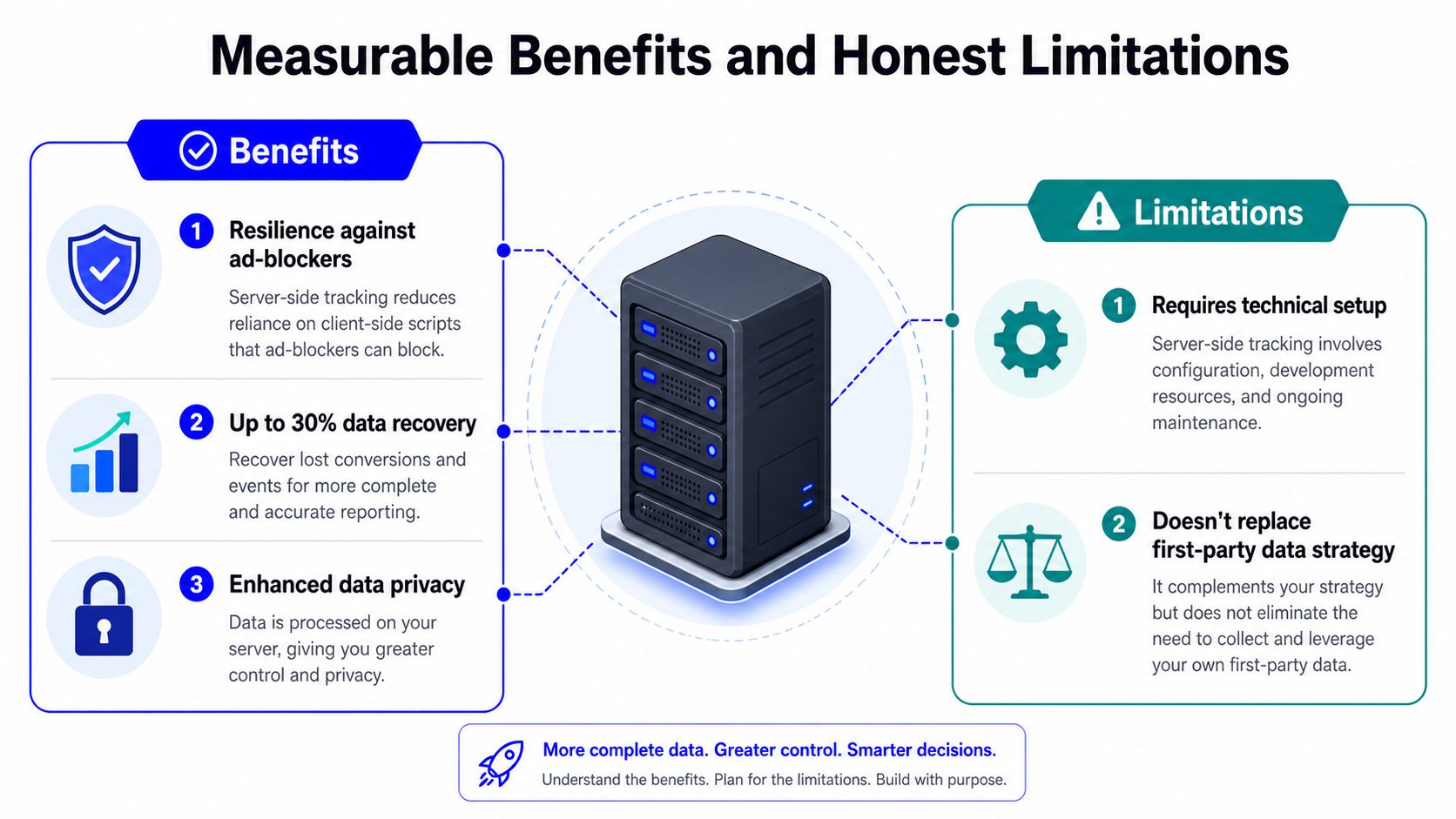
The appeal is straightforward. A server receives the event first, so it faces fewer browser-side constraints from ad blockers, cookie restrictions, and tracking-prevention rules that can suppress client-side pixels and scripts. In practice, that usually means cleaner event flow, tighter control over what each vendor receives, and more stable measurement when browser behavior gets hostile browser-side loss and forwarding advantages.
What usually improves
Teams usually see the biggest gain in data consistency. Fewer events get dropped before they reach analytics or ad platforms, so reporting can line up better across systems, and the handoff to downstream tools is easier to manage. For founders, that matters because pixel-only stacks often look acceptable in demos and then start leaking signal as traffic, tooling, and compliance requirements increase.
The practical lift is not only about one metric. Server-side setups can improve event forwarding, reduce browser-side loss, and give operators more control over what data leaves the server in the first place. That control matters when you are handling purchase events, lead submissions, or anything sensitive enough to deserve a deliberate policy before it goes to a vendor.
If you are standardizing data across ads, analytics, and CRM, a broader marketing data integration plan helps keep the setup from turning into another silo.
What it does not fix
Server-side tracking is not a cure for attribution problems. A 2024 POPETS study on Meta tracking found that server-side tracking using IP address, user agent, and geolocation reached only 60% to 65% accuracy, while the Pixel with third-party cookies reached 100% matching accuracy in that specific test POPETS study. That result should make founders cautious about overselling the change.
The bigger issue is structural. Server-side tracking can improve reliability, but it does not erase cross-channel attribution gaps, weak event design, or dirty source data. If your UTM structure is inconsistent, your funnel definitions are sloppy, or your CRM is full of duplicate leads, the server will forward the problem more reliably, not solve it.
It also carries hidden costs. You take on more governance work, more QA, and more responsibility for what gets transformed, stored, and passed to downstream platforms. For a startup, that trade-off is often worth it once measurement is expensive enough to matter, but it is still a trade-off, not free performance.
Core Architecture Components You Need to Know
Server-side tracking usually starts with Google Tag Manager Server-Side, because it gives non-engineering teams an orchestration layer without forcing every change through a product release. In Google's model, clients act as adapters that receive measurement data, transform it into events, route it to the server container, and package the result back to the requester Google's server-side architecture.
The moving parts on the whiteboard
A simple architecture sketch usually has four pieces. The website generates events, the web container captures them, the server container receives and processes them, and destination APIs forward them to tools like GA4, Meta Conversions API, or Google Ads. That's the flow founders need to understand before approving the project budget.
Data Layer: This is the standardized source of truth for event names and parameters.
Web Container: This handles the browser-side capture and formatting of events.
Server Endpoint: This receives the payload, validates it, and forwards it.
Destination APIs: These send the event to GA4, Meta CAPI, Google Ads, or other platforms.
For teams standardizing data across ads, analytics, and CRM, a broader marketing data integration plan helps keep the server-side setup from becoming another silo.
Hosting and destination choices
The server has to live somewhere. Google's own stack can run on managed cloud infrastructure, and many startups use hosted setups such as Stape or Blotout when they want less DevOps overhead. The right choice depends on how much control you need, how much technical support you have, and how painful downtime would be for your acquisition stack.
On the destination side, Meta Conversions API is often the first ask because it helps send events from your server to Meta's systems. Google Ads Enhanced Conversions matters when you want better conversion matching inside Google Ads, and GA4 Measurement Protocol gives you a way to forward analytics events server-side. The key is to choose the first destination that delivers the most business value, not the one that sounds most advanced.
Consent Management and Governance Realities
A server-side setup can look like a privacy upgrade on paper. In practice, it only helps if the team controls what is collected, what gets minimized, where it is routed, and what is blocked when consent is missing Usercentrics guidance.
Why consent has to live in the architecture
Usercentrics separates server-side tracking from server-side tagging, and that difference matters in real implementations. A server endpoint can centralize control, but compliance still depends on the actual data flow, not on the presence of a server container alone. If the server forwards too much, forwards too early, or ignores consent state, the setup just makes the wrong behavior happen faster Usercentrics guidance.
Regulated teams treat consent as a routing problem. The server needs to know which events can leave, which identifiers should be stripped, and which vendors should receive nothing until the user changes consent. That is one reason server-side setups can be easier to govern than browser-only stacks, because the rules can sit in one place instead of being spread across multiple scripts and tag managers.
The hidden cost founders forget
Hosting is only part of the bill. The larger cost is the operational work around QA, event mapping, monitoring, and the logic that decides what is allowed to move downstream. That work does not fade after launch, it usually becomes more important as more destinations depend on the server.
The hardest part is often not the initial build. It is keeping a clear record of which events leave the server under each consent state, then proving the implementation still matches that record after product changes, ad platform changes, or new vendor requests. If a team cannot explain that flow in plain language, the setup is not finished.
For teams building consent strategy alongside the rollout, the consent mode v2 technical rescue plan is a useful companion. It keeps the privacy discussion tied to actual implementation choices instead of letting it drift into policy language that never reaches the code.
Stepwise Onboarding Checklist for Startups
Server-side tracking is easier to adopt when the basics are already clean. A stable data layer, standardized UTMs, and a functioning GTM web container should come first, because server-side complexity only amplifies whatever mess you already have. If the inputs are broken, the outputs will be confidently broken.
Phase one, migrate the highest-value destination
For many B2C teams, the first destination is Meta CAPI. For B2B teams, it's often Google Ads Enhanced Conversions. The point is to pick the event path that most directly affects paid acquisition decisions, then prove the lift before expanding the setup.
A good first phase is narrow on purpose. You want to validate event names, deduplication logic, consent handling, and logging before you start routing everything through the server. Once the first destination is stable, the team can move to the next one without wondering whether the foundation is still wobbling.
Phase two and phase three should earn their place
Phase two usually adds GA4 server-side forwarding and any additional ad platforms that influence spend decisions. Phase three is where server-side enrichment, CRM sync, and offline conversion uploads start to matter. That's the stage where the stack stops being just a tracking fix and becomes part of the revenue operating system.
A practical checklist for founders looks like this:
Audit the current funnel: Find out where events are missing, duplicated, or misnamed.
Standardize UTMs and event taxonomy: Fix naming before you move data.
Pick one destination first: Start with the platform that drives the most paid spend.
Validate consent logic: Confirm what gets forwarded under each consent state.
Add CRM sync only after the event layer is stable: Don't merge two problems at once.
The internal logic should match the business logic. If your pipeline from first click to closed revenue is still half manual, a phased migration is safer than a full-stack rewrite. That's the same principle behind a structured 13-step attribution pipeline, which ties event capture to business outcomes instead of treating tracking as an isolated technical project.
Real-World Use Cases and Recommended Next Actions
A DTC brand scaling Meta spend usually cares about one thing first, recovering missed purchase signals. A server-side CAPI setup gives that team a better chance of sending complete conversion events, especially when browser-side signals get clipped. A B2B SaaS company with HubSpot or Pipedrive often cares more about connecting ad clicks to closed revenue, which means server-side tracking becomes part of CRM hygiene as much as media measurement.
A fintech startup has a different problem. It needs centralized consent governance, careful data minimization, and enough control to keep privacy reviews from becoming a fire drill. In that case, the architecture matters as much as the platform destination, because the company can't afford to guess which identifiers should or shouldn't move downstream.
The mistakes that waste the most time
The worst move is implementing server-side tracking before fixing UTMs, event names, and CRM hygiene. The second worst is building a heavyweight architecture for a business that doesn't yet have the traffic or spend to justify it. The third is launching it and never auditing the event flow again.
A server container is not a set-and-forget asset. It needs the same discipline you'd give paid media or a live dashboard.
For founders who want the tracking layer handled end to end, Du Marketing builds acquisition, analytics, server-side tracking, CRM sync, and reporting as one system, which is useful when the problem spans more than a single tag manager project. If you're deciding whether to fix attribution now or after the next spend push, visit Du Marketing and get the stack audited before more budget gets spent on uncertain data.