Application Marketing Mobile: A 2026 Growth Framework For

Your app is getting installs, the dashboard says spend is efficient, and yet retention feels like a leak you can't quite locate. Paid traffic looks busy, ASO gets a sprint, lifecycle gets whatever's left over, and the CRM team is staring at a different set of numbers than media is. That's the usual failure mode in application marketing mobile, not a lack of effort, but a system split into pieces that were never designed to talk to each other.
The fix is to treat mobile growth like one operating system. Ads, ASO, lifecycle, tracking, and CRM need to share the same event map, the same source of truth, and the same definition of success. That matters even more now that mobile is forecast to absorb 74% of total digital advertising investment worldwide in 2026, with global mobile ad spend expected to exceed $430 billion in the 2026 mobile marketing statistics forecast. The money is already in the channel. The hard part is making sure your spend turns into retained users and real revenue, not just more installs.
Table of Contents
Why Mobile App Marketing Breaks When Channels Stay Separate
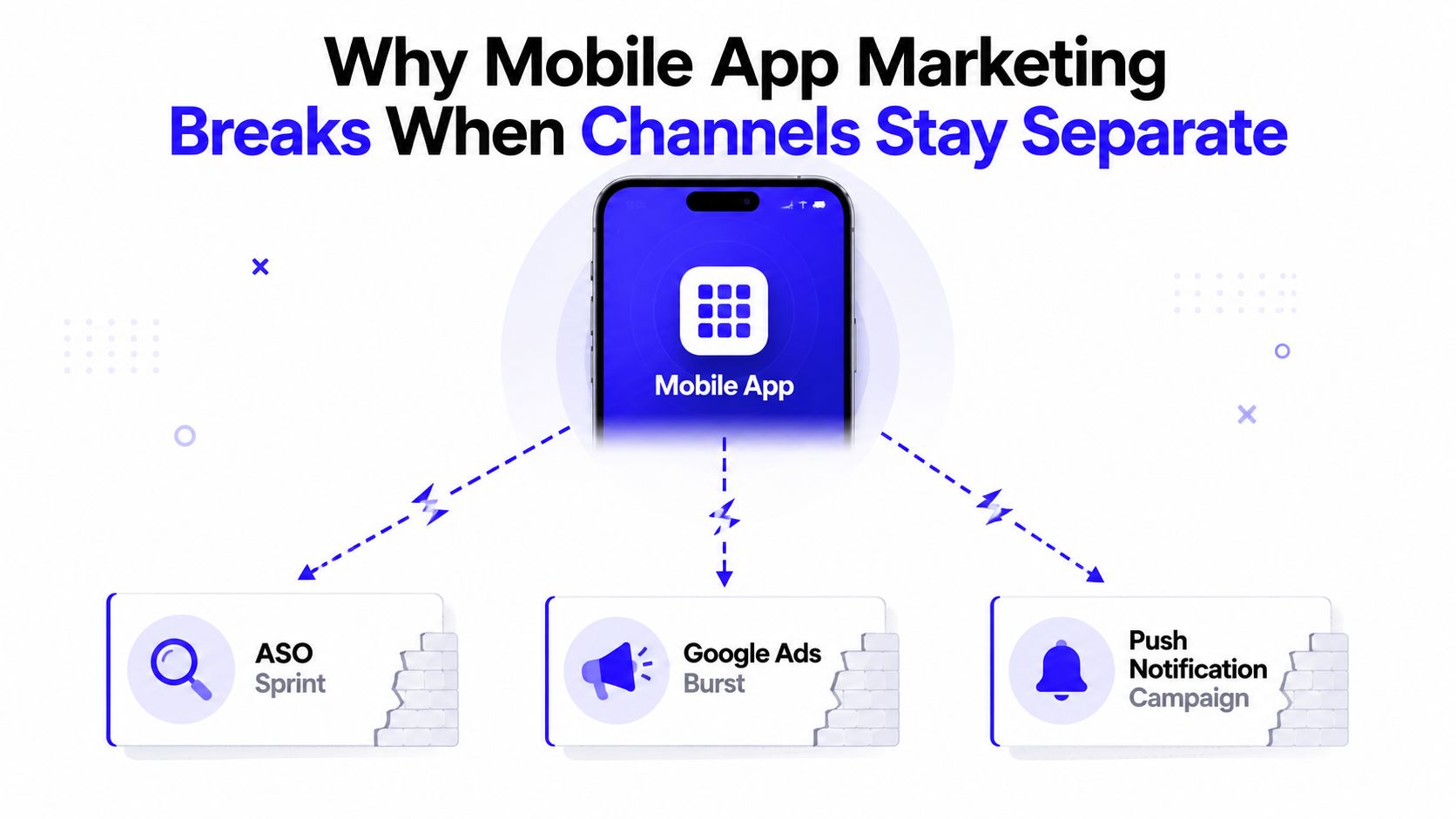
The first trap in application marketing mobile is assuming that each channel can “do its job” on its own. A founder runs an ASO push, a growth marketer launches Google App Campaigns, and someone in CRM sends push notifications after the fact. Each move can be reasonable in isolation, but the result is a fractured stack where no one can explain why a user stayed, paid, or churned.
That fragmentation gets expensive fast. In 2024, global annual revenue from mobile apps reached USD 522.67 billion, users worldwide spent 4.2 trillion hours on mobile devices, and about 218 billion apps were downloaded across stores and third-party Android sources according to the 2024 app economy data. In a market that large, installs alone are too shallow to guide budget decisions. You need a loop that connects the ad click to the in-app event, then to lifecycle behavior, then to closed revenue.
The real problem is measurement drift
A lot of teams think they have a channel problem when they really have a measurement problem. Meta says one thing, Google says another, the app store report says something else, and the CRM is missing the original source entirely. When that happens, the instinct is usually to keep adding more tactics. That usually makes the contradiction louder, not clearer.
Practical rule: if two channels are being judged with different success metrics, they're not competing fairly, they're just generating noise.
The integrated model is simpler. ASO improves the app store conversion rate for every click. Paid acquisition creates demand and feeds event data back into the platforms. Lifecycle picks up users after install and nudges them toward the events that matter. Tracking and CRM make the whole thing auditable. Once those pieces share the same event definitions, channel decisions stop being opinion-based.
The useful mental shift is this, your goal is not to “run more app marketing.” Your goal is to build a measurable system where each impression has a path to a post-install event and then to revenue. That's the only way mobile growth stops looking like a set of disconnected wins and starts behaving like an operating system.
Define Your Personas, Positioning, and the Event Map
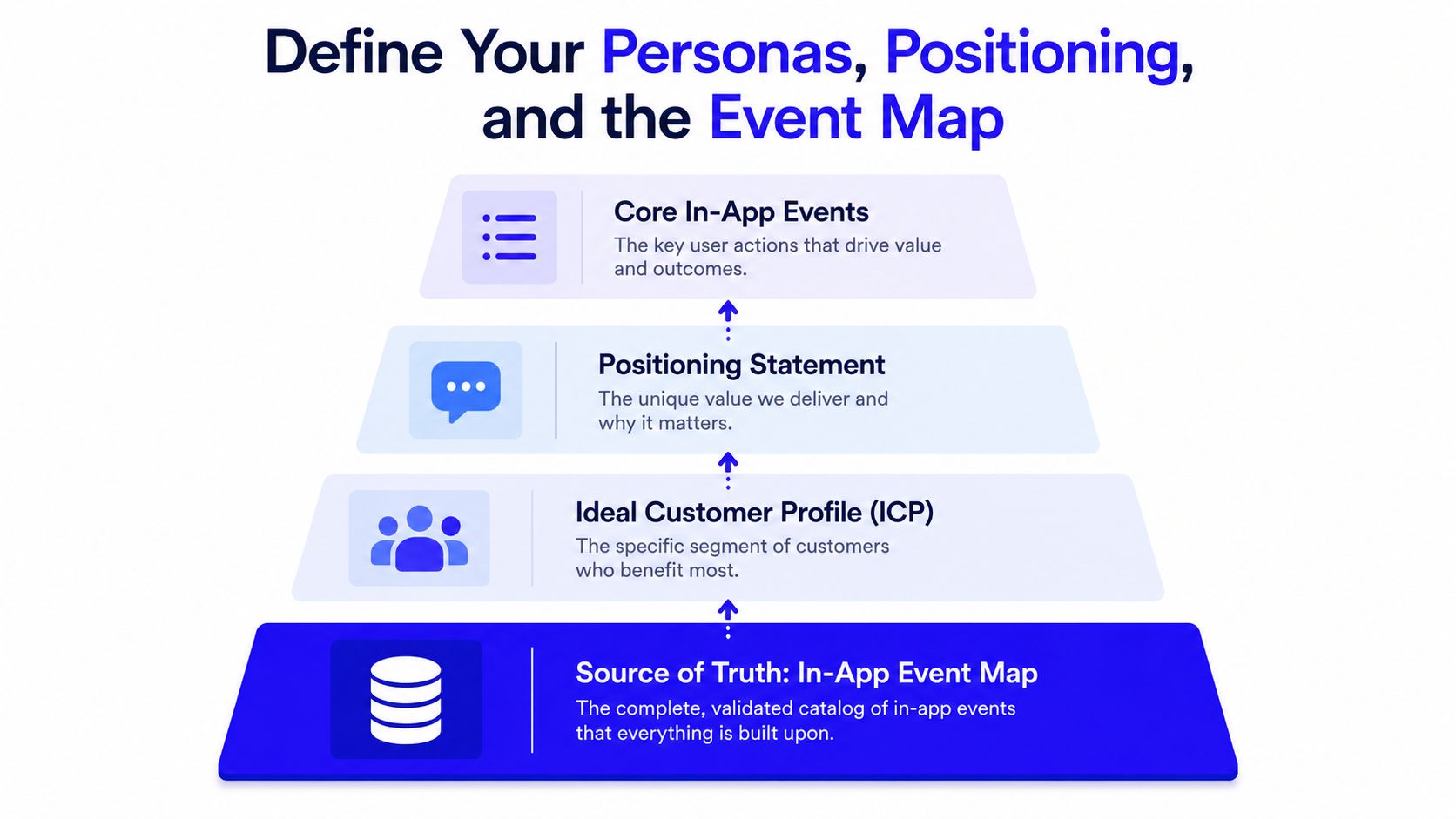
Before spending a dollar, the team needs to decide who the app is for, why it matters, and which events prove that the right users are moving forward. A lot of mobile teams rush to creatives and skip this part, which is why they end up optimizing around installs that never turn into meaningful product use. The cleanest work I've seen starts with a narrow ideal customer profile, a positioning statement that points to a real job-to-be-done, and an event map that nobody gets to improvise later.
The event map is the backbone. It should usually include 3 to 5 post-install events, such as account creation, onboarding completion, first key action, first purchase, or day-7 return, depending on the product. Aragil's guidance is to choose events that generate at least 10 conversions per day per ad group so the platform has enough signal to learn as outlined in its mobile app marketing workflow. That benchmark matters because weak signal leads to unstable optimization, and unstable optimization makes install-only reporting look better than it really is.
What the one-page event map should include
A good event map can fit on one page and still answer the questions media, CRM, and analytics all need. It should name the persona, the promise, and the first meaningful actions that indicate fit. It also needs a shared label for each event so the ad platforms, analytics stack, and CRM can all speak the same language.
For a SaaS app, the map might center on trial signup, workspace creation, and the first meaningful feature use. For a fintech app, it might focus on account creation, KYC completion, and first deposit or first transaction. For a DTC app, it usually revolves around account creation, product view depth, and first purchase. The names matter less than the consistency.
Practical rule: if the media buyer, lifecycle manager, and analyst would define success differently, the event map isn't finished yet.
The positioning statement should be blunt. Not “we help users manage money better,” but “we help first-time freelancers separate business and personal cash without spreadsheet pain.” That level of specificity sharpens keyword choices, creative angles, onboarding copy, and CRM segmentation. Once that statement is locked, everything downstream gets easier to test.
Build the ASO Engine That Compounds Paid Acquisition
A store page sits between every install click and every paid channel. If the page does not convert, Google, Meta, and Apple Search Ads all pay the same tax in the form of wasted traffic. ASO works as a compounding layer because it raises conversion on both organic discovery and paid clicks, which is why I keep it in the same weekly operating rhythm as media buying.
Treat store metadata like living campaign creative
Start with keyword research, then move into competitive audits, title and subtitle testing, and screenshot sequencing. If you need a practical starting point for keyword workflow, the process covered in this keyword research guide is a good companion to store optimization work. The goal is to match the terms real users already search for, then make the value proposition obvious in the first few seconds on the page.
ASO is a living asset, and the metadata should change with what users respond to. Screenshots need to show the sequence of value, not just the cleanest interface. Videos should do the same. Review velocity and rating quality also shape how much trust a store listing earns, especially when paid traffic starts scaling and more users land on the page with a cold start mindset.
The core problem is measurement drift
If the media buyer, lifecycle manager, and analyst define success differently, the store page will never improve cleanly. One team may celebrate installs, another may care about activated users, and a third may only trust revenue or retention. That mismatch turns ASO into a debate about opinions instead of a testable growth system.
For a SaaS app, the page should align with trial signup, workspace creation, and the first meaningful feature use. For a fintech app, it may revolve around account creation, KYC completion, and first deposit or first transaction. For a DTC app, the signal often centers on account creation, product view depth, and first purchase. The names matter less than the consistency.
Practical rule: if the event names in ad platforms, analytics, and CRM do not point to the same outcome, the store listing is being optimized against noise.
The positioning statement should be blunt. “We help users manage money better” is too soft to guide a listing. “We help first-time freelancers separate business and personal cash without spreadsheet pain” gives you a clearer keyword set, cleaner creative angles, better onboarding copy, and tighter CRM segmentation. Once that statement is locked, every downstream test gets easier to interpret.
A practical 30, 60, 90 day rhythm
In the first 30 days, lock the keyword set, refine the title and subtitle, and test a fresh screenshot stack. In the next 60 days, isolate what improves impression-to-install behavior and what does not. By 90 days, you should know whether ASO needs a deeper test or just a cleaner creative refresh. That cadence is enough for most startups because the store listing is rarely the only problem. It is usually the first visible one.
ASO does more than increase organic traffic. It raises the conversion rate of every paid click that reaches the store page, which changes the economics of the whole acquisition stack. Treat it as a force multiplier for the rest of the system.
Run Paid Acquisition as a Portfolio, Not a Single Bet
A lot of app marketers still run paid acquisition like a binary choice between Google and Meta. That holds up only until platform costs rise, creative fatigue sets in, or privacy changes make one source of signal less reliable. The stronger setup is a portfolio, where each channel has a role, a learning function, and a clear link to post-install value.
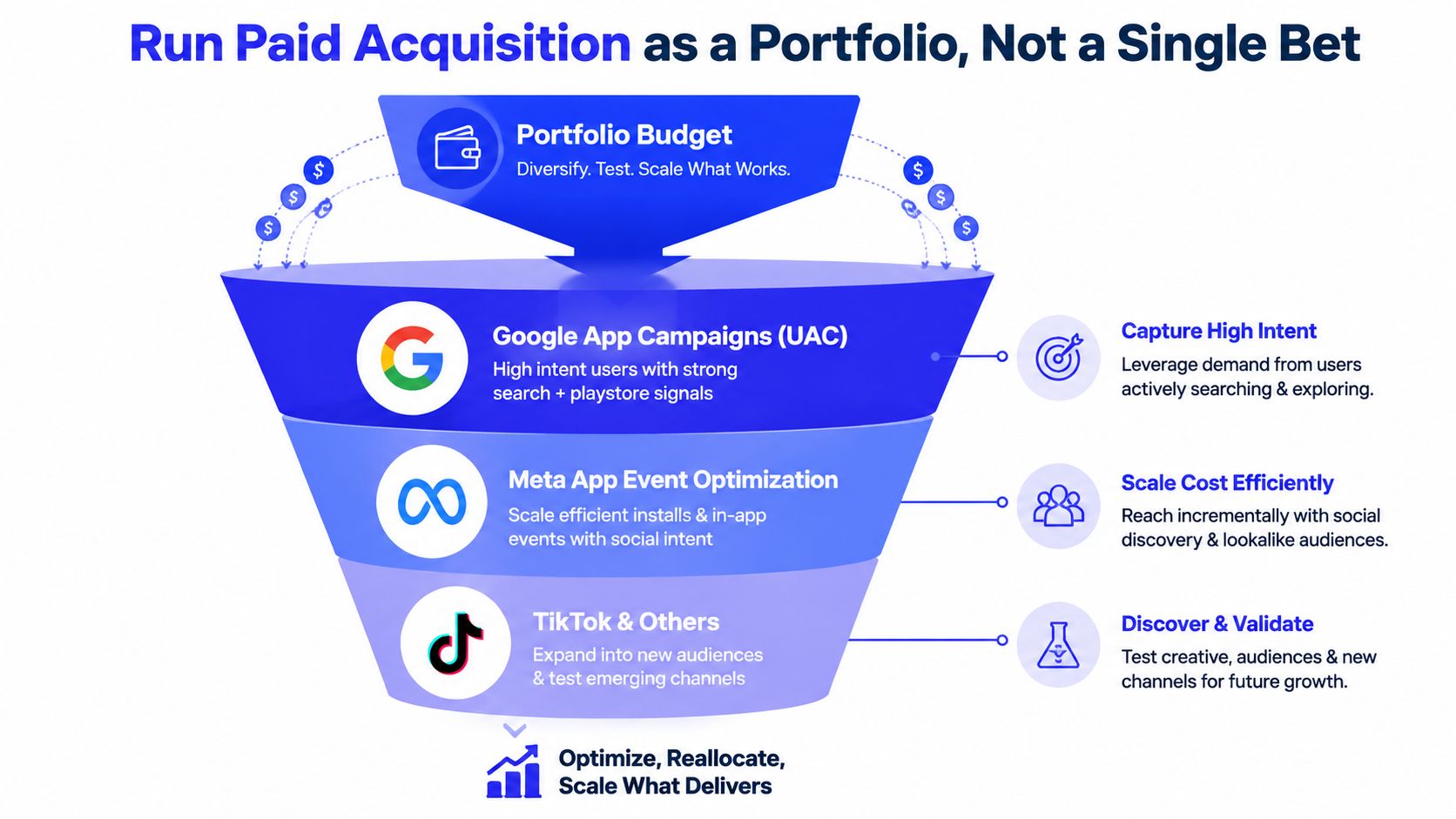
Google App Campaigns, Meta App Event Optimization, Apple Search Ads, and at least one non-duopoly channel should not be treated as interchangeable. They answer different questions. Google can capture high-intent demand. Meta can train around event quality and creative variation. Apple Search Ads often behaves like bottom-funnel intent capture on iOS. Regional or independent networks help reduce dependence on the same two platforms everyone else is using.
The practical trade-off is control versus concentration. A single platform may scale faster in the short term, but it also gives you one point of failure when auction pressure changes or signal quality drops.
Bid against events, not installs
The strongest campaigns are optimized toward in-app actions, not cheap installs. That is where the earlier event map pays off. If your optimization target is registration, onboarding completion, first purchase, or another meaningful action, the platform gets better at finding users who are likely to move forward. If you optimize only for installs, you can scale volume while hiding poor retention underneath it.
Budget allocation should protect learning. If one channel gets almost all the spend, the rest of the portfolio never develops enough signal to be useful. If every channel gets a tiny slice, none of them exits the learning phase cleanly. The right mix depends on audience and vertical, but the logic stays the same, enough concentration to learn, enough spread to avoid fragility.
That also changes how I read the dashboards. A campaign with cheaper installs can still be the weaker buy if downstream activation, trial start, or purchase quality is worse than the higher-cost source.
What to watch when a channel starts to wobble
Creative fatigue: if the same format keeps losing efficiency, rotate angles before you kill the channel.
Event quality: if the post-install event stream weakens, do not celebrate cheap acquisition.
Inventory concentration: if one platform becomes the only winner, the portfolio is too brittle.
Audience fit: if a channel pulls volume but not behavior, it is probably the wrong bet for that app.
Practical rule: scale the channel that produces the strongest downstream event quality, not the one that merely looks cheapest in the dashboard.
The point of diversification is stability. It keeps the growth system steady when one source changes, instead of forcing every channel to perform the same job. That matters more now than it did a few years ago, because mobile acquisition is crowded, competitive, and increasingly shaped by platform-specific signal loss.
For teams that want a cleaner setup, I usually pair this with the event definitions in event tracking in Google Analytics so the media plan, analytics layer, and CRM all read the same outcome.
Wire Up Attribution and Tracking Before Spend Scales
Attribution errors usually show up after the budget has already been spent, which makes them expensive to fix. The best teams install the tracking stack before launch so they can see what's happening from the first click onward. Without that, the media buyer is guessing, the analyst is patching holes, and the founder is comparing reports that never quite agree.
Build the stack in the right order
Start with an MMP, or a simpler equivalent built around GA4 and Firebase for lightweight cases, before scaling spend. Then connect Google Tag Manager server-side, Meta Conversions API, and Google enhanced conversions so the data layer survives more of the privacy mess. After that, sync the CRM, whether that's HubSpot or Pipedrive, so events can flow into lead stages, opportunities, and closed revenue.
The operational value here is simple. Ad clicks need to map to app events, app events need to map to pipeline or purchase behavior, and revenue needs to make it back into reporting without manual stitching. That's the difference between having data and having a system.
The earlier section on event maps matters here too. If the event names are inconsistent, the tracking stack becomes a pile of tools instead of a measurement layer. If the naming is clean, the same event can travel from ad platform to analytics to CRM without friction.
What must be live before scale
MMP or equivalent: so install and event attribution is visible from day one.
Consent mode v2: so the data layer is set up with privacy constraints in mind.
Server-side collection: so browser and device loss doesn't wipe out the whole picture.
CRM sync: so lifecycle and sales aren't operating from memory.
Offline conversion uploads: so closed revenue can inform media decisions.
For a simpler implementation walkthrough, the logic in this event tracking guide for Google Analytics is useful when you're mapping events into a clearer reporting layer. The specifics will vary, but the principle doesn't change, build the measurement system before the money starts moving.
If the team launches without the attribution layer, they're flying blind, and mobile budgets are too expensive for that kind of guesswork.
The one view every founder needs is the one that ties platform spend, event volume, and CRM revenue into a single report. If a number can't survive that path, it probably shouldn't guide budget allocation.
Design Lifecycle Programs That Turn Installs Into Revenue
A paid install only becomes revenue when lifecycle takes over after the first open and keeps pushing the user toward value. Too many app teams stop at a welcome email, a few push notifications, and a CRM tag. That is not lifecycle. Real lifecycle follows behavior, segments by event, and targets the exact point where users usually stall.
For a SaaS app, onboarding needs to move the user toward their first key action as quickly as possible. In practice, that can mean a short email sequence that supports setup, a few in-app prompts, and CRM tags that move the lead into a product-qualified stage once the right event fires. For a DTC app, the same operating logic usually becomes a post-purchase flow, a replenishment reminder, and a behavior-based push tied to browsing or cart activity. The backbone stays the same, while the commercial outcome changes.
Timing matters more than volume. A push that lands because a calendar says Tuesday is easy to ignore. A push sent after onboarding stalls, cart activity drops, or a key feature goes untouched is much harder to dismiss.
Lifecycle Channel Mix by App Type
App Type | Primary Event | Email Trigger | Push Trigger | CRM Stage |
|---|---|---|---|---|
SaaS | First key action | Account created, but setup incomplete | Onboarding stalled | MQL to product-qualified lead |
Fintech | KYC completion | Signup without verification | Funding step not completed | Activated user |
DTC E-commerce | First purchase | Browse or cart abandonment | Product viewed without checkout | First-time buyer |
Subscription app | Renewal intent | Trial nearing end | Usage drop after activation | Retention risk |
That table turns lifecycle strategy into an operating decision instead of a channel preference. It forces the team to speak in event terms, and it keeps push, email, and CRM from drifting into separate reporting silos.
This marketing automation workflow guide is useful if you are tightening the sequence logic, especially when CRM and lifecycle need to share one segmentation model. The cleanest setups I have seen are the ones where the CRM manager owns workflow logic and the growth lead owns event definitions.
Run the Weekly Operating Cadence and KPI Dashboard
A mobile growth team that skips cadence ends up arguing from fragments. One person looks at installs, another checks spend, a third watches retention, and nobody is looking at the same operating picture. A weekly rhythm keeps Application Marketing Mobile tied to the events, cohorts, and revenue signals that matter when attribution noise and creative fatigue start to blur the surface metrics.
The dashboard should answer one question
Which cohorts turn into value, and which channels produce them? Install count alone rarely tells you that. The KPI hierarchy should put LTV by cohort, Day-30 retention, Cost per Retained User, ROAS at Day 90, and payback period ahead of CPI when budget decisions are on the table. A good reference point is Appier's KPI analysis for mobile marketers, which reinforces the value of cohort-based review over vanity volume.
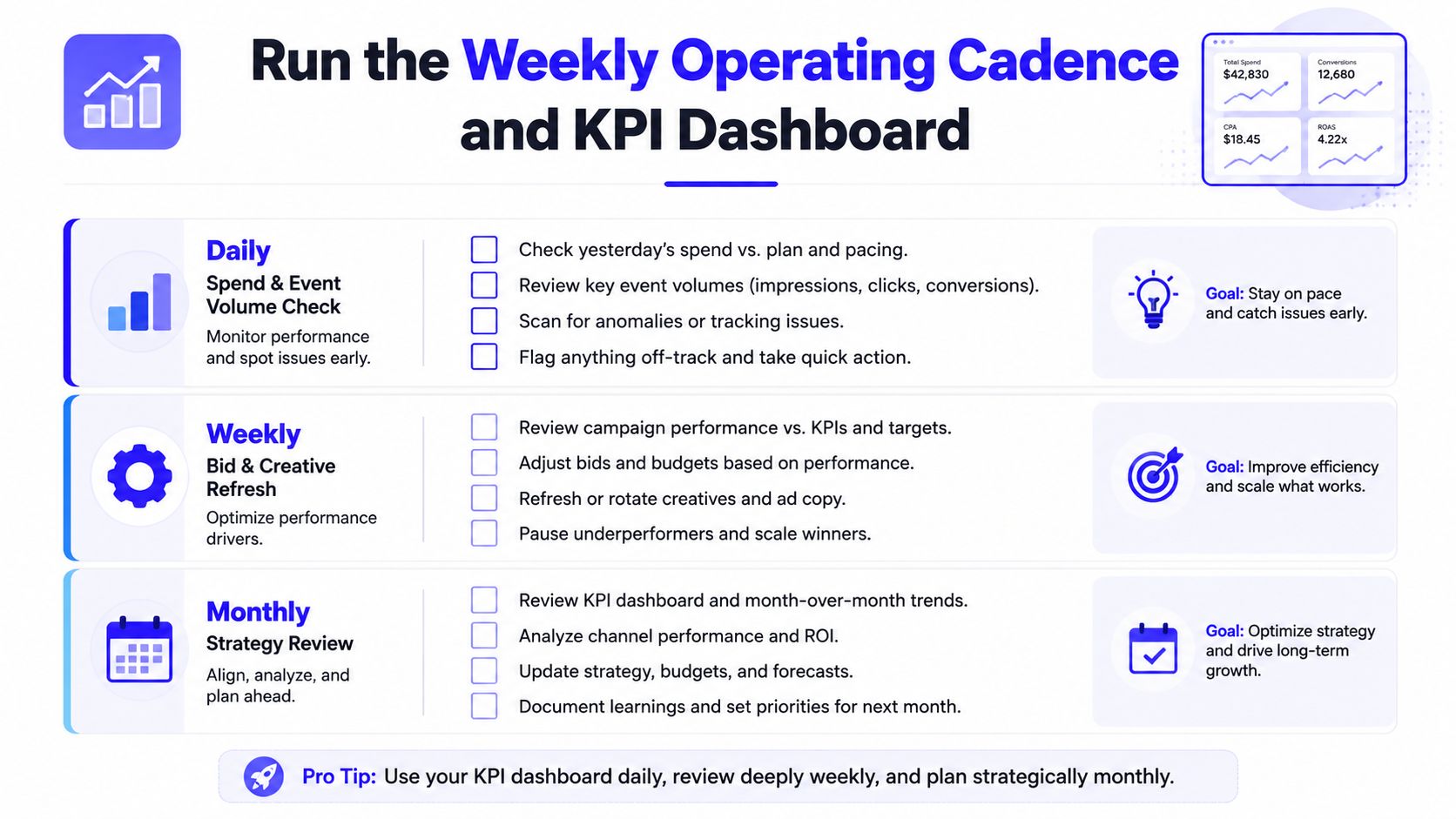
Daily, check spend and event volume. Weekly, adjust bids, audiences, and creative against the events you care about, such as activated users, completed onboarding, first purchase, or subscription start. Monthly, review cohort quality, channel concentration, and lifecycle contribution. The Looker Studio view should pull from ad platforms, the MMP, GA4, and CRM so the founder sees one report instead of four conflicting ones.
A simple budget and review rhythm
Acquisition spend: keep it tied to event quality, not raw install volume.
Lifecycle spend: reserve room for re-engagement and activation follow-up.
Testing budget: use it for new creatives, new channels, and new event hypotheses.
Review cadence: daily for pacing, weekly for optimization, monthly for strategy.
A single-operator team can run this well if the pipeline is clean. First click. Store visit. Install. Event. Segment. CRM stage. Revenue. Each step needs a defined owner and a defined metric, or the whole stack starts to blur. That is the difference between a dashboard and a decision system.
When the system is working, the founder does not ask whether mobile is performing. They can point to the cohort, the channel, the event, and the revenue path. That is the standard worth holding.