Event Tracking in Google Analytics: A Practical Setup Guide

You've got GA4 installed, the traffic charts are moving, and the team still can't answer the one question that matters: which campaigns create signups, demos, or revenue. That's the usual shape of the problem. The tracking is technically “on,” but the business side is still flying blind, and every week spent guessing turns into wasted spend, messy attribution, and arguments about whose channel deserves credit.
Table of Contents
Why Your GA4 Reports Feel Empty
A founder opens GA4 after a campaign launch and sees a clean graph of traffic, a few engaged sessions, and not much else. The Realtime card looks alive, so the setup feels “done,” but the conversion column is a ghost town. That's the trap, because event tracking in Google Analytics is the difference between seeing visitors and seeing decisions.
Without events, the platform tells you who arrived. It doesn't tell you who clicked the pricing page, who started a form, who watched a demo video, or who completed a purchase. That blind spot gets expensive fast, because paid media optimization starts leaning on vanity signals, attribution conversations become opinionated, and the team starts distrusting the dashboard they're supposed to use.
Practical rule: if a metric can't influence budget, messaging, or funnel changes, it probably doesn't deserve to sit near the top of your reporting stack.
The issue isn't that GA4 is broken. The issue is that the reporting surface is often treated like a finished product when it's really just the plumbing. GA4 can only show what you decide to instrument, and if your setup stops at page loads, the dashboard will always feel thin.
What changes the conversation is a small set of meaningful interactions tied to business outcomes. That means the platform stops being a traffic counter and becomes a decision tool. Once that happens, channel quality, landing page quality, and funnel quality all show up in the same language.
From Universal Analytics to GA4 Events
Universal Analytics taught a generation of marketers to split measurement into two layers, pageviews on one side and events on the other. Google's old setup required JavaScript on each element you wanted to measure, and every tracked interaction carried Category, Action, Label, and Value into the event hit, which made the system granular but also tedious to maintain. Google's own current guidance still frames events as the way to measure interactions like page loads, link clicks, purchases, and app crashes, which is the clearest bridge between the old model and the new one. Google Analytics event measurement
GA4 changes the mental model. Google states that all analytics data points are tracked as events, with automatically collected events and enhanced-measurement events enabled at setup. That means a page load is no longer separate in concept from a click or a form interaction. They're all just events, and the reporting logic is built around that assumption. GA4 event model and enhanced measurement
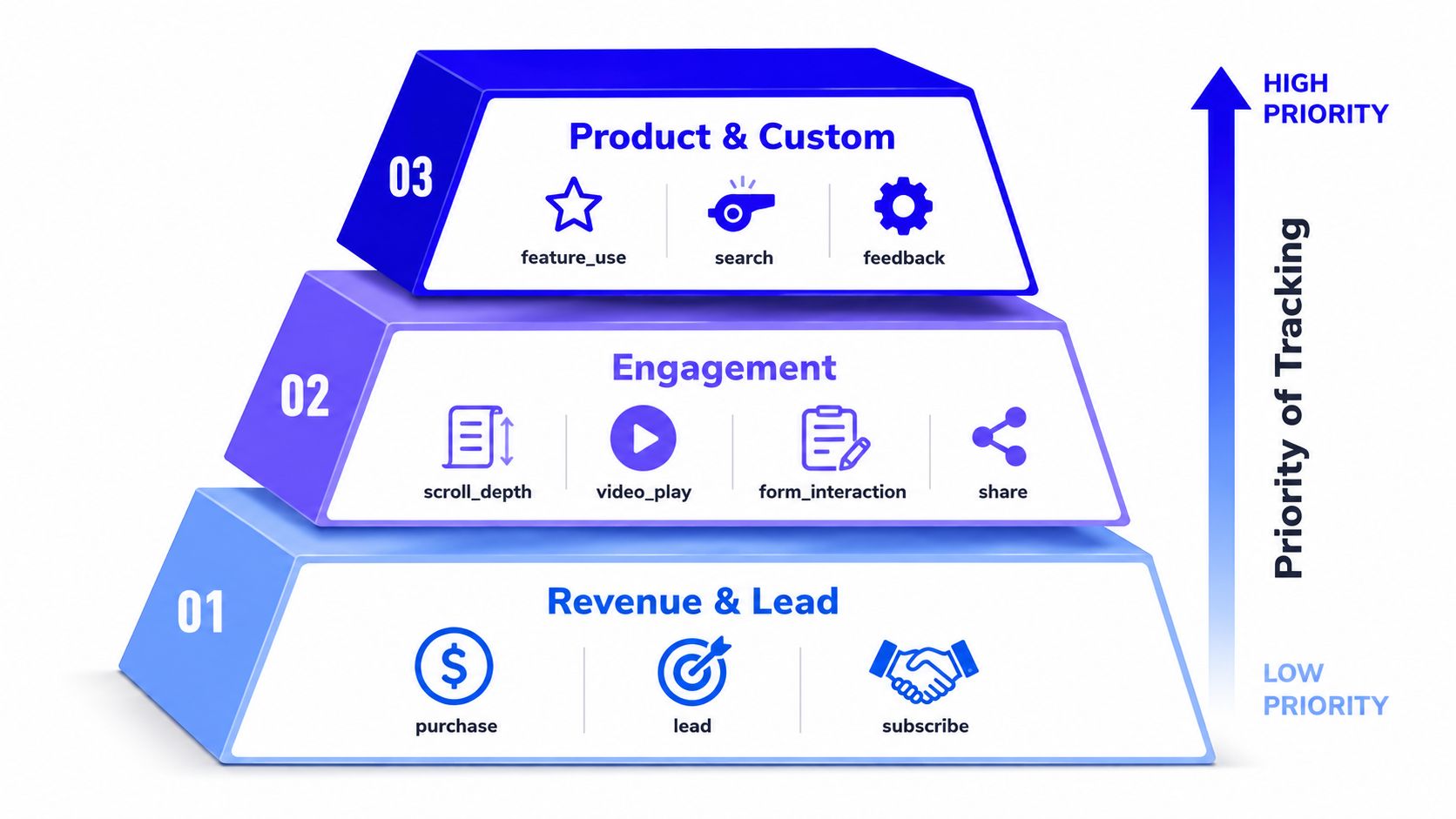
The practical consequence is simple. In Universal Analytics, event structure was a separate implementation discipline. In GA4, event structure is the house. The fields moved too, so the old “category” mindset doesn't really survive as a structural pillar. If you still think in category-action-label terms, you'll overcomplicate naming and underthink reporting utility.
What still carries over
Good measurement still depends on disciplined naming, consistent tagging, and a clear definition of what each action means. The technology changed, but the governance problem didn't. If one analyst names the same action three different ways, the report still becomes junk.
Realtime reporting serves a different purpose now. Google says it shows each triggered event and the number of times it was triggered in the last 30 minutes, which makes it useful for QA and live monitoring. That window is short enough to catch broken setups quickly, but not so short that you should mistake it for a historical report. GA4 realtime reporting
What breaks when the old model lingers
The biggest failure is treating GA4 like a renamed Universal Analytics property. That usually leads to too many events, weak parameter design, and dashboards that look busy but don't answer anything useful. Another common failure is assuming the interface will sort out bad planning. It won't.
If you want the shift in one sentence, it's this. GA4 rewards event design, not just tag deployment. The teams that win are the ones that decide what matters before they start firing tags.
Designing an Event Taxonomy Before You Tag Anything
A strong event setup starts on a whiteboard, not in Google Tag Manager. Teams often skip that step, then end up with a swamp of event names that nobody can interpret six months later. The fix is a simple hierarchy that forces judgment before implementation.
Start with business value, not page structure
Track revenue and lead events first. Those are the signals that connect directly to pipeline or cash, so they deserve the cleanest names and the most reliable QA. Next come intent indicators, things like pricing views or high-intent content consumption, because they help explain why a user moved closer to conversion. After that, add engagement and friction signals only where they help diagnose drop-off or content performance.
A B2B SaaS funnel might use names like demo_request, pricing_view, scroll_depth, and video_play. That mix is deliberate. The first two support revenue analysis, while the last two help explain behavior without pretending they carry the same weight. If everything is a priority, nothing is.
A useful event taxonomy is boring on purpose. If a future teammate cannot guess what an event means from the name, the name is already too clever.
Write the one-page spec before anyone touches GTM
Your event doc should include the name, owner, trigger logic, parameters, QA notes, and a deduplication rule. That sounds administrative, but it separates a trustworthy analytics program from a container full of tribal knowledge. Recent implementation guidance keeps pointing to the same problem, teams fire events, but they do not document the governance around them, so the data becomes hard to trust at scale. TrackingPlan's GA4 implementation guide
A clean spec also prevents duplicate fires. If the button click should only fire once, write that down. If a form event should only trigger after a successful submission, say so explicitly. The document does not need to be fancy, but it does need to survive handoffs.
Use a naming standard that people will not fight
Snake case is easy to scan and hard to misread, so it tends to age well. Keep the naming pattern consistent across teams, and do not bury meaning in arbitrary abbreviations that only one marketer understands. The point is consistency.
A lightweight governance checklist usually covers the essentials:
Naming standard: one pattern for all events, no personal preferences.
Parameter dictionary: every parameter has a definition and intended use.
Trigger notes: the exact condition that fires the event.
QA notes: where to verify it and what “correct” looks like.
Duplicate-fire prevention: what stops multiple hits from the same action.
Owner approval: who signs off before publish.
That checklist sounds strict until you have cleaned up a broken container at 9 p.m. After that, it looks cheap.
Setting Up Events in GA4 and Google Tag Manager
The safest implementation order starts in GA4, then moves into Google Tag Manager. First, confirm enhanced measurement in the data stream and decide which automatically handled interactions help and which ones just add noise. Google lists common enhanced-measurement events such as page_view, scroll, outbound click, site search, video engagement, file download, and form interactions, which is enough to cover a lot of baseline behavior without custom code for every small action. GA4 enhanced measurement
Build custom events only where the default set falls short
Once the defaults are sorted, use GTM for the actions that matter to your business. A click trigger, a form submission trigger, or a custom event pushed from the dataLayer all work, but each one should map back to the taxonomy doc, not to someone's hunch in the middle of a launch week. The useful question is never “Can we track this?” It's “Will anyone use this in a report?”
A standard custom event flow looks like this, dataLayer push, GTM custom event trigger, GA4 event tag, then parameter registration if reporting needs it. That's also where event parameters earn their keep. Send only what the reporting layer will use, because extra noise makes debugging miserable and reporting worse.
Operational habit: if a parameter won't be used in analysis, segmentation, or troubleshooting, don't ship it just because you can.
A worked example for a demo request
A demo request event should be boring and explicit. The website pushes a clear custom event, GTM listens for that event name, and the GA4 tag sends the interaction with the right parameters attached. If the event matters commercially, mark it as a key event so it can feed downstream reporting and ad optimization.
That setup is also where you stop pretending every interaction deserves the same treatment. A purchase or lead submission deserves more rigor than a casual scroll. If you blur that line, the event stream gets noisy and the reporting loses hierarchy.
Common startup events mapped to GA4 event names
User Action | GA4 Event Name | Trigger Source | Mark as Key Event |
|---|---|---|---|
Demo form submitted | demo_request | GTM form submission or custom event | Yes |
Pricing page viewed | pricing_view | Page path or custom event | Usually no |
Scroll past key section | scroll_depth | Scroll trigger or custom event | Usually no |
Product video played | video_play | Enhanced measurement or custom event | Usually no |
Newsletter signup | subscribe | Form submission | Yes |
Contact form completed | lead | GTM form submission or dataLayer push | Yes |
A practical setup guide for GTM event wiring, including browser-to-GA4 verification, is also available at Du Marketing's GTM event tracking guide. It's the kind of reference that's useful when you're checking whether the parameter that looked fine in the container reaches GA4 in the shape you expected.
Watch the parameter count and the reporting layer
Google's broader implementation guidance and the common setup pattern both point to a limit of 25 parameters per event in practice, so the safest move is to keep the payload tight and intentional. Register only the custom parameters that need to appear in reports as custom dimensions. Everything else should stay out of the analytics tax bill.
The fastest way to make event tracking useless is to overbuild it. A lean event model with strong names and reliable parameters beats a sprawling instrument panel every time.
When to Add Server-Side Tagging and CAPI
Server-side tagging looks advanced, so people tend to reach for it too early. That's a mistake. For most startups, the right default is still client-side tracking, because it's simpler, cheaper, and easier to debug.
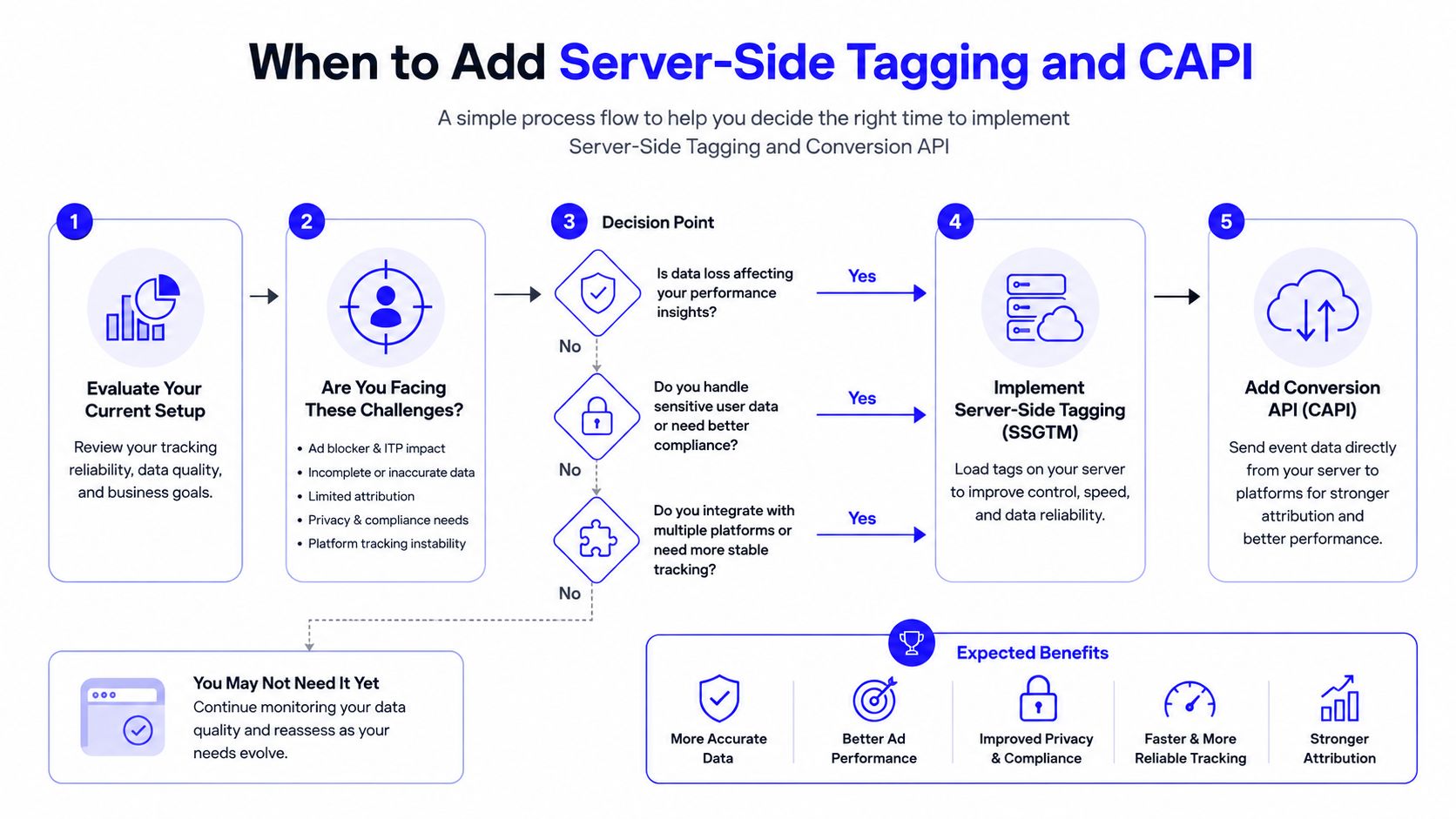
The shift becomes worth considering when client-side data loss starts to hurt paid media performance or attribution quality. Common triggers include ad-blocker losses that are large enough to distort your paid traffic view, iOS-related attribution problems, or a real need to stitch identity across channels. If none of that is happening yet, the extra complexity usually buys more overhead than value.
What server-side actually fixes
Server-side Google Tag Manager moves some collection and routing off the browser and into a server container. That can reduce browser leakage, improve first-party context, and create a cleaner path to destinations like GA4 and Meta CAPI. It doesn't magically make bad taxonomy good, and it won't rescue vague event names.
The trade-off is real. You pick up hosting, engineering time, and another thing that can break. You also add privacy and compliance work that has to be handled carefully, not hand-waved away because the setup looks advanced.
A simple startup decision rule
If you're early-stage and still sorting the basics, stay client-side. If you've got a clean taxonomy, stable reporting, and enough paid volume that data loss is changing decisions, then server-side deserves a look. That's especially true if you need better downstream ad matching or if the browser is clearly cutting off useful signals.
One practical recommendation stands out for smaller teams. If your monthly ad spend is still modest, don't rush to run your own server container yet. Clean up the client-side event model first, because a future migration will be far less painful if the taxonomy is already disciplined.
The implementation branch point is easier to understand in a flowchart, and the decision logic is worth keeping visible during planning.
For a more technical breakdown of the trade-offs, Du Marketing's server-side tracking guide is a practical companion when you're deciding whether the extra layer is justified.
Testing, QA, and the Debugging Workflow That Catches Real Bugs
Most bad analytics setups don't fail loudly. They fail in ways that look fine until somebody trusts the report and makes a bad decision. The fix is a layered QA process, because no single tool catches everything.
Use each testing surface for a different job
GTM Preview is the fastest way to verify trigger logic. If a click or form event doesn't fire there, don't bother blaming GA4 yet. DebugView is better for checking whether the event name, parameters, and debug flag show up inside GA4. Realtime is the end-to-end sanity check, especially because Google says it reflects triggered events in the last 30 minutes. GA4 realtime reporting
A simple spreadsheet closes the loop. Each row should list the event name, expected tag, trigger condition, parameters, and approval status. That sounds old-school, but it's exactly how you keep implementation from drifting when more than one person can edit the container.
If the spreadsheet and the container disagree, trust neither until the mismatch is fixed.
What usually breaks in the real world
The most common issue is an overbroad click trigger. A button contains nested elements, the trigger listens to the wrong selector, and now every inner div fires the event. Another common problem is missing parameters, especially when the dataLayer push and the tag variable names don't match exactly. Consent-related issues can also make a setup look healthy in Preview while staying silent in the live property.
A launch checklist should include these items:
Consent signals firing: make sure the consent state is present.
Duplicate prevention: confirm the same action can't fire twice.
Staging traffic excluded: keep test behavior out of reporting.
Key events marked: verify the important events are set correctly.
Debug mode verified: confirm test hits appear where expected.
The fastest debugging habit is to test one event at a time. If you change three things at once, you'll waste half an hour guessing which one broke the container.
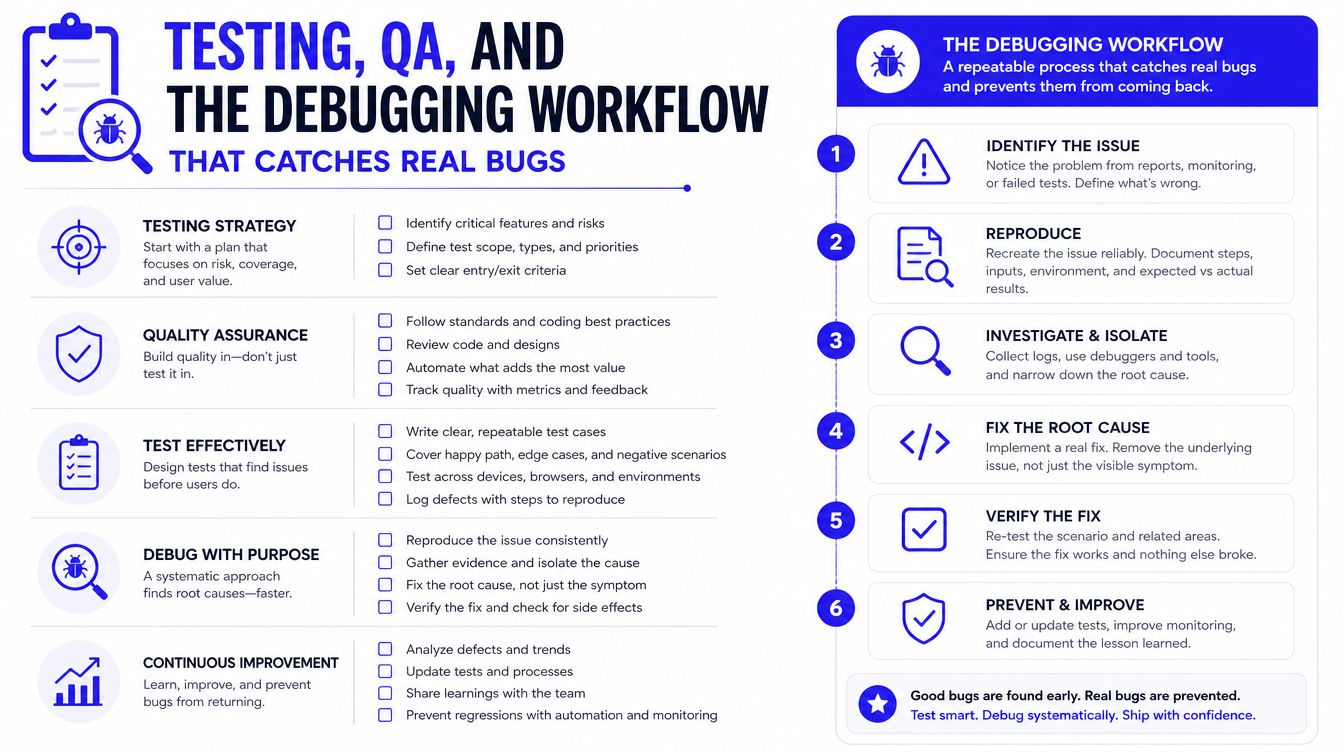
That discipline matters more than the tool choice. A clean QA workflow catches broken selectors, missing parameters, and accidental duplicate fires before they infect your reporting.
Reporting, Attribution, and a 90-Day Operating Cadence
Clean events only matter if the reporting layer turns them into decisions. The first dashboards worth building are the ones that tie key events to funnel movement, content paths, and source quality. GA4 Exploration reports are the right place for that work, especially funnel exploration for conversion steps, path exploration for drop-off patterns, and overlap views for high-intent segments.
Once the event model is stable, connect key events into paid media systems where it makes sense. Google Ads and LinkedIn can use conversion signals for bidding and optimization, while CRM workflows in HubSpot or Pipedrive can close the loop with offline conversions when the lead turns into revenue. A live dashboard is useful too, and if you need a reporting layer that makes the event stream readable for non-analysts, Du Marketing's Looker Studio dashboard templates fit naturally into that stack.
A workable 90-day rhythm
The first two weeks belong to taxonomy, ownership, and QA. Weeks three through six are for rollout and validation, where you make sure the events fire cleanly across the site, not just in staging. Weeks seven through twelve are for reporting refinement and attribution audits, because that's when you find out whether the data supports decisions.
The operating cadence matters because event tracking tends to drift after launch. Product teams add new buttons, marketing launches new landing pages, and no one updates the event map unless there is a named owner keeping the taxonomy in shape.
The goal isn't a bloated event inventory. The goal is a small, trustworthy system that the whole team can use without second-guessing every chart. That means ranking events by business value, retiring duplicates before they spread, and documenting which team owns each event, parameter, and conversion flag. It also means treating dashboards as working tools, not decorations, so the reporting layer reflects the questions the team asks.
Good event tracking in Google Analytics looks less dramatic than people expect. There are fewer events than the team wanted, more confidence in the numbers, and a shared language that marketing, sales, and product can all use without translation. When the setup is healthy, the charts stop arguing with each other, and the team can spend its time acting on the data instead of debating whether the data is usable.