Marketing Automation Workflow: Drive Revenue & ROI

You know the scene. A lead fills out a form. Someone on the team promises to follow up “right after lunch.” A spreadsheet gets updated halfway. A founder sends one personal email, forgets the next two, and then wonders why “good leads” keep going cold. Meanwhile, your CRM looks busy, but nobody can say which campaign produced pipeline.
That's where a marketing automation workflow stops being software and starts being infrastructure. Done well, it doesn't just save time. It creates a reliable system for routing attention, qualifying demand, and moving people from first touch to closed revenue without relying on memory, heroics, or a growing pile of tabs.
Most guides get stuck at button-clicking. They show triggers, branches, and email delays, then call it strategy. That's backwards. The hard part isn't building a workflow. The hard part is choosing the right process to automate, keeping it simple enough to maintain, and proving it influenced revenue after the launch buzz wears off.
Table of Contents
Your Escape from Manual Marketing Chaos
Manual marketing always feels manageable right until it doesn't. One person can send a welcome email. One person can also check form fills, tag contacts, ping sales, update the CRM, remember suppression rules, and chase dormant leads. Then volume picks up, and the cracks turn into a process.
A marketing automation workflow is a defined sequence that reacts to customer behavior and team rules without needing someone to babysit every step. That's the practical definition. Not “AI-powered orchestration.” Not “digital transformation.” Just a system that handles repeatable work correctly and on time.
What a good workflow actually replaces
The actual enemy isn't effort. It's inconsistency.
Without a workflow, startups usually end up with some mix of these problems:
Late follow-up: Form fills sit untouched while intent cools off.
Messy handoffs: Marketing thinks sales saw the lead. Sales didn't.
Duplicate outreach: A prospect gets the nurture email and a manual sales email on the same day.
Zero visibility: You know emails went out, but not whether they influenced deals.
Founder dependence: One person remembers the logic. Everyone else guesses.
That's why automation has moved from “nice to have” to operating layer. 95% of enterprise teams and 78% of mid-market B2B organizations were running at least one platform in 2026, and the average return reached $5.44 for every $1 invested, according to Digital Applied's roundup of marketing automation statistics.
Practical rule: If a task happens often, follows a pattern, and affects pipeline, it belongs inside a workflow.
The point isn't more automation
The point is better control.
A startup doesn't need dozens of automations. It needs a few workflows that do three things well:
Problem | Bad response | Better workflow response |
|---|---|---|
New lead arrives | “Someone should email them” | Trigger immediate routing and first-touch nurture |
Lead shows intent | Manual checking in the CRM | Score behavior and notify the right rep |
Customer converts | Keep sending top-of-funnel emails | Suppress, hand off, and launch onboarding |
If you're already cleaning up reporting by hand, the same discipline applies to workflows. The teams that get value fastest usually build tracking and process control together, not separately. That's the same logic behind marketing reporting automation for growing teams: reduce manual work, standardize the flow, and make results visible.
A strong workflow feels boring in the best way. It runs on schedule. It routes people correctly. It stops when it should. And it gives your team something far more useful than activity. It gives them confidence that the system didn't forget anyone.
The Five Essential Workflows Your Startup Needs
Startups love to overbuild. They imagine a giant behavioral machine with branching logic for every page view, every webinar, every edge case. Then nothing ships.
Businesses often need five workflows first. Not fifty. These cover the path from unknown lead to retained customer.

The broader market tells the same story. The marketing automation market was valued at $6.65 billion in 2024 and is projected to reach $15.58 billion by 2030, with 58% of marketers automating email campaigns, 49% automating social media management, and 32% automating paid ads, according to MoEngage's marketing automation statistics. Email still carries most of the load for a reason. It's usually the fastest place to build repeatable lifecycle logic.
Instant lead capture and welcome
Before: a form submission lands in your inbox, someone forwards it, and a reply goes out whenever there's time.
After: the form creates or updates the contact, tags source and offer, sends the promised asset immediately, and starts a short welcome sequence based on what the person asked for.
This workflow matters because speed and context matter. If someone requested a demo, don't put them into the same generic sequence as someone who downloaded a checklist.
Patient lead nurture
Some leads aren't ready. That doesn't make them bad leads. It makes them early.
A useful nurture workflow sends the next logical piece of education based on role, problem, or product interest. The best ones avoid fake urgency and stick to one job: move the lead from curiosity to qualified conversation.
Good nurture doesn't shout louder. It answers the next question the buyer is already asking.
MQL to SQL handoff
Startups leak money when Marketing says a lead is hot, but Sales opens the record and sees chaos.
A proper handoff workflow should:
Update lifecycle stage: Change status once the right criteria are met.
Push ownership: Assign the lead to the correct rep or queue.
Send context: Include source, recent activity, and relevant pages viewed.
Suppress overlap: Pause broad nurture once sales engagement begins.
If your team argues about what counts as a qualified lead, fix that before adding more campaigns. You'll get more value from clean definitions than from another sequence. That's the same reason solid marketing qualified lead criteria matter. The workflow only works if the handoff standard is real.
New customer onboarding
The sale isn't the end of the workflow. It's the start of a different one.
The manual version usually looks like this: a customer signs, gets a receipt, then waits while internal teams catch up. A good onboarding workflow fixes that by sending kickoff information, assigning owners, confirming setup steps, and nudging activation milestones.
This isn't just customer success hygiene. It affects retention and expansion later.
Proactive retention and upsell
Most startups wait too long to communicate after onboarding. Then churn risk appears, or expansion opportunities get spotted too late.
Retention workflows usually work best when tied to actual signals: inactivity, feature adoption milestones, support themes, renewal windows, or product usage changes. Upsell should feel like a next step, not a surprise invoice disguised as an email.
The pattern across all five is simple. Each workflow removes a manual delay, keeps the CRM cleaner, and creates a more consistent path from first response to revenue.
How to Build Your First Automated Workflow
The biggest workflow mistake happens before anyone opens HubSpot, ActiveCampaign, Pipedrive, or Zapier. Teams automate a process they've never defined.
That's why weak builds become tangled so fast. The tool isn't confused. The underlying process is.
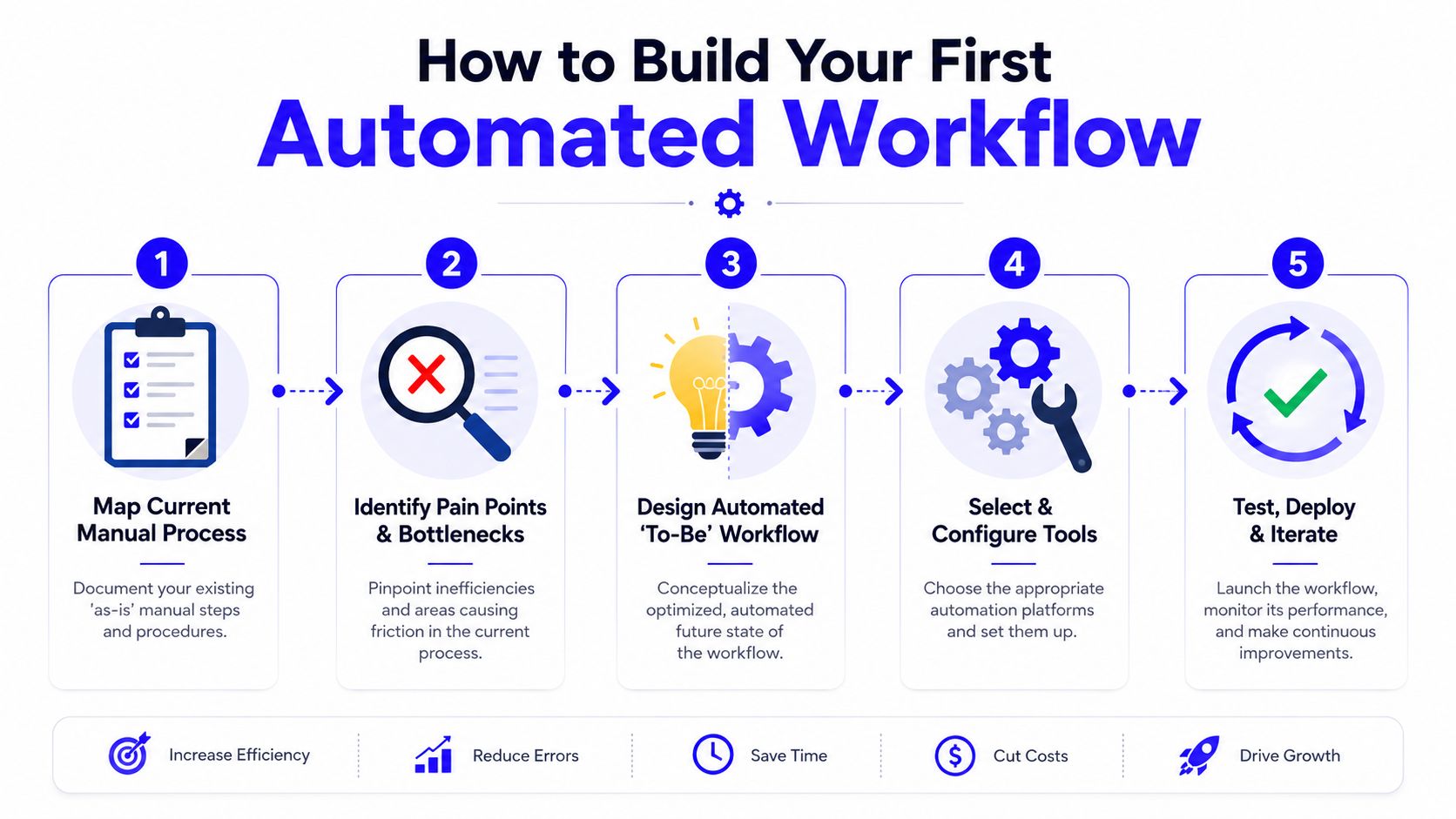
A common failure point is skipping that audit work. 54% of automation projects fail due to poor process definition, and workflows that start with excessive complexity of 20 or more steps fail up to 70% more often than modular, phased builds, according to Latenode's write-up on workflow automation pitfalls.
Start with the ugly manual version
Take one repeatable process. Not your whole funnel. One process.
Map it on a whiteboard or in a doc:
What starts the process?
Who touches it next?
What information do they need?
Where does it usually get stuck?
What counts as success?
What should stop the workflow?
This is the “as-is” map. It often reveals nonsense immediately. Duplicate notifications. Missing fields. Sales alerts firing before enrichment. Emails going out after a deal is already booked.
The fastest way to build a broken workflow is to automate a broken handoff.
Build from four parts
Every usable marketing automation workflow has four core pieces.
Trigger
This is the event that starts the flow. A form submission. A pricing page visit. A trial signup. A webinar attendance tag. Pick one clean trigger for the first version.
Logic
Organizations frequently overcomplicate their automation. Use simple branching. Segment by relevant conditions only, such as product line, lifecycle stage, or lead source. If you can't explain the logic in one sentence, it's probably too complex.
Actions and delays
This is the mechanical part. Send an email. Create a task. Add an owner. Wait. Notify Slack. Update a property. Keep actions tight and intentional.
Goal and exit criteria
A workflow needs a finish line. Booked demo. Closed deal. Trial activated. Customer onboarded. If the person reaches that goal, remove them from the sequence.
Keep version one small
Your first build should usually be 3 to 5 steps, not a cinematic branching masterpiece. The best early workflows are boring, obvious, and easy to debug.
A smart first build often looks like this:
Step 1: Trigger on form submission
Step 2: Send the promised follow-up
Step 3: Wait for a short period
Step 4: Check for engagement or status change
Step 5: Notify sales or continue nurture
That's enough to learn.
Use this quick filter before launch:
Question | If the answer is no |
|---|---|
Is there one measurable goal? | Don't build it yet |
Can the logic be explained simply? | Simplify the branches |
Are stop conditions defined? | Add suppression and exits |
Does sales know what happens next? | Fix handoff before launch |
The first win isn't sophistication. It's reliability. Once the workflow behaves the way your team expects, then you add nuance.
Workflow Blueprints for HubSpot and Zapier
Theory gets expensive when it hits a real stack. Most startups don't have one perfectly integrated platform. They have HubSpot or Pipedrive, a form tool, Slack, Calendly, maybe Typeform, maybe Stripe, and a few things someone connected on a frantic Friday.
That's normal. A workflow still works if the logic is clean.
A simple B2B nurture blueprint
Use this when someone downloads a high-intent asset, signs up for a webinar, or requests something short of a demo.
Trigger in HubSpot or Pipedrive A known contact submits a form tied to a specific offer.
Immediate actions Update source fields, campaign fields, lifecycle defaults, and owner rules. Send the promised asset or confirmation email right away.
Branching logic If the contact is already in an opportunity stage, suppress the top-of-funnel nurture. If they're a new lead, continue. If they belong to a target segment, assign the segment-specific path.
Nurture sequence Email one should answer the obvious next question. Email two should address friction or implementation concerns. Email three should push toward a meeting, trial, or sales conversation.
Behavior checks If the contact visits pricing, requests a demo, or hits your lead score threshold, stop nurture and trigger sales follow-up. If they don't engage, slow the cadence rather than blasting harder.
Where Zapier earns its keep
Zapier is useful when your CRM can't natively coordinate everything you need, or when you want cleaner alerts and cross-tool actions.
Typical examples:
HubSpot to Slack: When a lead becomes sales-ready, send the rep a Slack message with company name, source, last page viewed, and contact owner.
Typeform to CRM: Create or update a contact, tag the response type, and place the lead into the correct workflow.
Calendly to lifecycle automation: When a meeting is booked, remove the contact from active nurture and create a prep task.
CRM to Google Sheets or Looker feeder: Push workflow event logs into a simple QA sheet if you need a backup audit layer.
Keep the Zap simple. One job per Zap is usually better than a giant chain that nobody wants to debug later.
Here's a walkthrough worth watching if you want to see how workflow logic gets assembled inside a real platform setup:
One more hard-earned rule. Don't hide business logic inside random tools. Your CRM should remain the source of truth for lifecycle stage, ownership, suppression, and deal-related status. Zapier should extend the system, not become the system.
Connecting Workflows to Revenue with Smart Tracking
If your workflow report ends at opens, clicks, and “people reached,” you built a communications machine, not a growth system.
That's a gap that frequently remains unaddressed. A 2025 industry analysis found that 68% of marketing automation initiatives fail to move beyond engagement metrics. It also found that workflows with well-defined exit criteria achieve 30% to 40% higher conversion rates, according to Fullcast's analysis of marketing automation workflows. That second point matters because clean tracking and clean exits usually go together. Teams that know when a workflow should stop are also more likely to know what outcome it was supposed to influence.

What to track instead of vanity metrics
Open rates can help diagnose deliverability. Click rates can help diagnose message fit. Neither tells you whether the workflow helped create pipeline.
A revenue-focused workflow report should answer:
Did this workflow create qualified conversations?
Did it accelerate movement to booked meetings or opportunities?
Did it influence deals that reached closed revenue?
Did it reduce leakage between stages?
That means using workflow reporting alongside CRM fields, attribution data, and lifecycle timestamps. If you don't tie the sequence to opportunity records, your reporting stays trapped in the marketing layer.
Track the handoff, not just the send. Revenue lives at the stage change.
A clean attribution chain
This setup works well for startups because it's practical, not fancy.
Layer | What it should capture | Why it matters |
|---|---|---|
UTMs | Source, medium, campaign, content | Preserves acquisition context |
GTM and GA4 | Key events like form submits and high-intent actions | Confirms behavior before CRM sync |
CRM | Contact source, lifecycle stage, deal association, owner | Connects marketing activity to pipeline |
Workflow logs | Entry trigger, branch path, exit reason | Shows what the automation actually did |
Disciplined UTM naming matters more than people want to admit. If paid campaigns, content syndication, LinkedIn ads, and partner traffic all arrive with inconsistent parameters, your workflow reporting will become fiction. The same goes for event tracking. Form fills, demo requests, booked meetings, and activation milestones need clear definitions and consistent firing.
For teams trying to unify those layers, marketing data integration across CRM and analytics tools is what turns disconnected reporting into something a founder can trust.
Exit criteria are not optional
A surprising number of workflows keep running after the person has already converted. That creates bad reporting and bad customer experience at the same time.
Your workflow should exit when the contact:
Books the target meeting
Enters a live opportunity
Becomes a customer
Moves into a different lifecycle program
Behavioral triggers also matter. A static schedule is easy to launch but often tone-deaf. A workflow becomes more useful when key actions, such as pricing visits, repeat product page views, or trial events, change the path. That's how automation starts feeling relevant instead of robotic.
If the question is “which workflow influenced this customer,” the answer only gets clean when campaign tracking, event tracking, CRM sync, and suppression logic all agree with each other.
Optimizing Your Workflows Without Breaking Them
Launching a workflow is the easy part. Leaving it alone is hard.
Someone wants more emails. Someone else wants a new branch for webinar leads. Sales asks for a different alert. A founder wants “just one more condition.” That's how stable workflows turn into haunted houses.
Test like an adult
The best optimization work is narrow. One variable at a time.
High-growth teams report a 1.8x cumulative lift in pipeline velocity after 6 to 8 iterative A/B tests on workflow variables. Setting frequency caps at 3 to 5 messages per week can also reduce unsubscribe rates by 18% while maintaining engagement, according to Codewords' best practices for marketing automation.
That tells you two things. First, small tests compound. Second, restraint beats volume.
Use a sequence like this:
Start with timing: Test delay length before changing the whole message.
Then test messaging: Subject line, CTA framing, or first-email angle.
Then test routing logic: Which behaviors should trigger a handoff.
Leave everything else alone: If you change three things, you learn nothing.
Protect the workflow from “helpful” edits
Most workflow damage comes from unmanaged changes, not bad intentions.
A few habits keep things sane:
Keep a changelog: Note what changed, when, and why.
Assign an owner: One person decides whether a request belongs in the workflow.
Version the logic: v1 baseline, v2 timing test, v3 scoring update.
Review suppression rules: Make sure converted contacts stop receiving earlier-stage messaging.
Watch contact fatigue: More send volume isn't a growth strategy.
Small edits are cheap. Hidden side effects are expensive.
Optimization should improve performance without changing the job of the workflow every week. If the workflow exists to move webinar leads to booked calls, judge it on that. Don't turn it into a general newsletter, sales alert system, and customer education sequence just because the builder allows it.
The teams that get durable gains treat workflows like product features. They ship a clean version, monitor behavior, test carefully, and document every change. That's less exciting than building a giant automation map. It's also what keeps the thing producing pipeline six months later.
If your startup needs someone to build the workflow logic, tracking, CRM hygiene, and reporting as one connected system, Du Marketing does exactly that. The work covers paid acquisition, lifecycle automation, attribution, and revenue reporting without splitting strategy from implementation, which is usually where the mess starts.