How to Implement Data Pipeline Automation in Marketing

Your dashboard says paid search is fine. Meta says it assisted a pile of conversions. The CRM says half those leads came in as “direct / none.” Meanwhile, someone exported a CSV from HubSpot, someone else patched campaign names in a spreadsheet, and the one person who understands the setup is on holiday.
That's the normal starting point for marketing teams trying to clean up attribution. Not a pristine architecture diagram. A mess.
What usually breaks first isn't reporting. It's trust. If UTMs are inconsistent, GTM is firing unevenly, server-side events aren't mapped cleanly, and the CRM doesn't store original source values reliably, every “performance” conversation turns into an argument about whose numbers count. That's where data pipeline automation earns its keep. It turns ad clicks, site events, offline lead updates, and CRM stage changes into one repeatable workflow instead of a stack of manual fixes.
A lot of companies have already moved in this direction. As of 2026, approximately 60% of companies worldwide have implemented some form of automation in their operations, including data pipeline automation, according to Thunderbit's automation statistics summary. In marketing, that tracks with reality. Manual exports don't survive once spend, channels, and stakeholders multiply.
Table of Contents
Introduction to Data Pipeline Automation for Marketing
Marketing data pipeline automation is the practice of moving data from capture to reporting without relying on manual exports, copy-paste cleanup, or one-off fixes. In a marketing stack, that usually means a chain that starts with UTMs and on-site tracking, passes through tag management and server-side collection, pulls platform data through APIs, and lands in a CRM and reporting layer with consistent field definitions.
The important part is end-to-end. Plenty of teams automate one piece and leave the rest taped together. They'll have clean GA4 events but no CRM source mapping. Or they'll sync leads into HubSpot but never push qualified stages back into ad platforms. That isn't a pipeline. It's a partial convenience.
A working setup usually has five layers:
Capture through UTMs, GTM, forms, and event tracking.
Transport through server-side tagging, webhooks, and APIs.
Storage in analytics tools, warehouses, or CRM properties.
Validation through QA rules, staging, and alerts.
Activation in dashboards, attribution models, and offline conversion sync.
Clean reporting starts upstream. If campaign names are sloppy at click time, no dashboard fixes that later.
In practice, the gains are boring in the best possible way. Fewer broken reports. Fewer mystery leads. Faster answers when a founder asks which campaign sourced pipeline, not just form fills. And a setup that doesn't depend on one person remembering to upload a spreadsheet every Monday.
Establishing Planning Governance and Naming Conventions
The least glamorous part of data pipeline automation is the part that saves the most pain later. Governance.
If nobody owns definitions, naming, approval, and change logs, the stack drifts fast. A paid social manager names campaigns one way, the lifecycle person uses a different source taxonomy, sales edits lead source values in the CRM, and six weeks later every join key is a little bit wrong.
Assign ownership before anyone opens GTM
The market is growing fast, but the useful takeaway isn't hype. It's that this work has matured into operational infrastructure. The global data integration market reached a valuation of $15.24 billion in 2026, which is a useful reminder that teams need standards, not improvisation, according to Integrate.io's review of data integration adoption.
For a marketing pipeline, keep governance light and explicit. I use a simple RACI-style sheet with four columns:
Role | Decides | Executes | Approves |
|---|---|---|---|
Marketing ops | UTM taxonomy, event names, dashboard definitions | GTM changes, QA checks | Growth lead |
Paid media | Campaign naming, ad platform mapping | UTM generation | Marketing ops |
CRM owner | Lifecycle fields, deduping logic | workflow updates, property creation | Sales lead |
Analytics owner | schema, alert rules, dashboard logic | tests, monitoring | Marketing ops |
That table doesn't need to be fancy. It just needs to stop the classic problem where everyone can change everything.
A few governance rules matter more than the rest:
One source of truth: Keep naming standards in one document. Not in Slack, not in someone's head.
Version every change: Use Git, a changelog tab in Sheets, or a shared wiki with dated edits.
Separate draft from approved: New campaign names and event names go through review before they hit production.
Ban free-text edits in the CRM: If source fields matter for attribution, sales shouldn't type over them.
Use naming rules that survive scale
Most naming conventions fail because they're too clever. Good naming is dull, short, and hard to misuse.
Use lowercase. Use underscores or a single separator style. Don't include spaces. Don't let channel managers invent synonyms like paid-social, paidsocial, meta_paid, and facebook.
Here's a practical baseline.
Naming Convention Examples
Component | Format | Example |
|---|---|---|
Campaign | objective_audience_offer_geo_date | demo_saas_icp_checklist_uk_q3 |
Source | approved platform name | google, linkedin, meta |
Medium | approved acquisition type | cpc, paid_social, email |
Content | creative hook or asset identifier | founder_video_v1 |
Term | keyword or audience bucket | crm_software |
Event name | verb_object | form_submit |
CRM workflow | system_action_trigger | hubspot_set_first_touch |
Practical rule: If a new hire can't look at a campaign name and understand it instantly, the convention is too loose.
Two extra habits save a lot of downstream cleanup.
First, keep a controlled vocabulary tab. If linkedin is approved, then li and linkedin_ads are invalid. Second, reserve separate fields for human-readable labels. Dashboards can show a polished campaign label later. The raw tracking field should stay rigid.
Configuring UTMs and Google Tag Manager
UTMs are where marketing pipelines either start cleanly or start lying. If the source values are inconsistent at click time, every report downstream inherits the mess.
Build one UTM workbook and lock it down
Create a shared workbook in Google Sheets or Airtable with dropdown-driven fields for utm_source, utm_medium, utm_campaign, utm_content, and utm_term. The key is to generate links from approved values, not let everyone type whatever they want into the final URL builder.
This visual captures the basic flow.
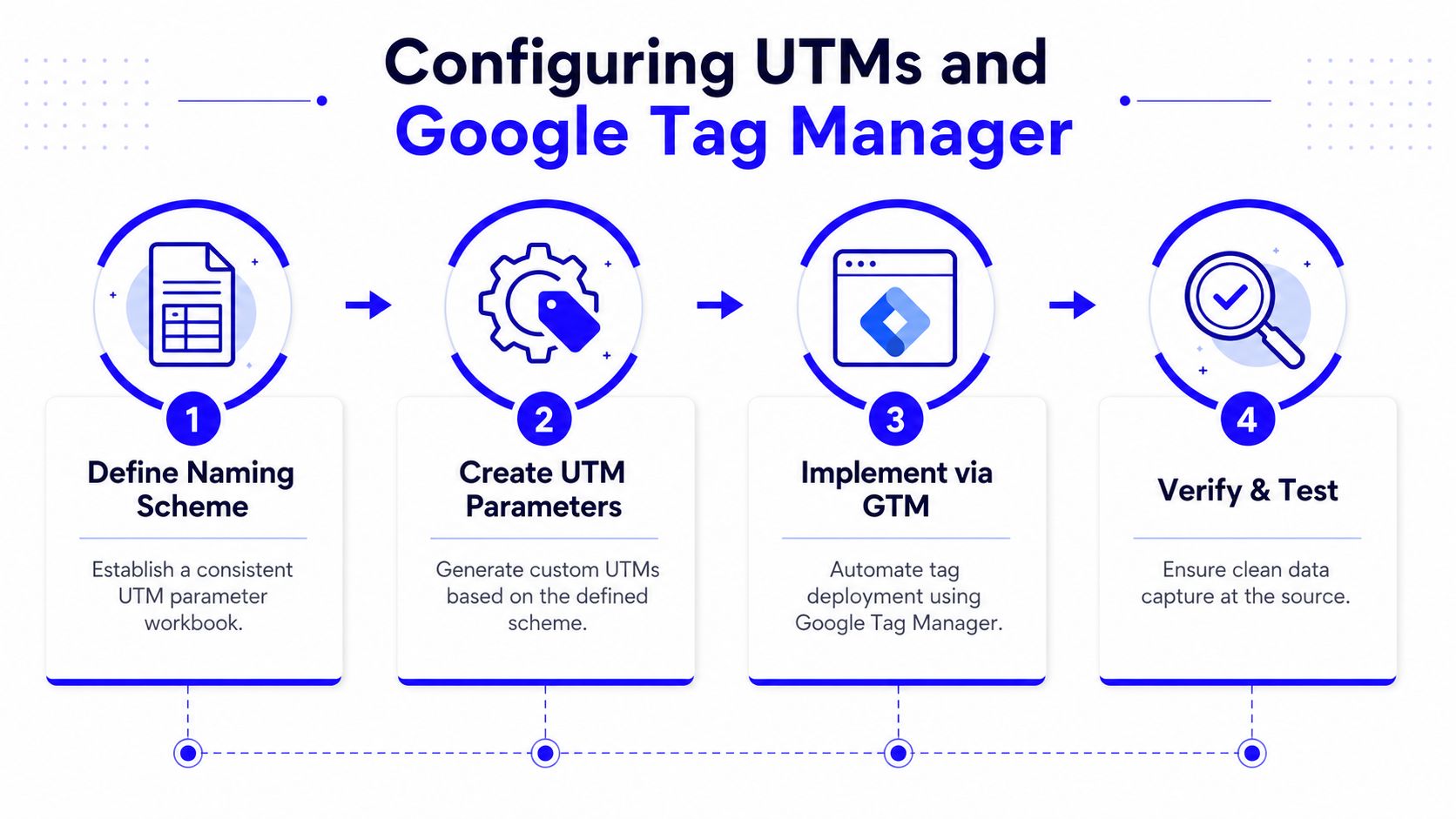
In the workbook, I usually keep these tabs:
Approved values: source, medium, campaign type, geo, offer, owner.
URL builder: landing page plus validated UTM fields.
Campaign log: launch date, owner, destination page, status.
QA tab: checks for blank fields, uppercase values, and duplicate campaign names.
That workbook should reject bad inputs. If someone enters a medium that isn't in the list, the sheet should flag it. This is one of those small controls that prevents weeks of cleanup in Looker Studio later.
Set up GTM to read what marketing actually sends
In Google Tag Manager, don't stop at the default pageview setup. Build variables that read and store the UTM parameters consistently across session entry points. At minimum, define URL variables for source, medium, campaign, content, and term, then pass them into GA4 event parameters and any form submission tags that feed your CRM or webhook layer.
For teams that need a cleaner GTM event plan, this guide on event tracking with Google Tag Manager is a solid companion read.
A practical container blueprint for marketing looks like this:
Core variables: URL query variables, click text, click URL, page path, referrer.
Custom JavaScript variables: first-touch cookie reader, session identifier, normalized source parser.
Triggers: page view, key CTA clicks, form submit, scheduler/book-demo completion.
Tags: GA4 configuration, GA4 events, Google Ads conversion tag, optional webhook or data layer handoff.
Don't overload the container with dozens of half-used tags. Marketing GTM accounts get messy when every campaign gets its own logic branch. Reuse event structures. Keep the names boring and stable.
This walkthrough is useful if you want to compare your setup while building:
Test before you publish
Preview mode catches plenty of mistakes if you use it properly. Check more than “did the tag fire.”
Look for these specifics:
Parameter integrity: Does
utm_campaignpass through exactly as expected?Form persistence: Do source values survive multi-step forms or delayed submissions?
Duplicate events: Does a thank-you page refresh trigger the same conversion again?
Fallback logic: If UTMs are missing, are you storing referrer context cleanly?
A GTM version should only ship once those checks pass. Otherwise you're just automating bad data faster.
Implementing Server Side and API Data Collection
Client-side tracking still matters, but it's not enough on its own. Browsers block things, scripts load late, and some conversions happen after the browser session is already gone. That's why marketing data pipeline automation gets sturdier when server-side collection and API pulls sit alongside GTM.
Where client-side tracking stops being enough
The most common setup is a hybrid one. Browser events still capture immediate on-site behavior, but a server-side layer receives, enriches, and forwards the data to endpoints that need cleaner delivery. For a marketing team, that often means a GA4 server container, a webhook or cloud function layer, and direct event forwarding to destinations like Meta Conversions API.
What matters is event design. Keep the event names and property names aligned with the naming standards already established. If the browser sends form_submit and the server forwards LeadCompleted, someone will eventually mis-map reporting or duplicate logic.
A simple event path looks like this:
Browser captures landing page visit and stores UTM context.
GTM pushes form submission data into the data layer.
Server-side endpoint receives the payload with consent-aware fields.
Destination connectors forward the event to GA4, Meta, or CRM webhook handlers.
Ad platform cost and conversion data is pulled through APIs into reporting storage.
If you're stitching ad platform data, CRM states, and on-site tracking together, this primer on marketing data integration is worth reviewing alongside your implementation.
A practical event flow for ads and analytics
For GA4 server-side tagging, route only the events that matter to attribution and lead quality. Pageviews are fine, but significant value comes from events tied to forms, bookings, qualified actions, and downstream CRM milestones.
Use these principles:
Normalize fields early: Convert source and medium values to approved formats before forwarding.
Attach identifiers carefully: Keep session IDs, click IDs, and CRM record keys in dedicated fields.
Respect consent state: Don't pass fields to destinations that your consent setup doesn't permit.
Pull cost data directly: Use Google Ads and Meta Ads APIs for spend and campaign metadata instead of relying on exported reports.
The browser is good at observing. The server is better at delivering reliably.
The trade-off is maintenance. Server-side setups reduce dependence on the browser, but they introduce another layer to debug. That's a fair exchange if you document payloads, keep mappings stable, and avoid custom logic that only one person understands.
Syncing CRM and Automating Workflows
Attribution usually falls apart the moment a lead hits the CRM. The click data exists. The form data exists. The ad platform data exists. Then the CRM stores one field incorrectly, overwrites original source, or creates two contacts for the same person and your pipeline starts arguing with itself.
Store first touch and latest touch separately
Don't force one field to do two jobs. In HubSpot or Pipedrive, keep separate properties for original acquisition context and latest known marketing touch. If you overwrite the first touch every time a lead returns through another campaign, your reporting shifts from attribution to revisionist history.
The field map should be plain:
CRM Property | Purpose |
|---|---|
first_touch_source | original acquisition source |
first_touch_medium | original acquisition medium |
first_touch_campaign | original campaign identifier |
latest_touch_source | most recent attributed source |
latest_touch_campaign | most recent campaign identifier |
session_id | analytics reconciliation key |
gclid_or_platform_click_id | ad platform match key |
This is the part many teams skip. They send a form into the CRM, but they don't preserve the acquisition data in a stable schema.
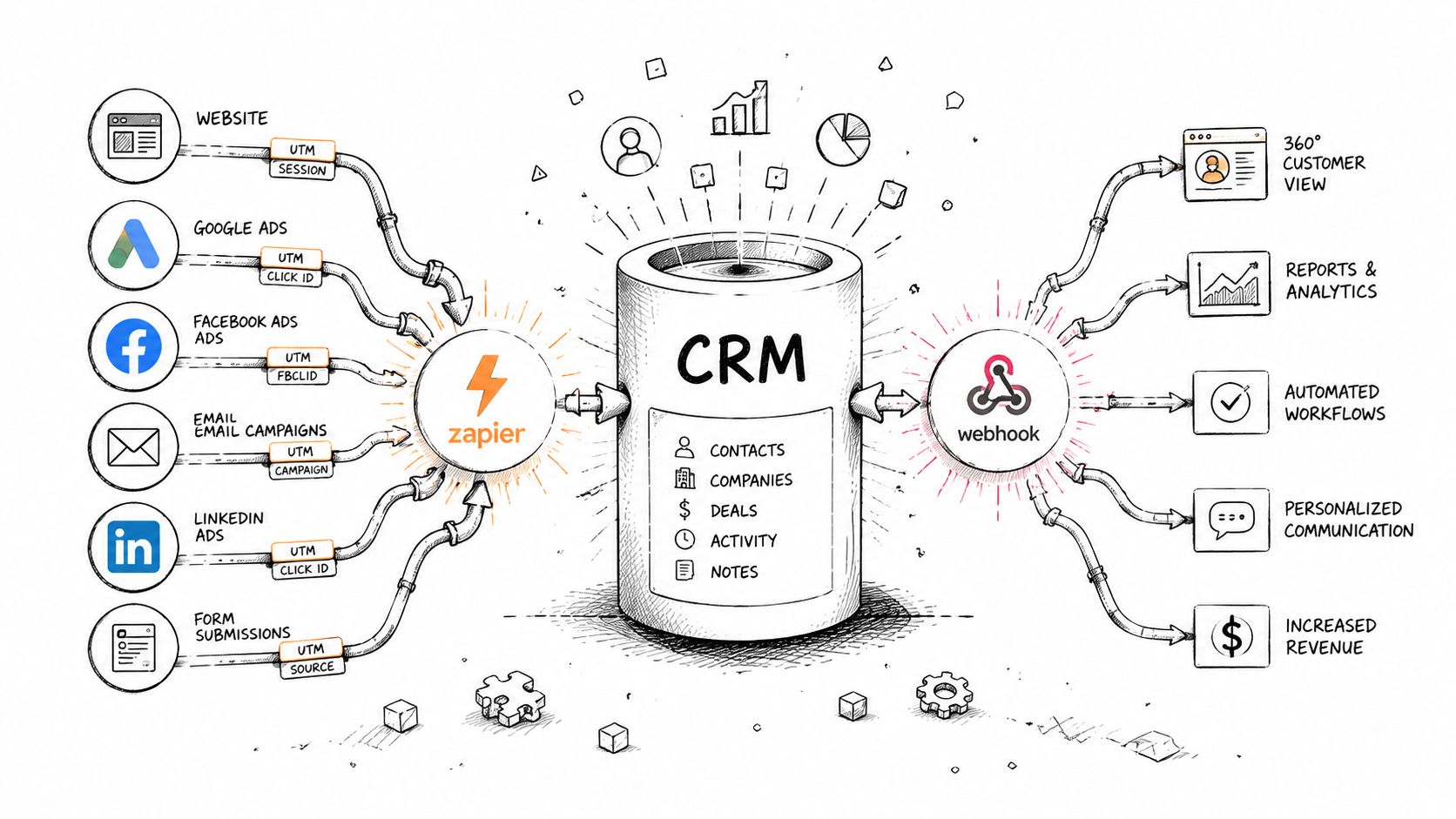
Here's the core flow most single-operator setups use.
Use idempotent workflow logic for CRM sync
When Zapier or native webhooks are involved, duplicates become the recurring annoyance. A form retries, a webhook times out, or two systems both attempt to create the same contact. The fix is to treat CRM writes as idempotent whenever possible. Search first, then create or update based on a durable key like email plus a secondary identifier when available.
A clean automation pattern looks like this:
Inbound lead capture: form submission triggers webhook or Zap.
Lookup step: search for an existing contact by email.
Conditional write: create if absent, update if present.
Field protection: write first-touch fields only if they're blank.
Lifecycle sync back out: when stage changes, send the update to reporting or ad platforms.
Common gotchas are rarely technical mysteries. They're mapping mistakes.
If a CRM workflow can overwrite source fields without restriction, it eventually will.
Watch for these specific issues:
Hidden field mismatches: Form field names don't match CRM property internal names.
Type conflicts: Date, boolean, and multi-select values arrive in formats the CRM rejects.
Rate limit behavior: Retries can create duplicate writes if lookup logic is weak.
Two-way sync loops: A CRM update triggers a webhook that writes back the same record repeatedly.
The fix isn't more tools. It's stricter write rules.
Conducting QA and Building Monitoring Dashboards
A marketing pipeline doesn't stay healthy because the original setup was smart. It stays healthy because someone put guardrails around it.
The checks that catch most marketing pipeline failures
The best production advice from data engineering applies directly to marketing pipelines. Embedding data quality checks and CI/CD pipelines reduces failure rates and teams should alert when success rates drop below 95%, according to Databricks' data pipeline best practices.
That matters because marketing failures are often silent. A tag fires to the wrong property. A webhook starts passing null campaign values. A CRM field changes type. Nobody notices until a board deck looks odd.
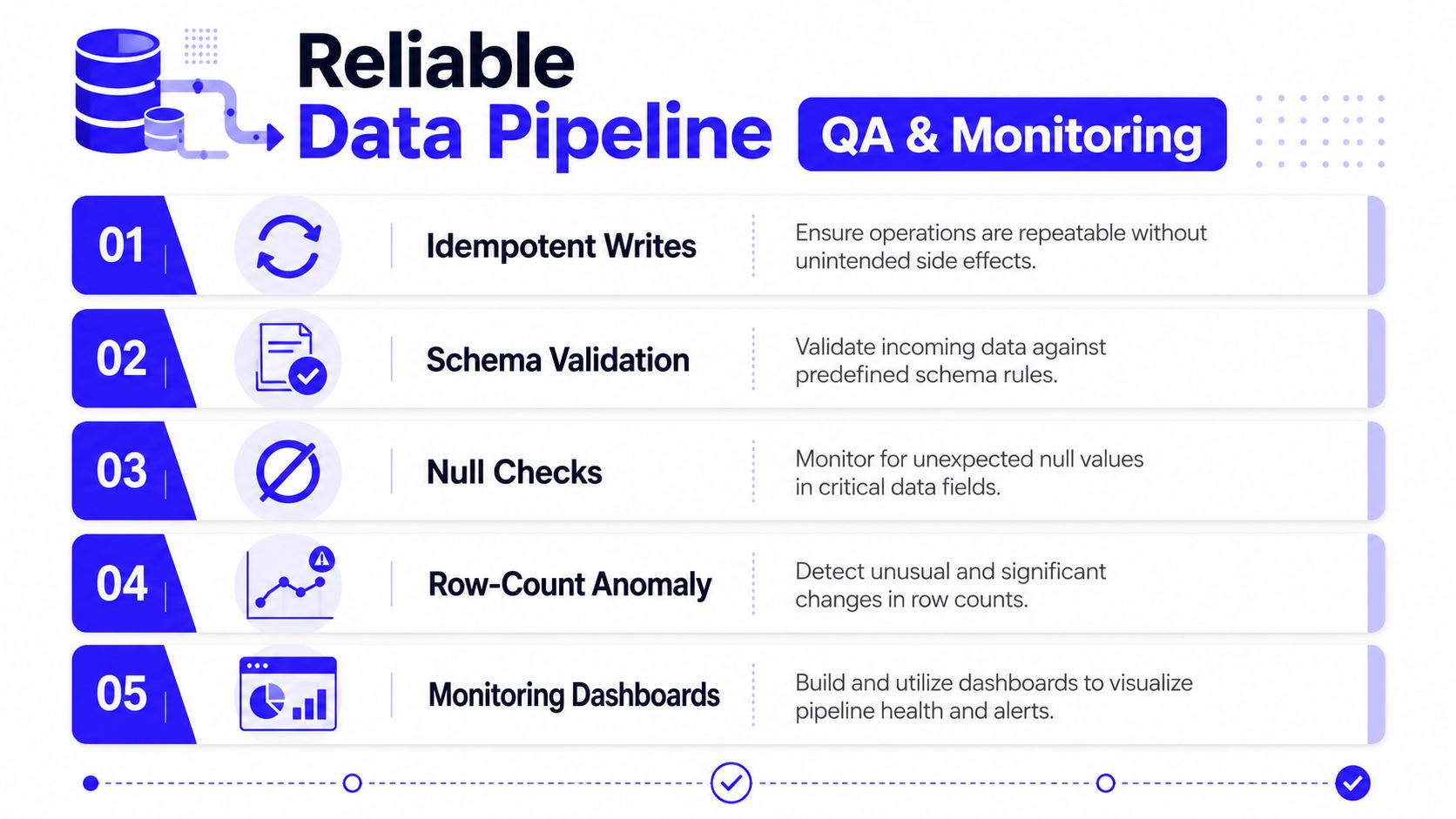
These are the QA checks worth making standard:
Idempotent writes: Retries shouldn't create duplicate leads or duplicate conversion records.
Schema validation: Confirm required fields exist and field types match expected structure.
Null checks: Flag blank values in critical fields like source, medium, campaign, record ID.
Row-count anomaly checks: Spot unusual drops or spikes in lead, event, or cost ingestion.
Staging before production: Test changes in dev and staging before touching live reporting.
This checklist works well as a standing reference.
For marketing stacks, I'd add one more rule. QA should check business meaning, not just technical success. A pipeline can run successfully and still be wrong if all branded search gets labeled as organic or all demo requests lose campaign values.
Build a dashboard for pipeline health, not just campaign results
Most dashboards answer “how did campaigns perform?” Build another one that answers “is the pipeline trustworthy today?”
In Looker Studio, create a separate tab or standalone dashboard for operational monitoring with widgets like:
Widget | What it should show |
|---|---|
Last successful sync | timestamp by source system |
Event volume trend | sudden drops or spikes |
Null-rate table | missing values by critical field |
CRM sync status | successful writes and failed writes |
Source mix sanity check | abrupt changes in source distribution |
For teams trying to tighten this layer, this guide to marketing reporting automation is a useful reference.
Alerting should be tuned by impact. Billing feed issues matter more than a low-priority sandbox event. Notify both the engineer or operator who can fix it and the analytics owner who understands reporting consequences.
A healthy dashboard doesn't just display revenue. It proves the numbers arrived intact.
Using Templates and Troubleshooting Common Issues
Templates save time, but only if they're modular. A giant export full of account-specific hacks isn't a template. It's someone else's technical debt.
The templates worth keeping in your stack
The useful starter files for marketing data pipeline automation are usually small and focused:
GTM naming matrix: event names, trigger rules, parameter mapping, owner.
UTM workbook: controlled values, URL builder, approval log.
Webhook payload template: expected field names, types, fallback behavior.
CRM field map: source fields, lifecycle fields, write conditions.
Dashboard QA checklist: pre-launch tests, recurring validation, alert destinations.
Store templates in a shared folder and pair each one with a short readme. The readme should answer three things. What this file controls, who owns it, and what breaks if someone edits it carelessly.
That last part matters because rushing implementation is expensive. Skipping foundational steps in pipelines increases failure incidence by 30–40%, while modular architectures and orchestration tools boost success rates above 95%, according to Improvado's review of data pipeline automation practices.
Three failures that show up constantly
Most troubleshooting in marketing pipelines comes back to the same three failure modes.
Broken tags
GTM changes publish cleanly, but conversions vanish or inflate. Usually the trigger changed, the variable name drifted, or duplicate firing logic slipped in through a thank-you page and a form event both counting the same action.
Fix it with a short triage list:
Check trigger overlap: One conversion event should have one clear firing rule.
Review parameter names: GA4, ads tags, and webhook payloads should use aligned keys.
Compare preview to live: Container version drift happens more than people admit.
API timeouts and partial loads
Cost data or conversion pulls arrive late or incomplete. The usual culprit is brittle retry logic or a monolithic job trying to do too much in one pass.
Better approach:
Split jobs by source or date chunk
Log failed records separately
Retry safely without creating duplicates
CRM sync mismatches
Leads exist, but attribution fields don't line up with campaign reporting. This often happens when internal property names changed, picklist values no longer match approved taxonomy, or workflows overwrite original values.
The fix is mechanical:
Reconcile internal field names
Protect first-touch fields from overwrite
Audit lookup logic for duplicate contacts
When troubleshooting, don't ask “what looks wrong in the dashboard?” Ask “where did the first bad value enter the system?” That question usually gets you to the core issue faster.
If you want a single operator to set up paid media, GTM, server-side tracking, CRM sync, attribution, and reporting as one connected system, Du Marketing does exactly that. It's a practical fit for startups that need clean execution without juggling multiple freelancers, agencies, and broken handoffs.