Voice Search Optimization for Startups in 2026

Most voice search advice is stuck in a weird time capsule. It still tells startups to add a few FAQs, sprinkle in conversational keywords, and call it a strategy, while the actual search experience has shifted toward machine-selected answers, zero-click results, and AI-generated summaries that sit in front of the click. If you're building growth with limited bandwidth, the question isn't whether your site is “voice optimized,” it's whether your content can be extracted, trusted, and cited when a machine chooses the answer.
That shift matters because voice search is no longer a side channel. Independent industry roundups report 8.4 billion active voice assistants worldwide, 4.2 billion monthly active voice search users, and more than 10 billion voice queries per day, with voice accounting for about 31% of all search queries globally, according to the 2026 summary cited in Digital Applied's voice search statistics. At the same time, the answer surface itself is changing, because search is moving from keyword matching toward AI-powered answer generation, which makes voice optimization inseparable from broader answer-engine optimization, especially for startups trying to earn discovery without paying for every visit.
Table of Contents
Why Voice Search Optimization Is Changing in 2026
The old checklist version of voice search optimization assumes the job is to write like a human, add schema, and win a few “near me” queries. That was useful when voice was a novelty layer on top of search, but it's too small for where the market has gone. Google's move toward AI-powered answer generation has blurred the line between voice search, featured snippets, and AI Overviews, so the primary target now is machine-selected answers across every zero-click surface.
That's why it helps to stop thinking in terms of “ranking for voice” as a separate channel. Independent tracking in the brief notes that featured snippets appear in only about 4% of Google searches, while AI Overviews expanded rapidly across major markets in 2024 and 2025, which suggests the answer box itself is being reshaped. The practical takeaway is simple. If a page can't be understood quickly by a machine, it won't win much visibility, whether the response is spoken aloud or shown on screen.
The checklist is still useful, but only as a starting point
The conventional checklist, conversational phrasing, FAQ sections, local SEO, and fast pages, still matters because it matches how assistants pull answers. It just doesn't tell the whole story anymore. Startup teams that only optimize for “voice” tend to build content that sounds friendly but isn't structurally useful, and that's a bad trade when the extraction layer is doing the heavy lifting.
Practical rule: write for the answer surface first, then make the page pleasant for humans second. If the first sentence doesn't resolve the query, the rest of the page is just decoration.
That shift also changes how startups should allocate effort. A small team doesn't need a separate voice playbook, it needs a page architecture that serves spoken queries, snippet extraction, local intent, and AI summarization all at once. That usually means better headers, cleaner answer blocks, tighter topical clusters, and fewer pages that ramble before saying anything useful.
How Voice Queries Differ from Typed Searches
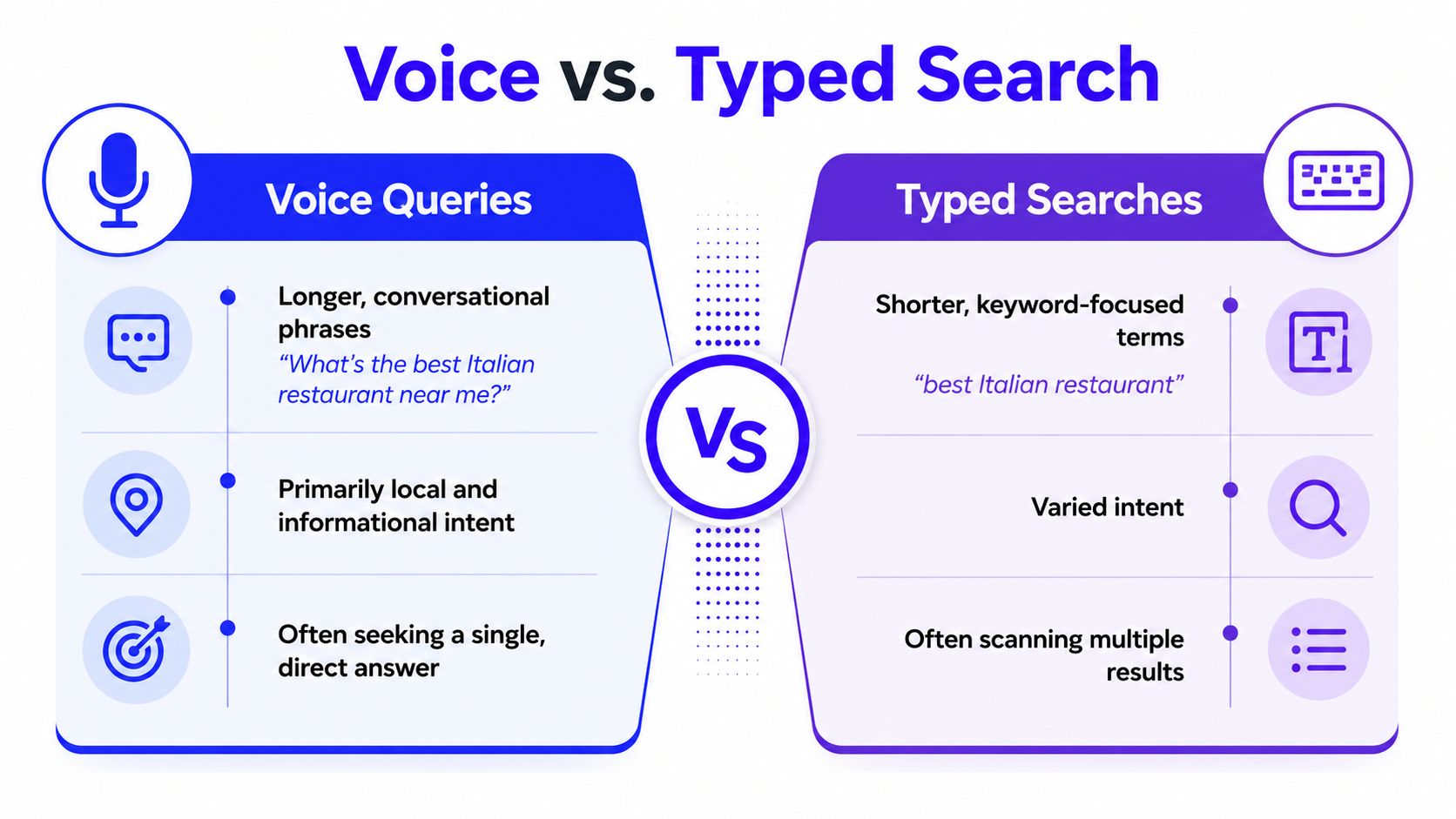
Voice and typed search aren't just different inputs, they trigger different consumption habits. Backlinko's voice search study found that the average voice search result page loads in 4.6 seconds, which is 52% faster than the average webpage, and that the average voice search result itself is only 29 words long, even though the page behind it contains about 2,312 words. The selection logic is brutal in a useful way. Assistants want short, direct answers they can read out loud without hesitation.
Query intent is usually more immediate
The same study reported that about 40.7% of voice search answers come from a Featured Snippet, and roughly 75% of voice search results rank in the top 3 organic positions for the underlying query, according to Backlinko's voice search SEO study. That tells you a lot about what assistants are doing. They're not hunting through the page for nuance, they're looking for a trusted, compact answer that already sits near the top of the results.
Location matters too. Other 2026 summaries in the brief report that around 58% of consumers use voice search to find local business information and roughly 76% of voice searches include a “near me” or other location-specific signal. In practice, that means voice queries often carry stronger immediacy than typed searches. Someone typing “best CRM onboarding tips” is browsing, while someone asking for a nearby provider, opening hours, or a fast fix is usually closer to action.
The page behind the answer still matters
A short answer doesn't mean a short page. The numbers show a strange but important split, the answer is brief, but the source page is often long and detailed. That tells startups to structure for extraction, not compression. You want the opening sentence to answer the query cleanly, then the rest of the page to prove depth, authority, and context.
Voice assistants don't reward verbose pages. They reward pages that make the first useful sentence easy to find.
That's why typed-search habits can mislead teams. A keyword-stuffed page may still attract clicks in traditional search, but it won't necessarily be the page a machine trusts enough to speak. Voice optimization starts when you write for retrieval, not just for indexing.
Finding Conversational Keywords That Voice Assistants Surface
Traditional keyword tools are fine for broad demand, but they're clumsy at surfacing the exact phrasing people use when they talk to devices. For voice work, the best input usually comes from real questions, not keyword fragments. That means mining People Also Ask, related searches, support tickets, sales calls, and Search Console queries before you touch a content brief.
Build your list from real questions, not keyword guesses
Start with the question forms your market already uses. Look for “what,” “how,” “where,” “best,” and “near me” patterns, then group them by intent, informational, commercial, and local. If you're a B2B startup, the winning terms are often process questions, comparison questions, and setup questions. If you're B2C or local, they're usually location, price, and availability questions.
For a practical workflow, I like this order:
Pull raw phrasing from Search Console. Use actual queries, not the sanitized version you think people should search for.
Mine People Also Ask boxes. They show the adjacent questions Google thinks belong to the topic.
Use answer-focused tools for breadth. Tools like AnswerThePublic are useful when you need a question map instead of a guess.
Sort by buying pressure. A question that leads to a call, demo, visit, or booking deserves priority over a curiosity query.
If you want a broader keyword research workflow, this guide from Du Marketing's keyword research resource is a useful companion, especially if your team needs a repeatable research process instead of a one-off brainstorm.
Prioritize by where voice really converts
The highest-value voice queries aren't always the most searched ones. They're the ones that create downstream action. A startup with limited resources should favor questions that are close to a commercial decision or a local action. That might be a comparison query for a software category, a service-area question for a local business, or a “how do I choose” question that precedes a demo request.
Good voice keyword research is about pressure, not volume. If a query leads to a booking, a call, or a branded follow-up search, it belongs on the roadmap.
The trap is treating every question like a content opportunity. Some questions deserve a full page, some belong in a section, and some should be folded into a local landing page. The job is to match structure to intent, not to publish a separate article for every phrase a tool surfaces.
Structuring Content for Voice Answer Extraction
Voice assistants usually need one thing from a page, a clean answer they can quote without making a mess of the rest of the response. That makes structure as important as topic. Pages that get selected usually put the answer in the first sentence, then use the rest of the section to back it up with detail, proof, or examples. That same structure also helps AI Overviews and other zero-click surfaces pull a clear response without sending a visitor to your site.
The simplest pattern still works best. Open with a question-based header, answer it in plain English, then expand. The answer block should be tight enough to stand on its own, but not so thin that it reads like filler. The first sentence should be unmistakable, and the next paragraph should give a human enough substance to keep reading.
Use question-answer blocks with clean hierarchy
A page built for answer extraction should have headers that sound like real questions, not internal jargon. If a customer would ask, “How does this work?” or “What's included?”, use that phrasing. Inside the section, keep paragraphs short, use bullets where lists make sense, and make each subheading do one clear job.
The infographic below is the kind of structure I look for when reviewing a page for voice readiness.

The same logic applies to AI-friendly content that needs to work across search, snippets, and support pages. If you already have a structure that helps people scan and compare, you are halfway to content that assistants can quote cleanly. For teams building that foundation, our content marketing guide for startups is a useful reference for turning scattered ideas into pages that answer real questions.
Match the schema to the page, not the other way around
Schema markup helps search engines understand what the page contains, but it will not rescue weak content. FAQ schema works best when the page contains concise question-answer pairs. Article schema helps when the page is clearly editorial. LocalBusiness schema matters when the page represents a location or service area. The point is to support the structure you have already built, not to paste code onto a page and hope an assistant gets curious.
The video below is worth a quick watch if your team is turning longer pages into answer-friendly assets.
Practical rule: if a page needs a reader to scroll for three screens before the point appears, it is not voice-ready yet.
This format also works for internal knowledge hubs, help centers, and product explainers. A startup does not need dozens of new pages. It needs a few pages that are structurally clear enough for a machine to lift the answer cleanly and for a human to keep reading when the snippet ends.
Technical Performance and Local SEO Requirements
Voice optimization breaks fast when the technical layer is weak. A page can have strong copy and still lose if it loads slowly, renders badly on mobile, or gives assistants mixed location signals. The best content in the world won't matter if the page feels clumsy on the device where the query happened.
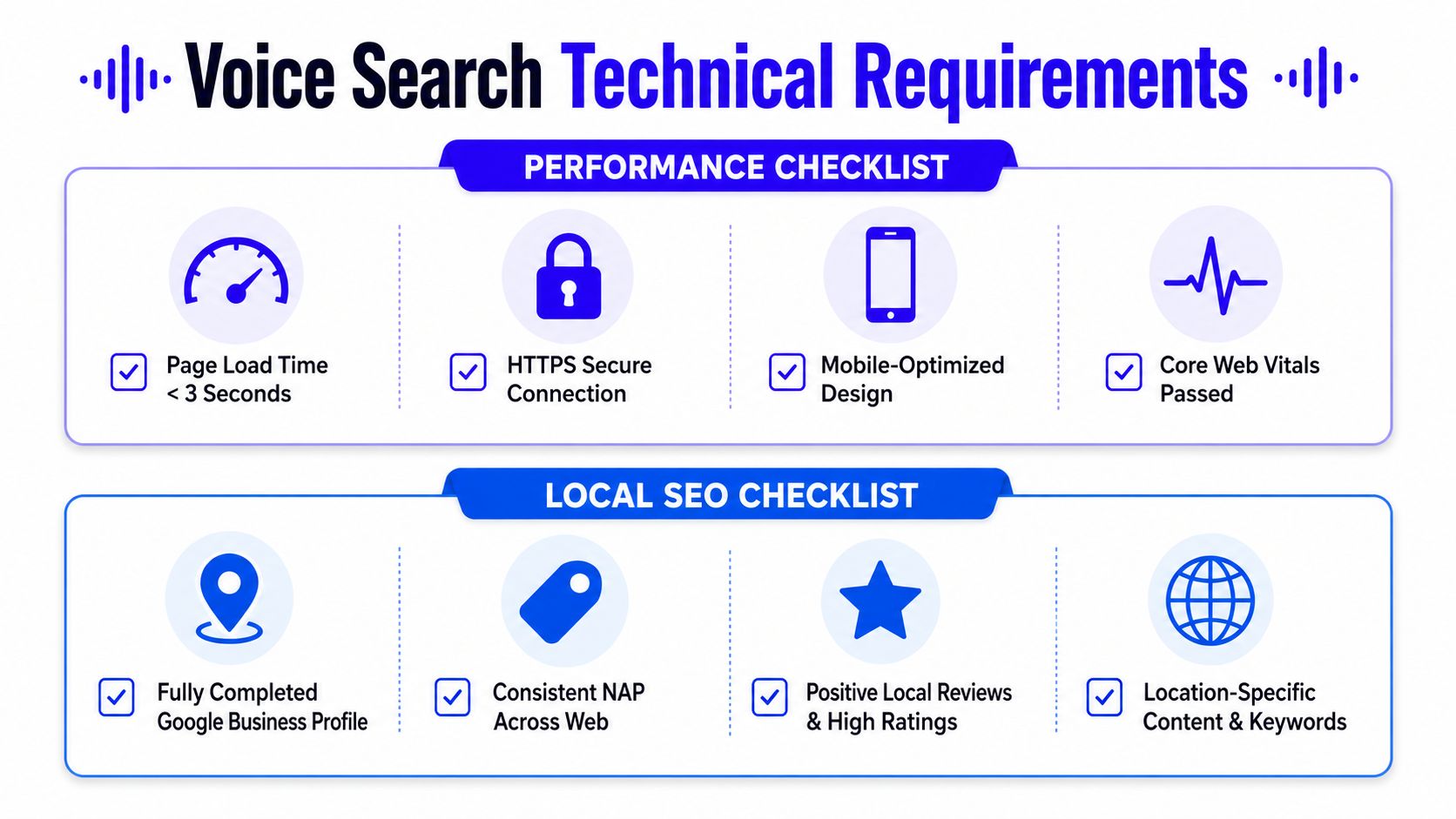
The technical side is especially important because the brief notes that the average voice search result page loads in 4.6 seconds, and that local relevance is a major driver of voice selection. That doesn't mean every startup needs a giant infrastructure project. It does mean the basics need to be boring, clean, and consistent.
Fix speed and mobile usability first
If your site is heavy, uncompressed, or awkward on a phone, you're fighting uphill. Voice queries often happen in mobile contexts, and mobile UX becomes part of the answer quality. A page that's hard to use is a page that's easy to skip, even if the copy is good.
For startups, the first pass should focus on these fundamentals:
Reduce page weight: compress images, remove unnecessary scripts, and cut anything that delays first useful content.
Keep the layout stable: if text jumps around while loading, assistants and users both get a worse experience.
Make tap targets obvious: small buttons and cluttered menus kill mobile usability fast.
Use HTTPS everywhere: trust signals matter, and insecure pages don't help.
Treat local SEO as an answer signal
For local voice work, Google Business Profile accuracy is not optional. Consistent business details, strong review management, and location-specific page copy all help assistants decide whether your business is a safe answer. If you serve one area, the location pages should say that clearly. If you serve several, each area needs its own unambiguous signal.
This is also where structured data earns its keep. LocalBusiness, FAQ, and service-related schema can reinforce the signals already on the page. The goal isn't to stuff in every possible tag, it's to remove uncertainty. Search systems prefer pages that leave fewer unanswered questions.
The checklist infographic below is a useful way to audit the technical layer without getting lost in theory.
Measuring Voice Search ROI When Traffic Is Invisible
The biggest measurement problem in voice search optimization is that success often happens without a visible click. That's not a bug, it's the surface. The brief notes that SparkToro's 2024 U.S. analysis found 58.5% of Google searches ended without a click, and that Similarweb reported in 2024 that AI Overviews reduced click-through rates on informational queries by a large margin in publisher data, both of which reinforce the same point, traffic alone is a bad scoreboard for answer-led search.
Track outcomes, not just visits
If a voice answer gives someone what they need immediately, the measurable result may happen later. The user might search your brand name afterward, call the business, request directions, submit a lead form, or come back through a different channel. That's why attribution has to widen beyond landing page sessions.
The cleanest measurement stack usually includes:
Branded search lift: if more people search your name after answer visibility improves, that's a sign the surface is working.
Call tracking: critical for local and service businesses where a spoken answer can lead directly to a phone inquiry.
CRM sync: if a query leads to a form fill or booked meeting later, the source should travel into the pipeline.
Offline conversion imports: useful when the first visible action isn't the actual revenue event.
If you're already instrumenting content and lead flow, Du Marketing's analytics resource fits this topic well, because voice work only becomes credible when it ties back to actual business outcomes.
Use the query, not the page, as the unit of success
The better question is not “Did this page get traffic?” It's “Did this query produce useful behavior?” That could mean a phone call, a demo request, a store visit, or a follow-up brand search. For B2B, I care most about assisted conversions and pipeline quality. For local businesses, I care most about calls, booking actions, and store visits.
Measure the effect you actually want. If a query leads to revenue later, the absence of a click isn't failure, it's a sign the answer worked.
Many teams waste time. They build attractive dashboards that celebrate impressions while ignoring downstream action. A better dashboard connects query clusters to actual outcomes, even when the first touch is invisible. That's the only way voice work earns a place in a startup's growth budget.
Voice Search Implementation Checklist for Startups
A startup doesn't need to do everything at once. It needs a sequence that respects limited time, limited content capacity, and the fact that some voice tactics are far more useful than others. The fastest wins usually come from better structure, cleaner local signals, and tighter measurement. The slower wins come from technical cleanup and content systems that compound.
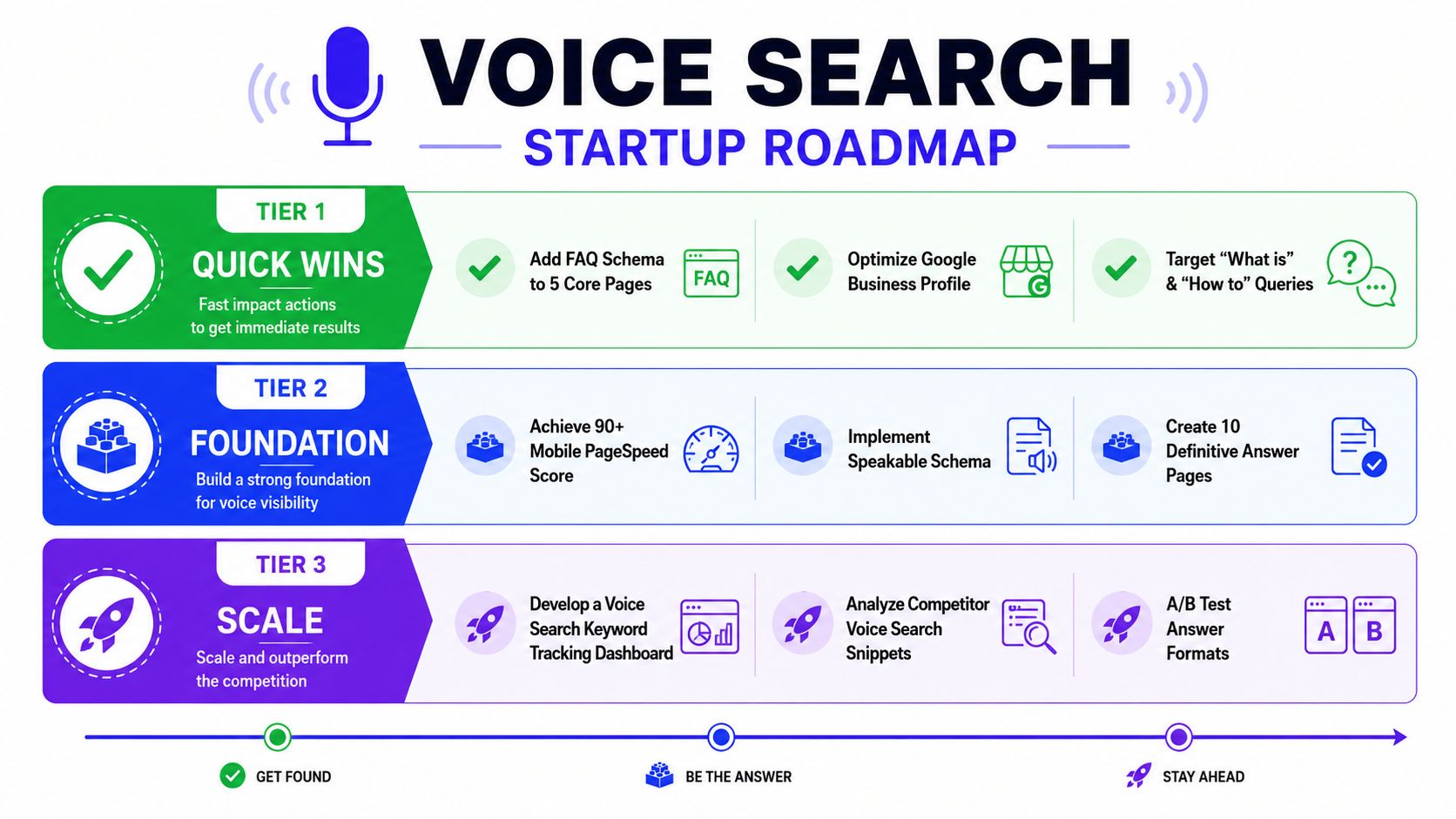
The roadmap below is the one I'd use if I had to launch voice optimization with a small team and no room for vanity work.
Tier 1 quick wins
Start with the pages closest to revenue or local action. Add FAQ schema to the core pages that already get attention, rewrite the opening answer blocks so the first sentence resolves the query, and make sure your Google Business Profile is fully complete if location matters. If your site already has solid traffic, these changes tend to be the fastest to test.
Tier 2 foundation work
Next, clean up the pages that should win answer extraction but don't yet. Tighten headings, improve mobile speed, and build a handful of definitive answer pages around the queries that matter most. This is also where you make the site easier for search systems to trust, because structure and clarity start to compound.
Tier 3 scale systems
Once the basics are working, build a dashboard that tracks query clusters against downstream outcomes. Then watch which snippets competitors own, and test answer formats against each other, short definition first versus short answer plus bullets, for example. That's the point where voice optimization stops being a page-level task and becomes a repeatable growth loop.
For startups that want implementation without splitting the work across five vendors, Du Marketing handles SEO, content, tracking, and lifecycle execution as one system, which makes this kind of answer-led strategy easier to measure and maintain.
If you want voice search optimization to drive real pipeline instead of just prettier snippets, Du Marketing can help you build the content structure, tracking, and attribution needed to prove it. Visit Du Marketing if you want a practical growth plan that connects SEO, analytics, and conversion paths without adding more handoffs.